
 Support
RentPackage Rent Increases: Landlords and Property Managers Raise Rent by a Yearly Percentage or Price Index with Reminders, a Calculated New Rent and Rebuilt Billing Periods

In this article
Write the yearly increase into the lease once. Before each increase date RentPackage reminds you and works out the new rent. When you confirm, the billing periods from the increase date onward are regenerated at the new rent, and the tenant is notified. The system never changes the rent by itself: you confirm it every year.
Why use rent increases in RentPackage
A yearly rent increase takes many steps: remembering the date, looking up the latest price index (CPI) change, calculating the new rent, updating every later billing period, and telling the tenant. A landlord or property manager with dozens of leases, each with a different anniversary, only has to miss one and the rent stays too low for a whole year, usually discovered at year end.
- The system reminds you before the date (remembers for you)
3 months before the increase date, staff who watch the property get an email and a bell notification, and the room card in property management shows a yellow "Rent Increase Due" tag. No need to dig through leases for dates. - The new rent is worked out for you (calculates for you)
For a fixed yearly percentage, the system calculates the new rent from the percentage. For a price-index lease, you enter this period's change and the system calculates the new rent. You can edit the amount. - Later billing periods are rebuilt automatically (calculates for you)
After you check the preview and save, the periods from the one containing the increase date onward are regenerated at the new rent. You don't edit them one by one. Periods that are already paid are not touched. - The tenant notice goes out by itself (follows up for you)
Once you confirm the increase, the system emails the tenant 1 month before the increase date, stating the new rent and the date it takes effect. Leases you have not confirmed are never sent, so nothing goes out by mistake.
Step 1: Set how the rent increases on the lease
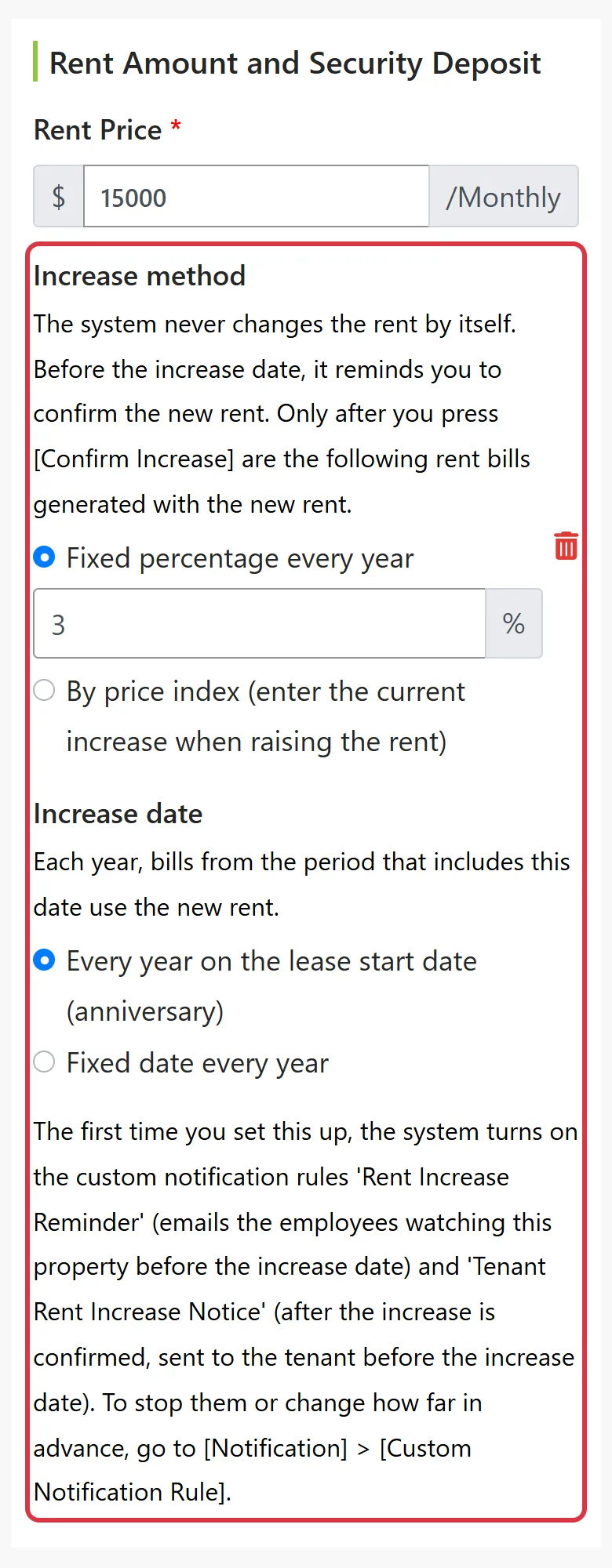
You can set it when creating a lease, renewing, or editing a lease. When creating or renewing, click [⊕ Rent Increase] under the rent field:
- Choose [Fixed percentage every year] and enter the percentage (above 0, up to 100, two decimals at most), or choose [By price index (enter the current increase when raising the rent)], in which case you enter no number yet.
- Choose the increase date: [Every year on the lease start date (anniversary)] or [Fixed date every year] (then pick the month and day).
- Finish the lease as usual. For a lease that is already signed, set it in the [Rent Increase] block of [Edit Contract].
- A renewal carries over the previous lease's setting, and you can change it.
- This only saves a setting. Setting it does not change any rent or billing period.
- The free version cannot set rent increases, and a renewal in the free version does not keep the previous lease's setting.
Step 2: Before the date, confirm the new rent in Rent Increase Due
From 3 months before the increase date, the lease appears in the [Rent Increase Due] tab of [Properties] (the number on the tab is how many leases need action) and its room card shows the yellow tag. To handle it:
- On the room card, click [More Actions] > [Confirm Increase].
- The window shows the current rent and the increase date. For a fixed percentage the rate is already filled in. For a price-index lease, look up this period's change at your local statistics office and enter it in [Price index change for this period] (enter a negative number if the index fell).
- Check the [New rent]. The system calculates it from the rate and you can edit it.
- Click [Next Step]. The system opens [Rental Terms] in [Edit Contract], with the new rent and the effective period (the one containing the increase date) already selected. Check the billing preview, then save.
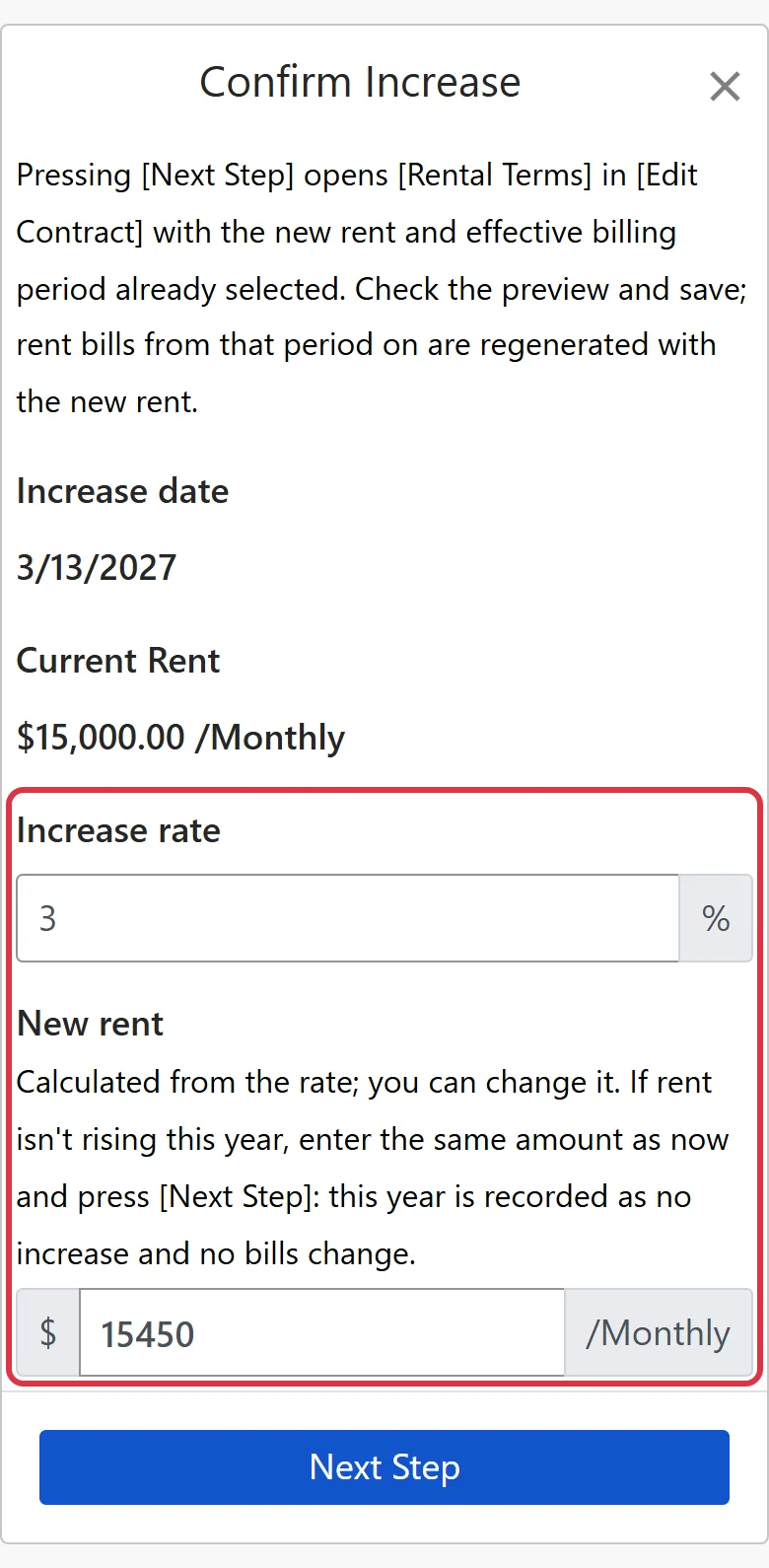
No increase this year: enter the same amount as the current rent and click [Next Step]. The system records no increase for this year, changes no billing period, and does not remind you again for this year.
Notifications the system sends
When you set a rent increase for the first time, the system turns on two custom notification rules:
- [Rent Increase Reminder]: sent 3 months before the increase date to staff who watch the property (email and bell). It tells them where to click [Confirm Increase].
- [Tenant Rent Increase Notice]: after you confirm, sent to the tenant 1 month before the increase date, stating the new rent and the date it takes effect.
To turn them off or change how early they are sent, go to [Notifications] > [Custom notification rules].
When the lease is about to end
For a fixed-term lease whose increase date is after the lease end date, the top of the [Confirm Increase] window states when the lease ends and says the new rent must be set through [Renew]. Once the renewal is done, that year's increase counts as done, and the system does not ask again for a year after the renewal. If there is no increase this year, enter the same rent as now and click [Next Step] to record it.
FAQ
Does the system look up the price index by itself?
No. For a price-index lease you enter this period's change yourself when confirming. Local caps on increases and how often you may increase depend on local law, and you are responsible for checking them.
If I don't confirm, will the rent go up by itself?
No. The system never changes the rent by itself. Until you click [Confirm Increase], billing periods keep the current rent.
Will periods that are already paid be changed?
No. The new rent applies only from the period containing the increase date onward, and only to periods not yet paid. Paid periods stay as they are.
How many times a year can the rent increase?
The system has one increase date a year and handles it once a year. If several years were missed, it only asks about the most recent increase date that has passed.
Summary
If you keep working the old way, next year's increase still means remembering the date, looking up the index, calculating the amount, editing billing periods and writing the notice. Set the increase on the lease, and from then on you only confirm the new rent once a year in Rent Increase Due, and the system does the rest.
Pick one lease whose anniversary is coming up, set the rent increase in [Edit Contract], and see when the reminder appears.
Free trialRelated articles
- RentPackage Custom Notifications: Automatic Lease Renewal, Rent Increase and Insurance Expiry Reminders for Landlords and Property Managers:How to set up custom notification rules, including the rent increase reminder and tenant notice.
- RentPackage Rent Billing Periods: How Landlords and Property Managers Handle Partial Periods, Merged Periods and Extra Fees:How billing periods are created and edited, including periods after a rent increase.
- Rent Paid by the Government Directly to the Landlord: RentPackage Splits Every Period into a Tenant Bill and a Government Bill for Landlords and Property Managers:How the two bills are split after an increase when the government pays part of the rent.