📄 Interface Environment Overview: Understand the main screen in five minutes, knowing where to handle everything. 📄 How to Use the Property Overview in RentPackage to Quickly Grasp the Status of the Entire Building 📄 Add Managed Property: Complete property setup, owner details, account opening, and online signing in one go. 📄 Tenant Move-in & Lease Signing: Set rental period, deposit, utilities, and billing cycle in one go. 📄 Tenant Ledger Actions: Payment Reconciliation, Partial Payments, Meter Reading, and Deposits. All routine rent collection in one place. 📄 Owner transfer feature guide 📄 Custom rental notifications: rent reminders, lease expiration, sent to the right person at the right time 📄 How to Quickly Estimate Next Month and Year’s Rental Income with Forecast Receipts in RentPackage 📄 Compliance assistance and responsibility statement 📄 Contract templates overview 📄 Sublandlord feature guide 📄 Partial payment feature guide 📄 Advance Receipts feature guide 📄 Rent billing periods feature guide 📄 Start billing feature guide 📄 Recurring billing periods feature guide 📄 Booking feature overview 📄 E-contract setup guide 📄 Management fee setup guide for property management companies 📄 Why are deposits and advance receipts liability accounts in accounting? 📄 RentPackage General Edition overview 📄 Commission split setup guide 📄 why do all landlords and agents need tenant management automation software? 📄 How to handle exchange rates for Euro-denominated rent? 📄 US Tax Filing - Schedule E Instructions 📄 UK Tax Filing - SA105 Instructions 📄 How to Enable Stripe Online Rent Payments in RentPackage 📄 How to use Calendar to schedule tenant notifications: Power outage example 📄 How to set the agency logo to display your brand on Email notifications and contract PDFs 📄 What is Rent Insurance? Compensation for unpaid rent; policy managed with the lease 📄 How to Use the German Rental Income Tax Statement (Anlage V) in RentPackage 📄 T776 Canada Rental Income Tax Report User Guide 📄 PIT-28 Polish Rental Income Tax Report User Guide 📄 How to Generate an Australian Rental Schedule in RentPackage, Auto-Match Income and Expenses to ATO Categories 📄 How to Use the Romanian Rental Income Tax Report (Declarația Unică 212) in RentPackage 📄 How to generate Hungarian SZJA rental income report data in RentPackage and compile eSZJA entry numbers with one click. 📄 Profit and Loss Statement: Auto-calculates income per property, per owner 📄 Balance Sheet: How much of the bank balance is tenant's? View deposits and prepayments at a glance. 📄 Cash Flow Statement: How much did actual cash increase during the rent period? 📄 How to generate a General Ledger in RentPackage, automatically summarizing rent and property accounts 📄 Enter manual journal entries: repairs, insurance, depreciation. Record transactions outside of the billing period. 📄 Custom rental notifications: rent reminders, lease expiration, sent to the right person at the right time 📄 Why can property management software dramatically save time and cost?


Quick Links


What is the PIT-Rental Tax Calculator?

In Poland, rental income from private properties is taxed on a fixed rate (ryczałt). Landlords must self-calculate and pay taxes monthly, with no monthly filings required. Submit PIT-28 only once annually. The PIT-Rental Tax Calculator automatically calculates monthly cumulative income and taxes based on rent received in the system, eliminating manual calculations before monthly payments and preparing necessary tax data for annual filings.

Please Note: This report is a calculation tool for the rental portion of private leases under PIT-28, excluding other incomes, deductions, and actual payment records. It does not constitute tax advice. For official filings, refer to updated regulations and your tax advisor's guidance.


How to Pay Polish Rental Tax?

The report lists monthly tax dues, aligning with Poland's 'monthly payment' rule. Below are the current rules for the 2026 tax year:

  • Only one taxation method is available.: From 2023, private rental income is taxed at a flat rate: 8.5% for annual rent income up to 100,000 zł, 12.5% for any amount above.
  • Double threshold for couples: For joint property, one spouse can declare all rental income. In this case, the 8.5% rate applies up to 200,000 zł, with 12.5% on the excess. Set the 'Annual Income Threshold' to 200000 in the report.
  • Pay monthly by the 20th of the following month: Landlords must pay tax on rental income by the 20th of the month following the income month. For example, January's rent is due by February 20. If the 20th is a Saturday or public holiday, the deadline is extended to the next business day.
  • December is an exception: December's tax is due by January 20 of the following year, not included in the annual return.
  • Quarterly payments optional: If last year's rental income was under the equivalent of 200,000 euros, you can pay quarterly by the 20th of the following month (for Q4, by January 20 of the next year). Quarterly payments need no prior application, just check the option in the annual PIT-28 return.
  • Regular payments only, no interim returns: File returns once a year: Annual PIT-28 return between February 15 and April 30 of the following year; any deficit must be covered by April 30.
  • Recognize income on actual receipt date: Polish tax law recognizes income on the date rent is 'actually received'. If a tenant pays late, the tax obligation is deferred accordingly. For example, rent from January to June paid in June is due in a single payment by July 20 without incurring back taxes for previous months.
Please Note: The above reflects current Polish regulations for 2026. Laws may change; refer to the latest announcement from the Polish Ministry of Finance or consult your tax advisor before filing.


How to Use the PIT-Rental Tax Calculator

1. Open the Report

Go to the left menu and select '[ Reports ]' → '[ Reports ]', then choose '[ PIT-Rent Tax Estimate ]' from the '[ Report Type ]' dropdown.
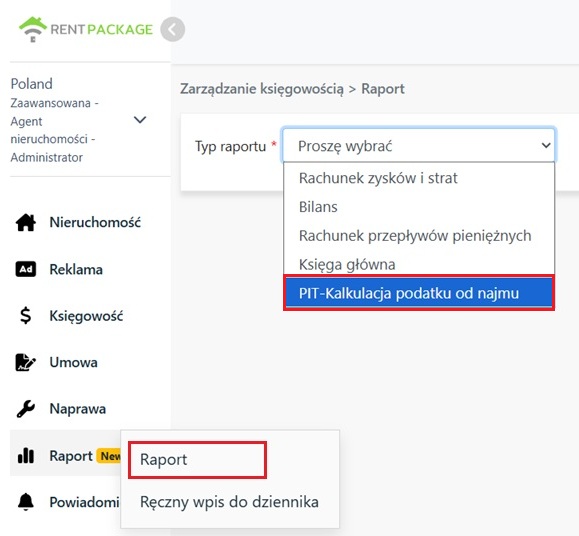
Open the report from the Reports menu, select report type PIT-Rent Tax Estimate.
2. Select Tax Year and Set Rate Parameters

Then select '[ Tax Year ]' and '[ Company/Owner ]', click 'Next':

  • Select Company: Estimate rent for company-managed and sublet properties.
  • Select Owner: Estimate rent for properties managed under the owner's name.

The system will list tax rate parameters with the following defaults, which you can adjust according to applicable regulations:

  • Annual Income Threshold: Default 100,000 zł.
  • Below-threshold tax rate: Default 8.5%.
  • Above-threshold tax rate: Default 12.5%.

After confirming parameters, click [ Generate Report ].
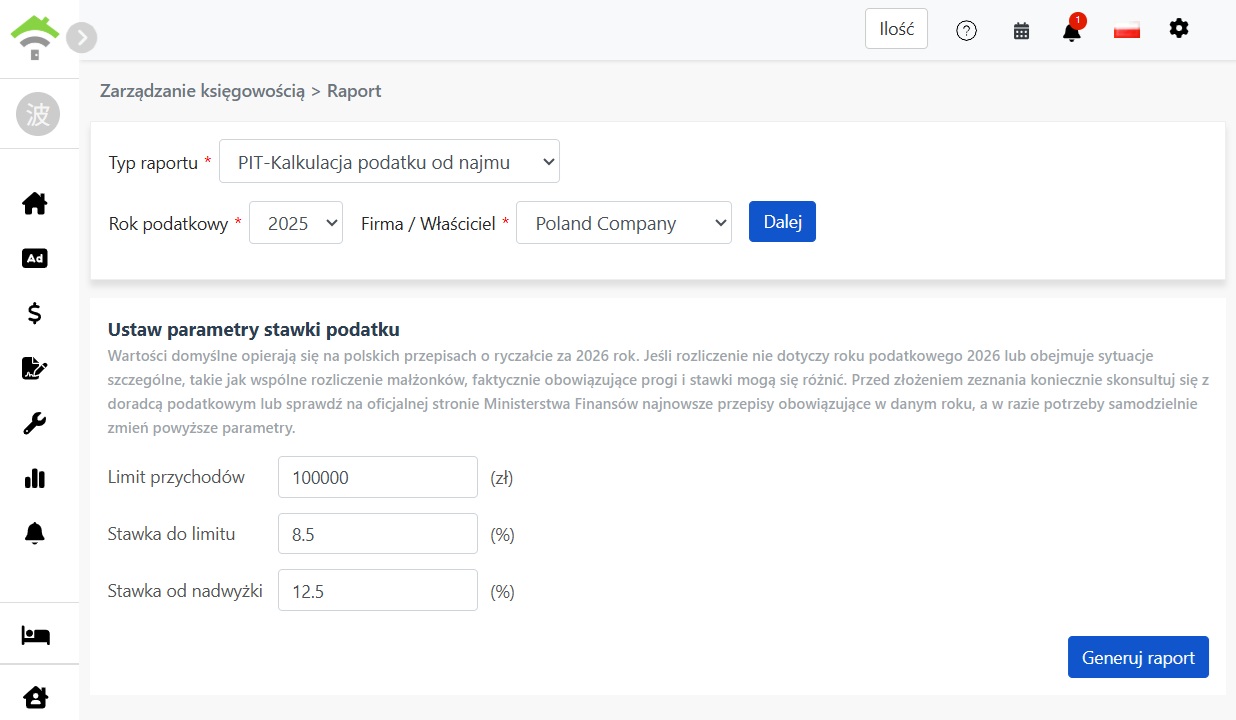
Please Note: Default values are based on Poland's 2026 fixed tax provisions. If not filing for 2026, or in special cases like joint filing, the applicable thresholds and rates may differ. Consult a tax specialist or check the Polish Ministry of Finance website for the latest regulations of the filing year. Adjust parameters as needed.
Select filing year and company or owner, then set annual income thresholds and tax rate parameters
3. Review Annual Report

The report lists trial calculations for the entire year by month, showing [ total rental income ] and [ tax payable ] for each month. The "Total" row at the bottom sums up the year. Check the previous month's row to know how much is due by the 20th. Click the print button in the top right to print the full report.
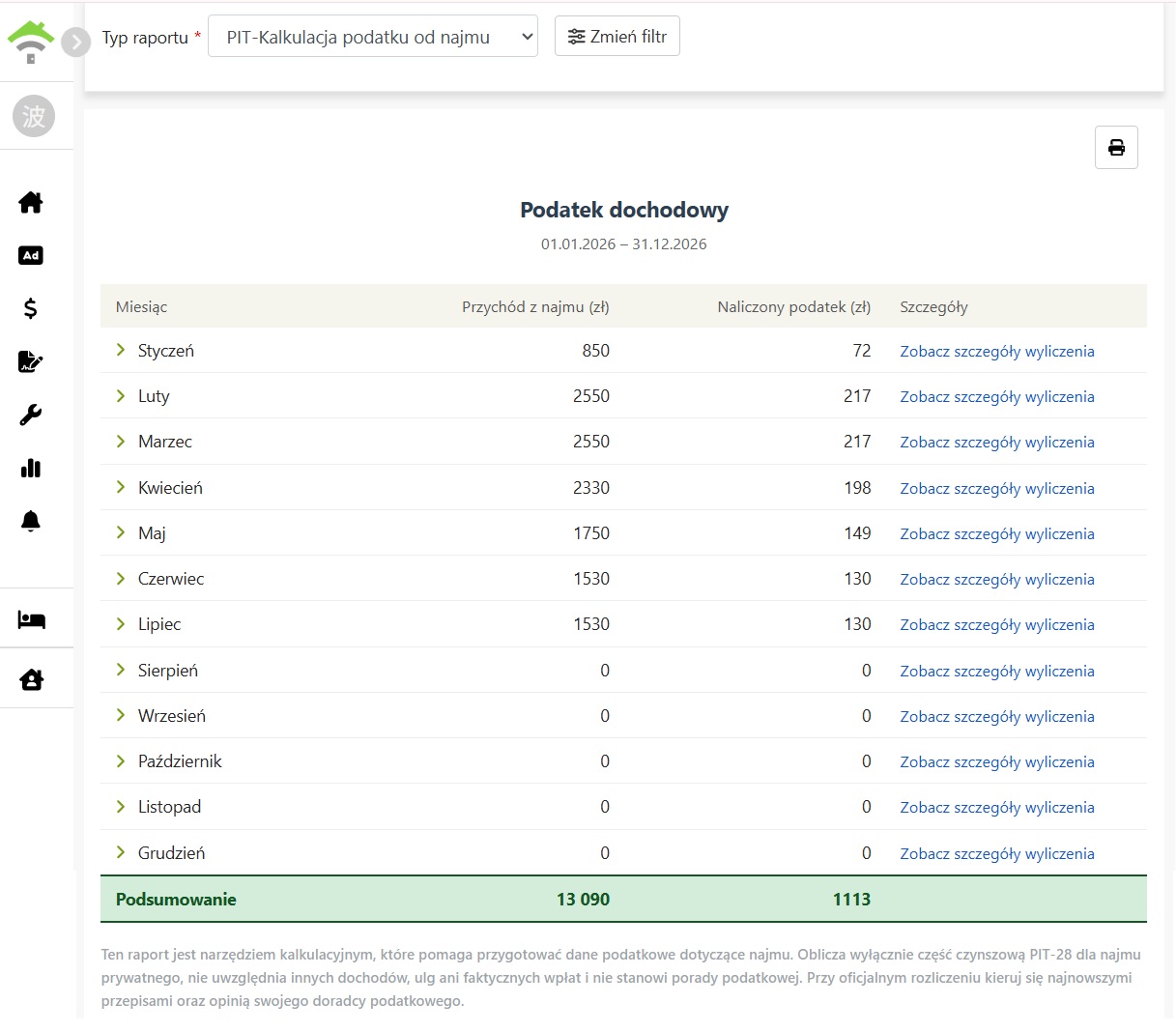
PIT - Annual rental tax estimate report, listing rental income and taxes payable by month, with yearly totals at the bottom

Click a month to expand each rental detail, including:

  • Property • Unit • Tenant: Which property and tenant this rent is from.
  • Billing cycle name: The billing cycle for this rent.
  • Amount: The actual amount received for this rent.

If there are no collections for the month, "No collections this month" will be displayed when expanded.
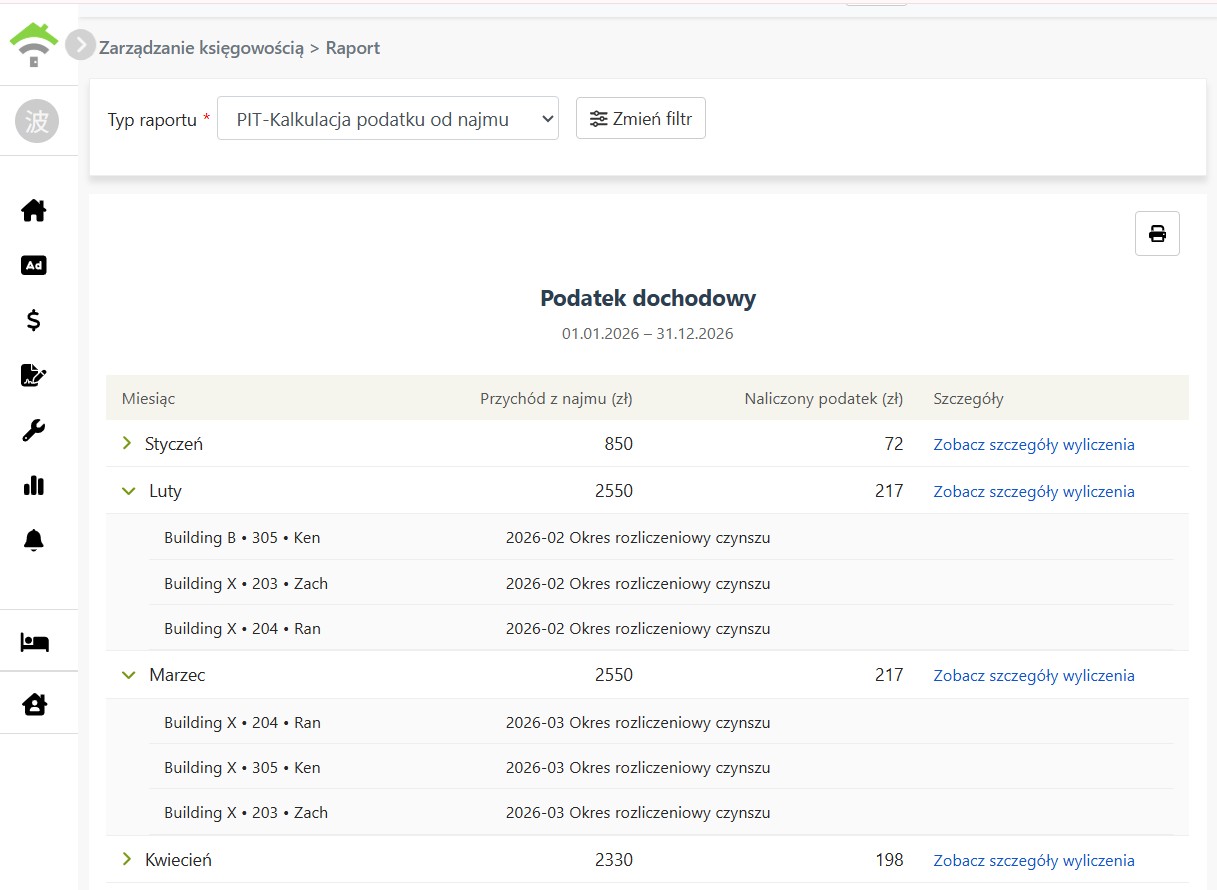
Click on the month to expand details of each rent, including property, unit, tenant, billing cycle, and amount.
4. View Calculation Details

Click each month's "View calculation details" to open the monthly calculation steps, showing how the month's tax is computed:

  • Cumulative rental income: Total rental income accumulated from the beginning of the year to this month.
  • Cumulative tax calculated at a fixed rate: The portion of cumulative income within the annual income threshold is taxed at the "below threshold rate"; income exceeding the threshold is taxed at the "above threshold rate" (before rounding).
  • Monthly tax (before rounding): Cumulative tax less monthly taxes due since the beginning of the year.
  • Monthly Tax Due: Round the above amount to get the monthly tax due.
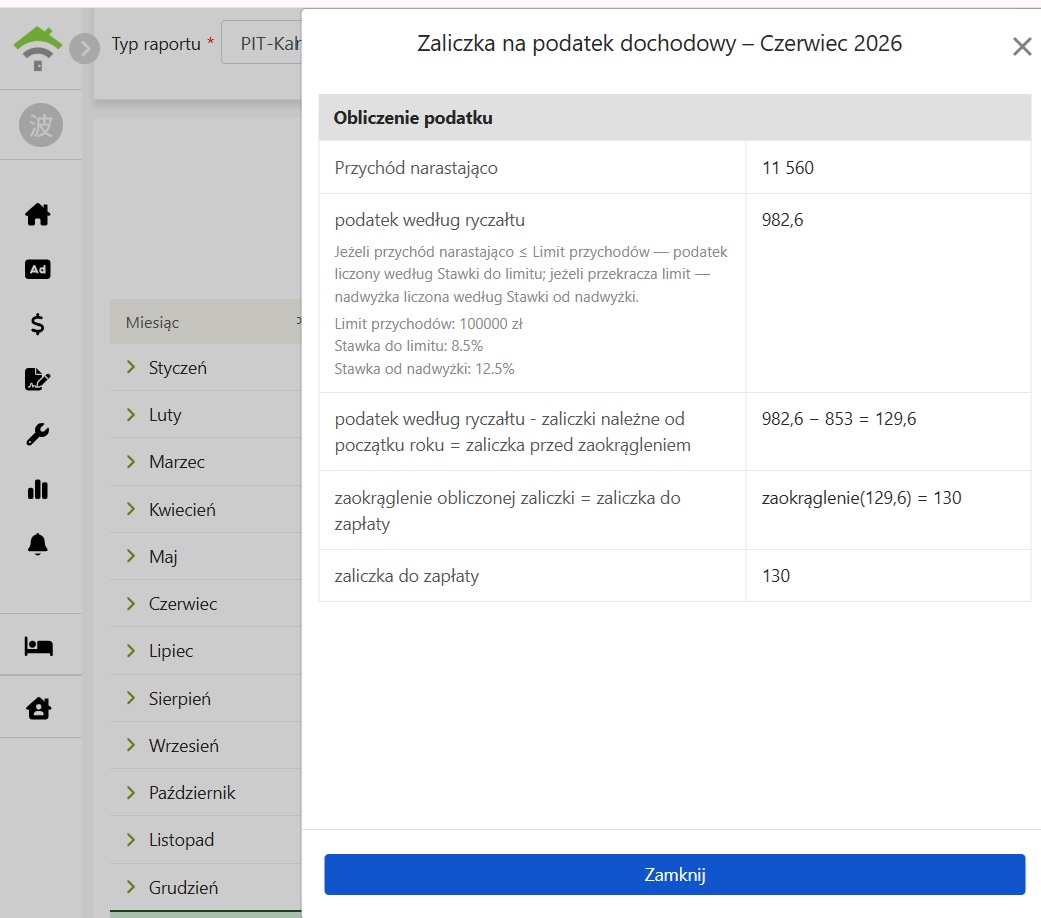
Calculation details show step-by-step cumulative rental income, cumulative tax, and monthly tax due calculations.
5. Calculation Basis and Notes
  • Cash Basis: Based on the actual receipt date of rent and only includes paid rent; invoices marked as 'No Payment' are excluded. This follows Polish tax law to recognize income on the actual receipt date. For late tenant payments, the report month matches the month the payment obligation arose.
  • Only Rent Calculated: The report only accounts for rent income, excluding utilities, deposits, and other fees.
  • Rent Paid by Prepayment: If rent is offset by prepayment, the month is based on the [ actual receipt date of the rent invoice ] rather than the original prepayment date.
✅ Instantly generate a PIT-Rental Tax Estimate Report. Get clear monthly rental income and tax due, making tax filing easy!