📄 Interface Environment Overview: Understand the main screen in five minutes, knowing where to handle everything. 📄 How to Use the Property Overview in RentPackage to Quickly Grasp the Status of the Entire Building 📄 Add Managed Property: Complete property setup, owner details, account opening, and online signing in one go. 📄 Tenant Move-in & Lease Signing: Set rental period, deposit, utilities, and billing cycle in one go. 📄 Tenant Ledger Actions: Payment Reconciliation, Partial Payments, Meter Reading, and Deposits. All routine rent collection in one place. 📄 Owner transfer feature guide 📄 Custom rental notifications: rent reminders, lease expiration, sent to the right person at the right time 📄 How to Quickly Estimate Next Month and Year’s Rental Income with Forecast Receipts in RentPackage 📄 Compliance assistance and responsibility statement 📄 Contract templates overview 📄 Sublandlord feature guide 📄 Partial payment feature guide 📄 Advance Receipts feature guide 📄 Rent billing periods feature guide 📄 Start billing feature guide 📄 Recurring billing periods feature guide 📄 Booking feature overview 📄 E-contract setup guide 📄 Management fee setup guide for property management companies 📄 Why are deposits and advance receipts liability accounts in accounting? 📄 RentPackage General Edition overview 📄 Commission split setup guide 📄 why do all landlords and agents need tenant management automation software? 📄 How to handle exchange rates for Euro-denominated rent? 📄 US Tax Filing - Schedule E Instructions 📄 UK Tax Filing - SA105 Instructions 📄 How to Enable Stripe Online Rent Payments in RentPackage 📄 How to use Calendar to schedule tenant notifications: Power outage example 📄 How to set the agency logo to display your brand on Email notifications and contract PDFs 📄 What is Rent Insurance? Compensation for unpaid rent; policy managed with the lease 📄 How to Use the German Rental Income Tax Statement (Anlage V) in RentPackage 📄 T776 Canada Rental Income Tax Report User Guide 📄 PIT-28 Polish Rental Income Tax Report User Guide 📄 How to Generate an Australian Rental Schedule in RentPackage, Auto-Match Income and Expenses to ATO Categories 📄 How to Use the Romanian Rental Income Tax Report (Declarația Unică 212) in RentPackage 📄 How to generate Hungarian SZJA rental income report data in RentPackage and compile eSZJA entry numbers with one click. 📄 Profit and Loss Statement: Auto-calculates income per property, per owner 📄 Balance Sheet: How much of the bank balance is tenant's? View deposits and prepayments at a glance. 📄 Cash Flow Statement: How much did actual cash increase during the rent period? 📄 How to generate a General Ledger in RentPackage, automatically summarizing rent and property accounts 📄 Enter manual journal entries: repairs, insurance, depreciation. Record transactions outside of the billing period. 📄 Custom rental notifications: rent reminders, lease expiration, sent to the right person at the right time 📄 Why can property management software dramatically save time and cost?

Cash Flow Statement: How much did actual cash increase during the rent period?

Quick Links

What can the Cash Flow Statement do for you?

The Cash Flow Statement answers what the Income Statement can't: How much did cash actually increase or decrease over the period? It starts with the beginning cash balance, lists net cash changes, and aligns with the ending cash balance, showing actual cash flow.

Why doesn't net profit equal cash? In property rentals, profits often decouple from cash: rent is due but unpaid; you have profit, but no cash. Deposits received mean cash flow, but not profit. The income statement tells you your earnings, while the cash flow statement shows cash on hand. Viewing both gives a complete picture.

How to Operate

Step 1: Set Report Conditions

Go to the report page in the features list (click Reports on the left menu, then select Report) and set the following conditions in order:
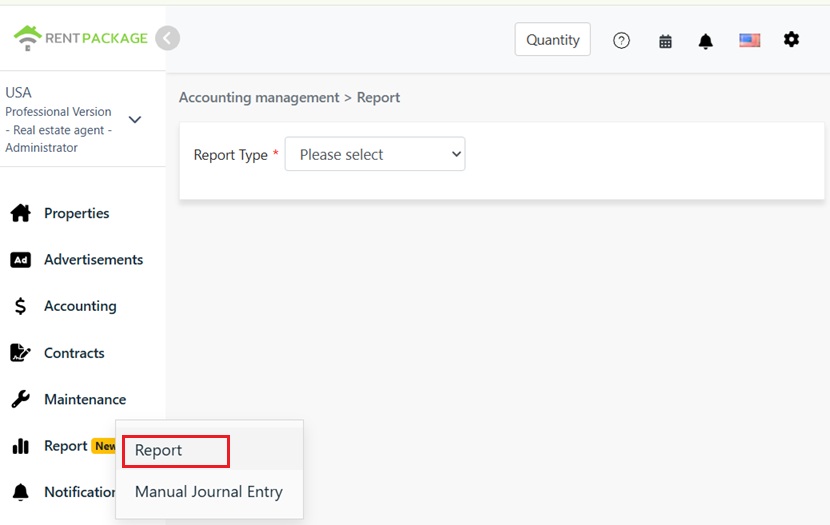
Report entry in left menu Reports
  • Report Type: Select Cash Flow Statement.
  • Select Property/Owner/Company: Determine the scope of the report: a single property, all properties under an owner, or the entire company.
  • Report Period: Choose start and end dates freely. Beginning cash balance is taken from the start date status, end cash balance from the end date status.
  • Accounting Basis: Choose between the Cash Basis (recorded on receipt date) or Accrual Basis (recorded on due date). The basic choice affects current period net income and adjustment components. See FAQ.
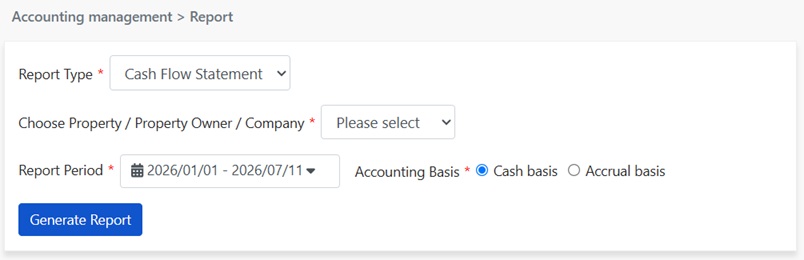
Set cash flow statement parameters: report type, analysis subject, period, accounting basis
Step 2: Generate Report

Click to generate the report. The system will produce the cash flow statement. Read top-down, it traces the path from profit to cash:

  • Operating Activities: Start with current period net income (same as on the income statement), plus adjustments (changes in working capital). Adjustments address profit-to-cash discrepancies, like accrued but not received rent, changes in deposits and advances.
  • Net Cash Flow for the Period: After adjustments, derive the actual cash increase or decrease for the period.
  • Opening and Closing Cash Balance: Opening cash balance plus net cash flow of the period equals ending cash balance. The closing balance should match your account's actual state at period end, serving as a direct reconciliation method.
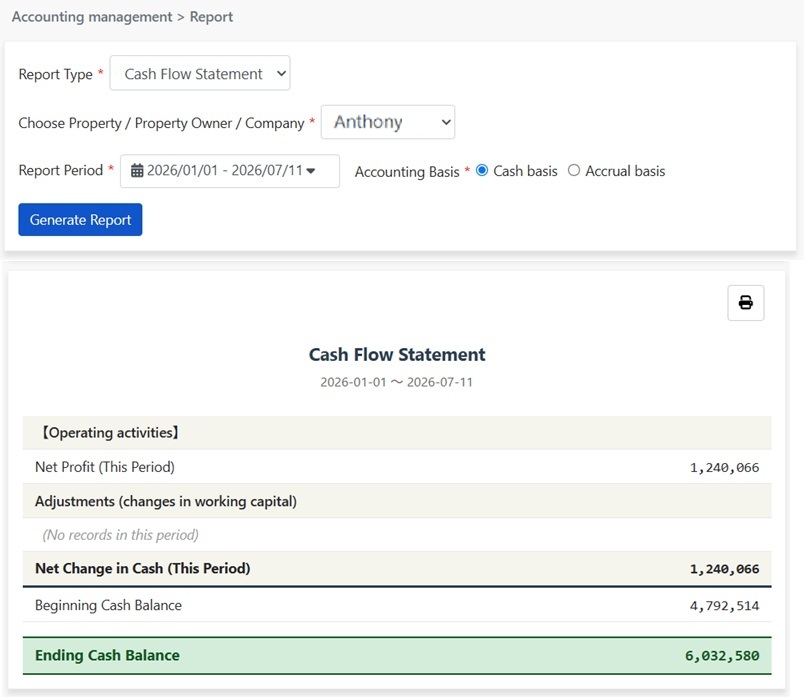
Generated Cash Flow Statement: Operating Activities, Net Cash Flow for the Period, Opening and Closing Cash Balance

Click the print icon at the top right of the report to print directly or save as PDF for accountants or owners to keep.

FAQ

Why is this period's net income different from the cash net change?

Because earned money isn't always received, and received money isn't always earned. Rent due but unpaid: income recorded, but no cash. Security deposits or prepayment received: cash in, but a liability, not income. Such differences are adjusted via operating capital changes, so net income plus adjustments equals actual cash change.

What is the difference between the income statement and the cash flow statement?

The income statement shows how much was earned: period income minus expenses. The cash flow statement shows how much cash was received: actual cash change and reasons from start to end of the period. Over time, both align in a healthy property, but may vary greatly in a single period. For example, a high rent delinquency month looks good on the income statement but poor on the cash flow statement, highlighting the need to view both.

What does 'no records for adjustments this period' mean?

It indicates no events caused a disconnect between profit and cash, like no new or collected receivables, unchanged deposits, or prepayments. In this case, net cash change equals net income for the period.

✅ Generate a cash flow statement now to see if earnings are actually received, at a glance!