📄 Interface Environment Overview: Understand the main screen in five minutes, knowing where to handle everything. 📄 How to Use the Property Overview in RentPackage to Quickly Grasp the Status of the Entire Building 📄 Add Managed Property: Complete property setup, owner details, account opening, and online signing in one go. 📄 Tenant Move-in & Lease Signing: Set rental period, deposit, utilities, and billing cycle in one go. 📄 Tenant Ledger Actions: Payment Reconciliation, Partial Payments, Meter Reading, and Deposits. All routine rent collection in one place. 📄 Owner transfer feature guide 📄 Custom rental notifications: rent reminders, lease expiration, sent to the right person at the right time 📄 How to Quickly Estimate Next Month and Year’s Rental Income with Forecast Receipts in RentPackage 📄 Compliance assistance and responsibility statement 📄 Contract templates overview 📄 Sublandlord feature guide 📄 Partial payment feature guide 📄 Advance Receipts feature guide 📄 Rent billing periods feature guide 📄 Start billing feature guide 📄 Recurring billing periods feature guide 📄 Booking feature overview 📄 E-contract setup guide 📄 Management fee setup guide for property management companies 📄 Why are deposits and advance receipts liability accounts in accounting? 📄 RentPackage General Edition overview 📄 Commission split setup guide 📄 why do all landlords and agents need tenant management automation software? 📄 How to handle exchange rates for Euro-denominated rent? 📄 US Tax Filing - Schedule E Instructions 📄 UK Tax Filing - SA105 Instructions 📄 How to Enable Stripe Online Rent Payments in RentPackage 📄 How to use Calendar to schedule tenant notifications: Power outage example 📄 How to set the agency logo to display your brand on Email notifications and contract PDFs 📄 What is Rent Insurance? Compensation for unpaid rent; policy managed with the lease 📄 How to Use the German Rental Income Tax Statement (Anlage V) in RentPackage 📄 T776 Canada Rental Income Tax Report User Guide 📄 PIT-28 Polish Rental Income Tax Report User Guide 📄 How to Generate an Australian Rental Schedule in RentPackage, Auto-Match Income and Expenses to ATO Categories 📄 How to Use the Romanian Rental Income Tax Report (Declarația Unică 212) in RentPackage 📄 How to generate Hungarian SZJA rental income report data in RentPackage and compile eSZJA entry numbers with one click. 📄 Profit and Loss Statement: Auto-calculates income per property, per owner 📄 Balance Sheet: How much of the bank balance is tenant's? View deposits and prepayments at a glance. 📄 Cash Flow Statement: How much did actual cash increase during the rent period? 📄 How to generate a General Ledger in RentPackage, automatically summarizing rent and property accounts 📄 Enter manual journal entries: repairs, insurance, depreciation. Record transactions outside of the billing period. 📄 Custom rental notifications: rent reminders, lease expiration, sent to the right person at the right time 📄 Why can property management software dramatically save time and cost?

Balance Sheet: How much of the bank balance is tenant's? View deposits and prepayments at a glance.

Quick Links

What can a balance sheet do for you?

A balance sheet shows your financial position on a specific date: assets (bank balance, receivables owed) and liabilities (tenant deposits, prepaid utility bills, payables). The net of these will indicate your equity. It's not a period's total but a snapshot of financial standing on that specific day.

Most Practical Scenario: Instantly know how much tenant money is under deposit. Deposits and advance payments are funds that eventually need to be returned. When mixed in bank balances, they can easily be spent as if they are your own. The balance sheet lists them separately under liabilities, making it clear which funds cannot be touched.

Procedure

Step 1: Set Report Conditions

Access the report page from the function list (click Reports in the left menu, then click Report) and set the following conditions in order:
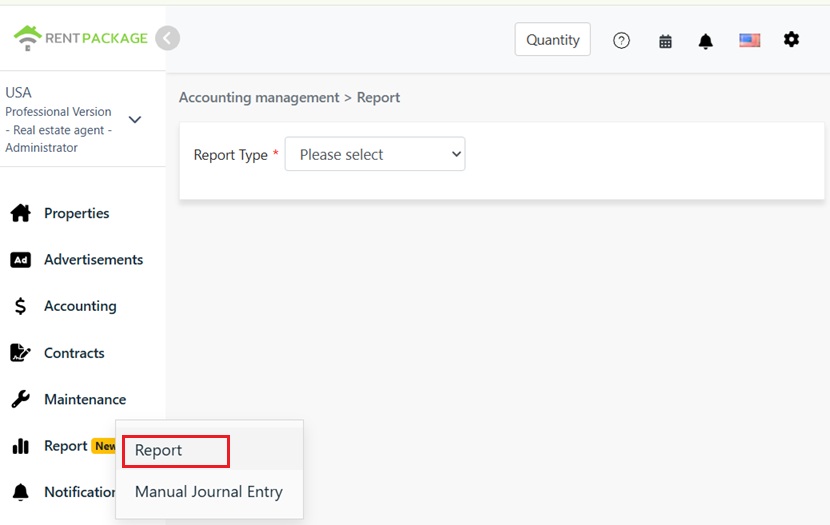
Report access in the Reports section of the left menu
  • Report Type: Select Balance Sheet.
  • Select Property/Owner/Company: Determine the report's scope: a single property, all properties under an owner, or the entire company.
  • Report Date: Select a single date. The balance sheet reflects the situation on that specific day, requiring only one date, unlike the income statement which uses a range. This is the most noticeable operational difference.
  • Accounting Basis: Choose cash basis (recognized on receipt date) or accrual basis (recognized on invoice date). See FAQ for differences.
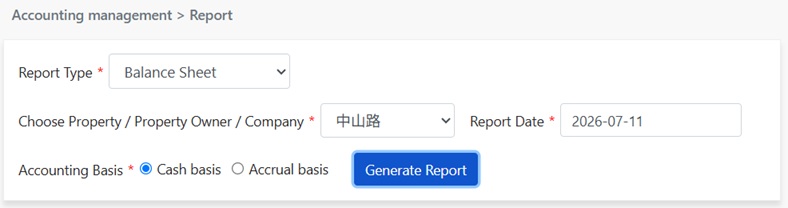
Set balance sheet parameters: report type, target entity, report date, accounting basis.
Step 2: Generate Report

Click to generate report, system outputs the balance sheet for the specified date, divided into three sections:

  • Assets: Resources you own, like trust account balances and accounts receivable not yet collected, totaling assets.
  • Liabilities: Money owed to others, mainly to tenants: deposits (refundable upon move-out), unearned revenue (prepaid utility fees not yet offset), accounts payable, totaling liabilities.
  • Owner's Equity: Your stake after liabilities, including net income accumulated this period.
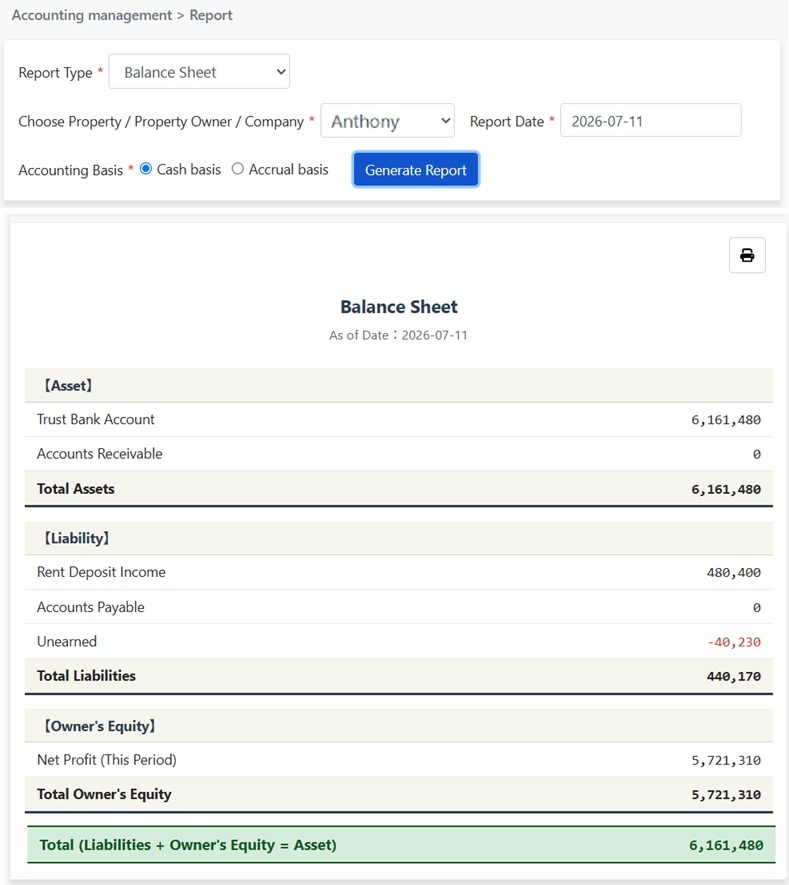
Please Note: The total row at the bottom confirms the accounting equation: Liabilities + Owner's Equity = Assets. This always holds as every asset's origin is either debt (liability) or ownership (equity). A balanced total indicates books are accurate.
Generated Balance Sheet: Assets, Liabilities, Owner's Equity

Click the print icon at the top right of the report to print directly or save as PDF for accountant or owner.

FAQ

Why do cash and accrual basis report amounts differ?

This is normal. The two bases attribute the same payment to different periods: cash basis considers the received date, accrual basis the due date. Any cross-period transactions (e.g., late rent payments, prepaid income) will result in different amounts, but long-term totals are identical.

How are the Income Statement and Balance Sheet different?

Different time concepts. The Income Statement shows operating results over a period, like from Jan 1 to Jun 30, how much was earned, spent, and net profit, like a video. The Balance Sheet shows financial status at a single point in time, like on Jun 30, the assets and liabilities to tenants, like a photo. Check the Income Statement to see profits for half a year; consult the Balance Sheet for tenant deposits and asset structure.

Why are deposits and prepaid electricity funds liabilities?

These funds belong to tenants and are not your revenue. Deposits are refundable upon tenant move-out; prepaid electricity funds are advanced payments deducted periodically from real consumption, simplifying monthly meter readings, with remaining amounts refundable at move-out. Thus, they appear as liabilities on the Balance Sheet, not the Income Statement. When electricity is deducted, the amount recognized as income appears on the Income Statement.

✅ Generate your Balance Sheet now for instant asset and deposit visibility!