📄 Interface Environment Overview: Understand the main screen in five minutes, knowing where to handle everything. 📄 How to Use the Property Overview in RentPackage to Quickly Grasp the Status of the Entire Building 📄 Add Managed Property: Complete property setup, owner details, account opening, and online signing in one go. 📄 Tenant Move-in & Lease Signing: Set rental period, deposit, utilities, and billing cycle in one go. 📄 Tenant Ledger Actions: Payment Reconciliation, Partial Payments, Meter Reading, and Deposits. All routine rent collection in one place. 📄 Owner transfer feature guide 📄 Custom rental notifications: rent reminders, lease expiration, sent to the right person at the right time 📄 How to Quickly Estimate Next Month and Year’s Rental Income with Forecast Receipts in RentPackage 📄 Compliance assistance and responsibility statement 📄 Contract templates overview 📄 Sublandlord feature guide 📄 Partial payment feature guide 📄 Advance Receipts feature guide 📄 Rent billing periods feature guide 📄 Start billing feature guide 📄 Recurring billing periods feature guide 📄 Booking feature overview 📄 E-contract setup guide 📄 Management fee setup guide for property management companies 📄 Why are deposits and advance receipts liability accounts in accounting? 📄 RentPackage General Edition overview 📄 Commission split setup guide 📄 why do all landlords and agents need tenant management automation software? 📄 How to handle exchange rates for Euro-denominated rent? 📄 US Tax Filing - Schedule E Instructions 📄 UK Tax Filing - SA105 Instructions 📄 How to Enable Stripe Online Rent Payments in RentPackage 📄 How to use Calendar to schedule tenant notifications: Power outage example 📄 How to set the agency logo to display your brand on Email notifications and contract PDFs 📄 What is Rent Insurance? Compensation for unpaid rent; policy managed with the lease 📄 How to Use the German Rental Income Tax Statement (Anlage V) in RentPackage 📄 T776 Canada Rental Income Tax Report User Guide 📄 PIT-28 Polish Rental Income Tax Report User Guide 📄 📄 How to Use the Romanian Rental Income Tax Report (Declarația Unică 212) in RentPackage 📄 📄 Profit and Loss Statement: Auto-calculates income per property, per owner 📄 Balance Sheet: How much of the bank balance is tenant's? View deposits and prepayments at a glance. 📄 Cash Flow Statement: How much did actual cash increase during the rent period? 📄 How to generate a General Ledger in RentPackage, automatically summarizing rent and property accounts 📄 Enter manual journal entries: repairs, insurance, depreciation. Record transactions outside of the billing period. 📄 Custom rental notifications: rent reminders, lease expiration, sent to the right person at the right time 📄 Why can property management software dramatically save time and cost?

How to generate a General Ledger in RentPackage, automatically summarizing rent and property accounts

Still manually entering rent transactions into Excel for reconciliation? RentPackage has a built-in double-entry bookkeeping engine that automatically accumulates accounting entries as you collect rent and maintain accounts. To view the ledger, select the period and press a button for an instantly balanced General Ledger—no accounting background or manual summation needed.

Quick Links

1. What is a General Ledger?

The General Ledger summarizes all transactions for a given period by accounting category (assets, liabilities, equity, income, expenses), presenting debit totals, credit totals, and balances for each category. It forms the basis of the Income Statement and Balance Sheet, and is often requested during audits. When reporting to accountants, landlords, or tax authorities, this report is your draft.

2. Data sources for the report

The figures in the General Ledger come from two sources, automatically merged and calculated:

  • Periodically generated entries: After contract creation, the system automatically generates entries for rent, deposits, management fees, etc., according to the billing cycle. Corresponding entries are completed upon payment, requiring no manual bookkeeping.
  • Manual Entry: For transactions outside the billing cycle (e.g., repair fees, opening balance transfers, owner distributions), use the manual entry feature. Refer to: Manual Entry Tutorial
Please Note: Rental and income recording are handled daily; during report generation, both automatic and manual entries are integrated for a complete account.

3. Generating the General Ledger

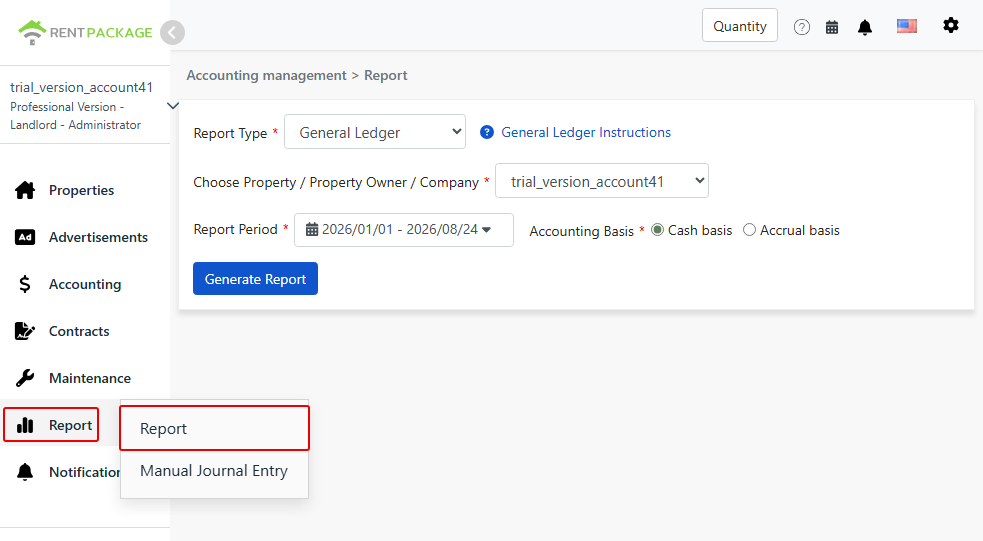
Step 1: Access the Reports Page

Go to the left menu and click "Reports" → "Reports".

Enter the reports page from the menu and select the General Ledger.

Step 2: Set Report Parameters

  • Report Type: Select "General Ledger".
  • Property/Owner/Company: Choose the entity to query. One account can generate separate reports for different owners, ensuring no mix-up in accounts, which is crucial for management agents.
  • Report Period: Select the date range for the query, e.g., 2026/01/01 – 2026/07/24.
  • Accounting Basis:
    • Cash Basis: Recognized on actual payment date; income is recorded when money is received. Suitable for individual landlords and small-scale filings.
    • Accrual Basis: Recognized on accounts receivable date; income is recorded when rent is due, regardless of receipt. Suitable for companies needing formal financial statements.

After setting, click Generate Report.

Step 3: Review Reports

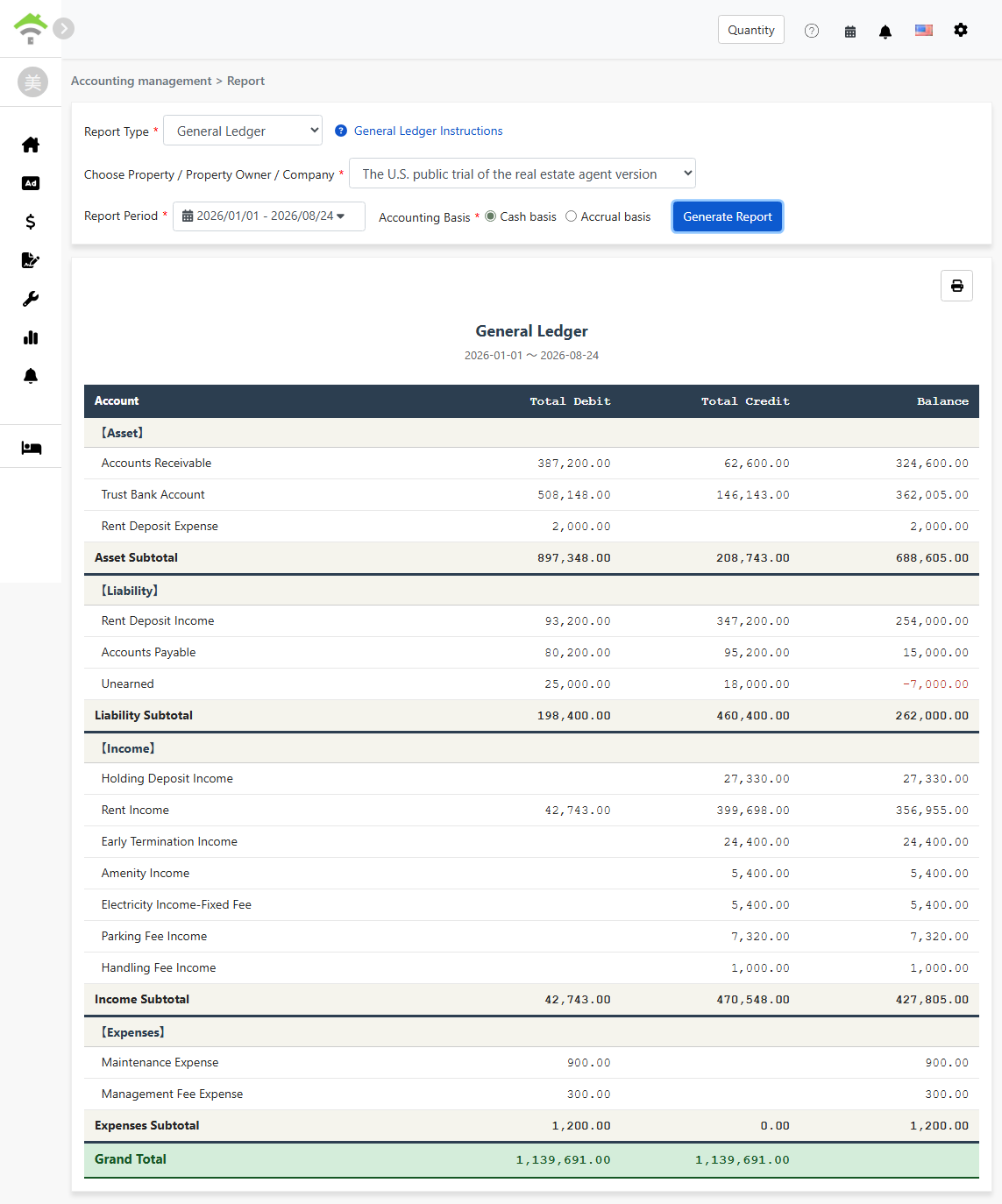
General Ledger Report: Five main sections—Assets, Liabilities, Owner's Equity, Revenue, Expenses—and balanced totals.

4. How to read this report

Reports are divided into five main sections by account category, with sample numbers illustrated:

  • Assets: "Trust Bank Account" balance 443,579, reflects actual fund balance during the period; "Accounts Receivable" balance 402,695, represents due but unpaid amounts; Other accounts like "Deposit Bank Account" clearly list the deposit funds separately.
  • Liabilities: "Deposit" balance 577,332, "Advance Payment" balance 13,685. Deposits and advance payments are not income; they are amounts to be refunded to tenants or for future periods. The system accurately classifies these to prevent the common mistake of counting deposits as income.
  • Owner's Equity: "Beginning Balance" credit 4,523, is the initial equity carried forward when the account was set up; "Owner's Distribution" refers to the amounts distributed to owners during the period, a deduction from equity shown in red. Typical rent collection and payments rarely create equity entries; this section usually derives from beginning balances, contributions, or owner's distributions. If no such entries occur during the period, it will not be displayed.
  • Income: Besides "Rental Income" 222,818, various incomes like cleaning fees, water fees, internet fees, and retention deposits are separately listed by account. Income subtotal 243,849, clearly shows each income source.
  • Expenses: Expenses incurred during the period such as "Company Management Fees", "Rent Expenses", "Service Fees" total debit 30,015.
Total The total debit and credit at the bottom of the report are always equal (both 972,004 in the example). This is the self-verification mechanism of double-entry bookkeeping—equality on both sides signifies all entries for the period are fully recorded, with no omissions or duplicates. This is what differentiates RentPackage from Excel bookkeeping: Excel relies on manual checks, while here the system guarantees balanced accounts.

5. Print and save

The print icon at the top right of the report allows direct printing or saving as PDF, eliminating the need for reformatting when sharing with accountants or owners.

6. FAQs

Why do cash and accrual figures differ?

The difference is in recognition timing. Accrual basis recognizes on the 'invoice date', counting income as rent is due. Cash basis recognizes on 'payment receipt', counting income only when funds are received. If a tenant pays late, the income for the period will differ between the two, which is normal.

Do manual entries appear in the general ledger?

Yes. Manual entries are merged together with entries auto-generated by the billing period, no extra setup required.

Can I view accounts for a single property?

Yes. Select a specific property from the 'Property/Owner/Company' dropdown, and the system will aggregate entries for only that property.

✅ Go to 'Reports' to generate your first general ledger! Rent, deposits, and expenses are automatically classified and summarized, giving you a clear financial overview.