📄 Interface Environment Overview: Understand the main screen in five minutes, knowing where to handle everything. 📄 How to use Property Overview in RentPackage for a quick grasp of the full building status. 📄 Add Managed Property: Complete property setup, owner details, account opening, and online signing in one go. 📄 Tenant Move-in & Lease Signing: Set rental period, deposit, utilities, and billing cycle in one go. 📄 Tenant Ledger Actions: Payment Reconciliation, Partial Payments, Meter Reading, and Deposits. All routine rent collection in one place. 📄 Owner transfer feature guide 📄 Profit Calculation: See exactly how much the owner and your company each earn 📄 How to Quickly Estimate Next Month and Year’s Rental Income with Forecast Receipts in RentPackage 📄 Compliance assistance and responsibility statement 📄 Contract templates overview 📄 Sublandlord feature guide 📄 Partial payment feature guide 📄 Advance Receipts feature guide 📄 Rent billing periods feature guide 📄 Start billing feature guide 📄 Recurring billing periods feature guide 📄 Booking feature overview 📄 E-contract setup guide 📄 Management fee setup guide for property management companies 📄 Why are deposits and advance receipts liability accounts in accounting? 📄 RentPackage General Edition overview 📄 Commission split setup guide 📄 why do all landlords and agents need tenant management automation software? 📄 How to handle exchange rates for Euro-denominated rent? 📄 US Tax Filing - Schedule E Instructions 📄 UK Tax Filing - SA105 Instructions 📄 How to activate Stripe online rent collection in RentPackage 📄 How to use Calendar to schedule tenant notifications: Power outage example 📄 How to set the agency logo to display your brand on Email notifications and contract PDFs 📄 What is Rent Insurance? Compensation for unpaid rent; policy managed with the lease 📄 Anlage V Germany Rental Income Tax Report User Guide 📄 T776 Canada Rental Income Tax Report User Guide 📄 PIT-28 Polish Rental Income Tax Report User Guide 📄 How to Generate an Australian Rental Schedule in RentPackage, Auto-Match Income and Expenses to ATO Categories 📄 How to Use the Romanian Rental Income Tax Report (Declarația Unică 212) in RentPackage 📄 How to generate Hungarian SZJA rental income report data in RentPackage and compile eSZJA entry numbers with one click. 📄 Profit and Loss Statement: Auto-calculates income per property, per owner 📄 Balance Sheet: How much of the bank balance is tenant's? View deposits and prepayments at a glance. 📄 Cash Flow Statement: How much did actual cash increase during the rent period? 📄 How to generate a General Ledger in RentPackage, automatically summarizing rent and property accounts 📄 Enter manual journal entries: repairs, insurance, depreciation. Record transactions outside of the billing period. 📄 Custom rental notifications: rent reminders, lease expiration, sent to the right person at the right time 📄 LINE Rent Payment Notifications: Tenant Setup Guide and Automatic Rent Reminders 📄 Why can property management software dramatically save time and cost?

No more separating landlords and brokers! RentPackage Universal Edition is live

One account, multi-role support—handle all rental tasks in one place

In today’s rental market, user roles are rarely single. You might be a self-managing landlord on weekends and an employee at a management firm; you might do leasing while also managing other owners’ properties; or you might run several management companies with multiple branches.
Most rental systems still force you to log in as a single role—rigid and impractical for real operations.

Seeing this industry pain point, RentPackage launched the new Universal Edition, breaking the landlord-only and broker-only silos. One account lets you operate multiple roles, properties, and branches, boosting efficiency and flexibility.
Why launch the Universal Edition?

Many users told us they often manage properties of different types at the same time:

  • Some are your own homes where you sign and collect rent directly (landlord)
  • Some are properties you manage for others (property management)
  • Some are company master leases that you re-rent out (master lease, sublandlord)
  • Some only involve finding tenants and signing (leasing-only)

If you must switch accounts or upgrade editions to handle different business types, it raises learning costs and fragments accounting, staffing, and operations.

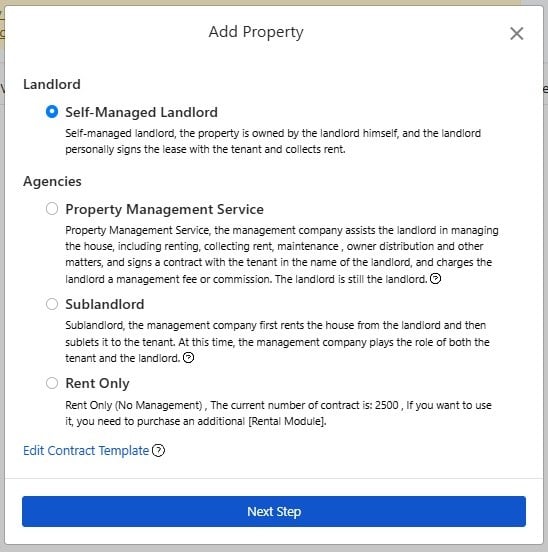
So we designed from the user’s perspective: with the Universal Edition, one account lets you add all kinds of properties and roles on one platform—handling multi-role, multi-property, multi-process needs painlessly.

Four supported roles (mix and match freely)
  • Self-managing landlord — you own the property, sign with tenants, and collect rent directly
  • Property manager — act on behalf of the owner, contracts still in the owner’s name
  • Master lease (sublandlord) — your company leases from the landlord and sublets to tenants; manage both sides
  • Leasing agent — handles showings and signing only; others handle rent collection and management
All-in-one features to upgrade rental management

RentPackage Universal Edition unifies key features to streamline your leasing workflow:

  • Online sharing and leasing: quickly create property listings and publish with one click
  • E-signing: sign now, email remote signing, and contract versioning; tenants can sign on their phone
  • Rent collection, reconciliation, and payment management: create billing cycles, payment notices, receipts
  • Tenant maintenance and emergencies: online requests, progress tracking, repair costs
  • Move-out and settlement: auto deposit settlement, catch-up billing, and move-out inspections
  • Showing and deal records: track showing progress and closing bonuses for leasing staff

Each role has built-in logic and accounting flows, adapting to any business model.

Real-time visibility across the entire process to raise efficiency and reduce errors

with RentPackage, whether in the office, out for a showing, or managing rentals from home, simply open your computer or phone to instantly view the status and progress of each property.

  • Which tenants have paid rent?
  • Which repair is in progress?
  • Which tenant is about to move out?
  • Which colleague scheduled how many showings today?

Everything is clear at a glance—no paper digging or back-and-forth needed—efficiency soars.

Simple, transparent pricing with flexible pay-as-you-go

RentPackage Universal Edition is priced by number of properties and number of leasing units—one price covers all features and roles.

  • Self-managed or managed properties
  • Leasing-only properties
  • If you don’t provide leasing-only services, no extra module is required, saving costs

This design lets small landlords, growing firms, and large master-lease companies scale as needed—pay for what you use with no waste.

Conclusion: one account to manage every rental role

From solo landlords to large management firms, from one unit to hundreds, RentPackage Universal Edition scales with your growth.

✅ Join RentPackage now to manage rentals efficiently—with tighter, clearer operations.