
When the lease rent is set in a foreign currency, how do you recalculate the exchange rate each month when collecting rent?
Menu
- Why is rent in Euros but billed in local currency?
- Common Issues with Traditional Methods
- RentPackage Approach
- What is 'Exchange Rate Adjustment (must enter 0)'?
- Why is the [exchange rate confirmation] step necessary?
- Actual setup process (including screen instructions)
- Explanation of each billing operation process
- Real Examples
- Recommended Note: How to Record Exchange Rate (for Audit Purpose)
- More FAQs
Why is rent in Euros but billed in local currency?
In countries like Hungary, Romania, Serbia, and Argentina where exchange rates fluctuate, or markets prefer foreign currency as a pricing benchmark, lease agreements are often priced in Euros (EUR) or US Dollars (USD), but actual payments, invoicing, and taxation still need to be processed in the [local currency].
Common Issues with Traditional Methods
[Common issues when using Excel or manual methods include:]
- Each period requires manual exchange rate lookup and recalculation
- Verification must be repeated for accuracy before invoice generation
- Inconsistent calculations and record-keeping when managed by different individuals
- Errors found post-billing are costly to correct
That's why many feel that [foreign currency rent is manageable but difficult to administer].
RentPackage Approach
[In RentPackage:]
- Contracts can use Euro as a pricing reference
- Invoices only process the [final amount in local currency]
- System requires an amount confirmation before issuing invoices
- Unconfirmed billing periods won't be visible to tenants
What is 'Exchange Rate Adjustment (must enter 0)'?
[Exchange rate adjustment] is an item for [process confirmation], indicating the amount is confirmed with the current rate.
- This item [does not participate in amount calculation]
- Can fill in with 0
- Any value entered signifies period confirmation is complete
Why is the [exchange rate confirmation] step necessary?
Exchange rates may fluctuate daily; thus, rental amounts should be confirmed by the user before invoicing.
In RentPackage, this confirmation is done via a field: [Exchange rate confirmation (must fill 0)].
- This field [does not participate in amount calculation]
- Only represents [Payment Confirmed This Period]
- Enter 0 to complete confirmation
Actual setup process (including screen instructions)
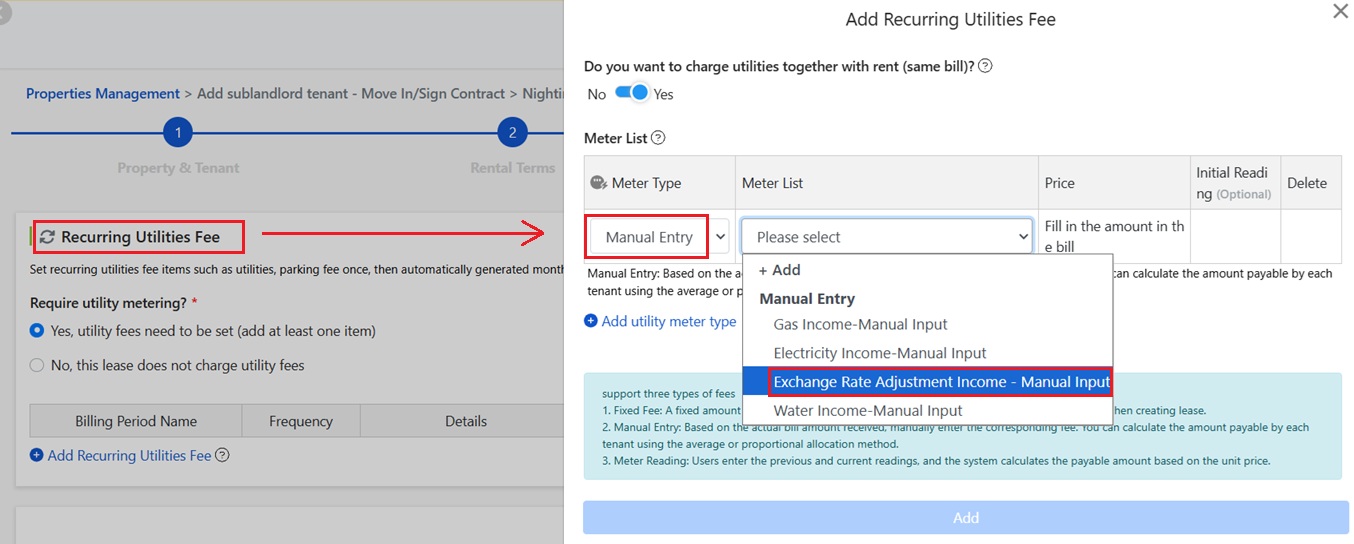
1️⃣ Step 1: Add [Recurring Utilities] during [Move-In/Contract Signing]
During the tenant's [Move-In or Contract Signing] process, add [Recurring Utilities] as a basis for future billing settings.
2️⃣ Step 2: Select [Manual Input] for Meter Reading Type
When adding recurring utilities, choose [Manual Input] for [Meter Reading Type] to adjust amounts manually later.
3️⃣ Step 3: Select [Exchange Rate Adjustment] for Meter Reading List
In the [Meter Reading List], select [Exchange Rate Adjustment] as a confirmation item.
Explanation of each billing operation process
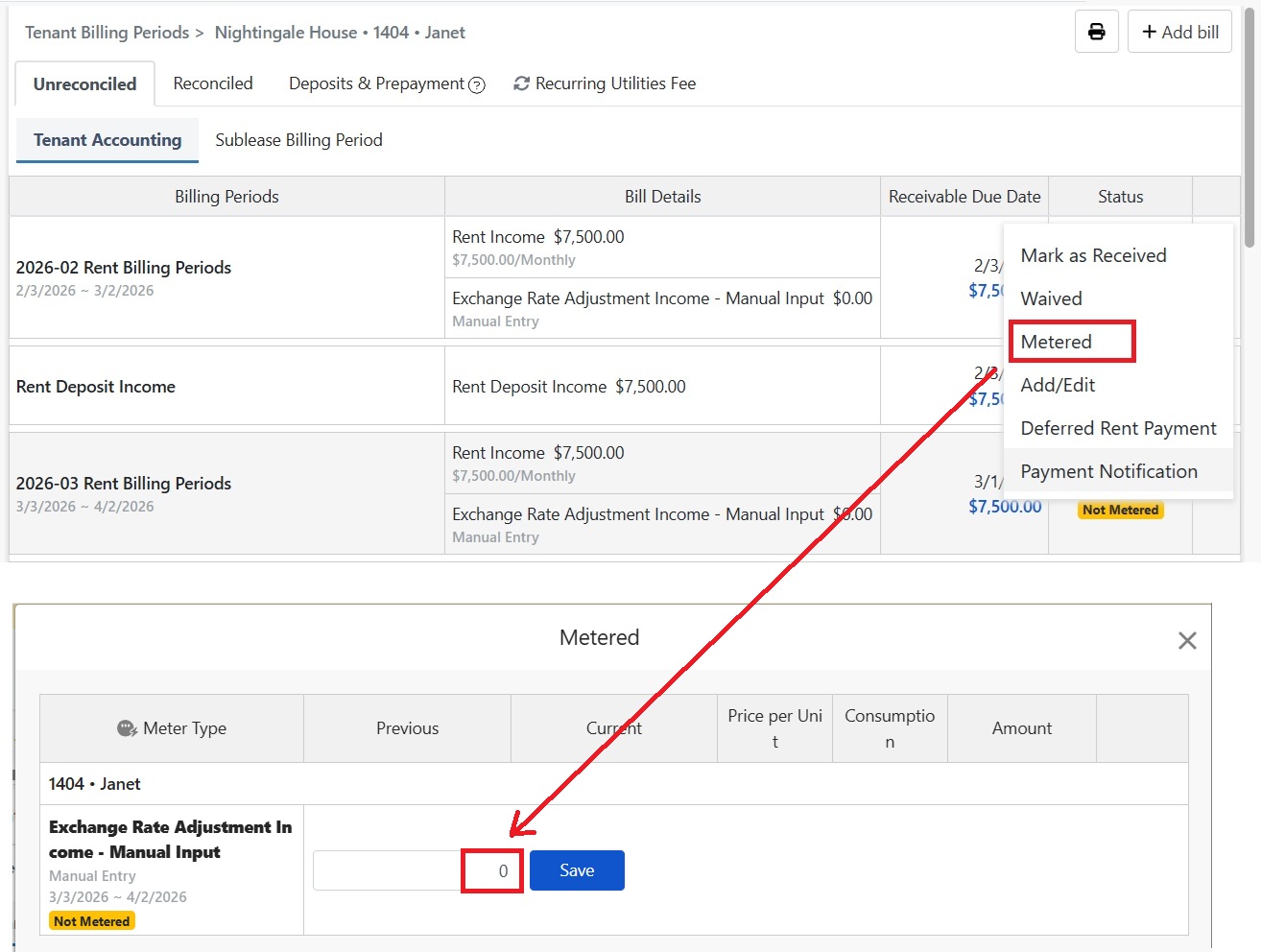
1️⃣ Step 1: Calculate Current Period Receivables (Local Currency)
Based on your preferred exchange rate source (bank, central bank, or internal policy), calculate the current period receivable in local currency.
2️⃣ Step 2: Adjust Rent Amount Directly
During the rental billing period, directly adjust the 'Rent' to the final correct amount.
3️⃣ Step 3: Fill in the 'Exchange Rate Confirmation (Enter 0)'
After the rent period amount adjustment, this entry remains in 'Not Metered' status. In 'Meter Reading' > enter a value in 'Exchange Rate Confirmation' field (must enter 0) to mark this period as confirmed.
Real Examples
[Scenario:]
Contract Rent:500 EUR
Current Period Exchange Rate:1 EUR = 5.1
- Calculate Current Period Receivables:500 × 5.1 = 2,550
- Adjust the Rent Amount During the Billing Period to 2,550
- [Exchange Rate Adjustment] Input 0
- (Recommended) Note Input:500 EUR,Exchange Rate 5.1
Recommended Note: How to Record Exchange Rate (for Audit Purpose)
Suggested Note Format (Choose One):
- Contract Rent 500 EUR; Exchange Rate 1 EUR = 5.1; Current Invoice 2,550
- EUR 500 × 5.1 = 2,550
More FAQs
Q1: Is Exchange Rate Confirmation Required?
If you want tenants to see the current rental billing period only after confirming the exchange rate, fill in [Exchange Rate Confirmation (0 required)]. Until filled, the tenant won't see the billing period or receive payment notifications.
Q2: Does Entering 0 in Exchange Rate Confirmation Affect the Amount?
No, it won't. This field is only for process confirmation and does not impact amount calculations. First adjust the current rent amount to the correct local currency based on exchange rate, then enter 0 to complete confirmation.
Q3: Can I use different exchange rates for each period?
Yes. You can decide based on company policies or the period's exchange rate and note the rate used in the remarks.
Q4: Is this process applicable to all countries?
This process is mainly used when contracts/pricing refer to a foreign currency, but billing/accounting requires local currency, which is more common in countries like Hungary and Romania.