
Agency leasing practice: How does commission splitting work?
Commission split feature overview
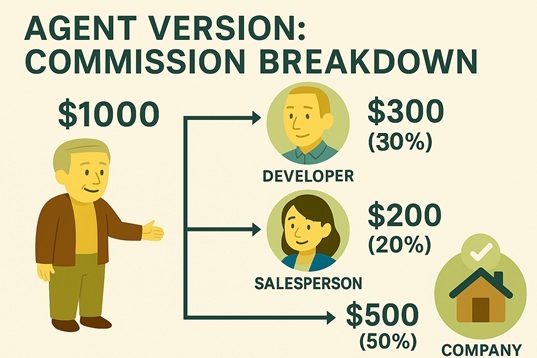
Agency leasing: Commission sources and split mechanism
In agency leasing, commissions usually come from two sides:
- ✅ Landlord-paid [broker commission income] :For example, one month’s rent, $1000
- ✅ Tenant-paid [broker commission income] :For example, half a month’s rent, $500
Total pre-tax commission is $1500; add tax $150; total after tax is $1650.
However, this amount isn’t all company revenue—it’s split internally as commission bonuses:
- Sourcing agent bonus (finds listings): $300
- Sales agent bonus (showings and closing): $200
- Company net revenue: $1000
Transparent, data-driven commission splits are key to fair incentives and team performance.
What can our system do? Automate commission splitting!
To build fair, trackable splits, our system offers a complete Commission Split feature—from deal closure to bonus allocation at a glance.
Feature details
1️⃣ Set “Commission” on a listing or room
- Go to [Room Unit] or [Listing] and choose [Set Commission] under More Options
- Enter landlord and tenant [broker commission income] (e.g., $1000 + $500)
- The system auto-calculates total ($1500), tax ($150), and after-tax ($1650)
2️⃣ Assign [commission bonuses] and split recipients
In Commission Bonus settings, assign up to 4 staff as:
- 👷 Sourcing agent (recruits listings)
- 💬 Sales agent (contacts tenants and closes)
The system will automatically validate:
- Total split percentage must not exceed 100%
- Total split amount must not exceed pre-tax commission
- Any remainder is automatically counted as company revenue
3️⃣ Transparent audits and clear reports
- Accounting > Agency Accounting > [Leasing / Management]:View [broker commission income] and [commission bonuses]
- Accounting > Agency Accounting > [Commission Bonuses]:Each staff member can view their bonuses, labeled by Sourcing/Sales role
✅ Feature benefits summary
| Feature | Advantages |
|---|---|
| Auto-calculate commissions and taxes | Reduce manual errors |
| Caps for multi-person bonus allocation | Ensures no over-allocation or mistakes |
| Company revenue auto-balanced | Remaining amount auto-assigned after splits |
| Audit and reporting provided | Strengthen management and payroll basis |
| Individual bonus details | Each staff member can view and confirm |
💡 Tip: After enabling commission splits, set clear incentives to drive teamwork and growth, while giving management visibility into revenue mix and bonus payouts.