
RentPackage UK SA105 Tax Return: Rental Income and Expenses Summarised by Box for Landlords and Property Managers
Contents
What is SA105?
SA105 is the UK property income supplement form required by HM Revenue and Customs (HMRC). It is filed as part of your Self Assessment Tax Return. If you own rental properties in the UK, you need to complete this form each year to report your rental income and related expenses.
Why prepare SA105 with RentPackage
Many UK landlords and property managers prepare their return by picking a whole year of rent, repairs and insurance out of spreadsheets or bank statements, adding them up box by box against SA105, and then splitting loan interest between residential and non-residential use. Because the tax year starts on 6 April and does not line up with the months in ordinary books, it is easy to miss or double-count items.
RentPackage provides an SA105 report feature that automatically summarizes your rental income and expenses, making UK tax preparation simple and efficient.
- Day-to-day bookkeeping flows into SA105 boxes
Once each account is set to its SA105 box, amounts from billing period payments and manual journal entries are added up in the matching box automatically, so there is nothing to re-sort before filing. - No tax year date conversion
The dropdown lists UK tax years from 6 April to 5 April of the following year and pre-selects the most recently completed one. - Finance cost allocation is checked
The system calculates each property's total finance costs and puts the full amount in Box 44 by default. If the Box 26 and Box 44 amounts do not add up to the total, the system asks you to correct them. - One report per owner or company
When you manage properties for several owners, select an owner or company to produce a separate report, then print it for the owner or their accountant.
Step 1: Select Tax Year
- Access the Report:Go to function list → Report → Tax Report
- Select Tax Year:The dropdown will display complete tax year ranges, e.g., '2025/2026 (6 Apr 2025 - 5 Apr 2026)'
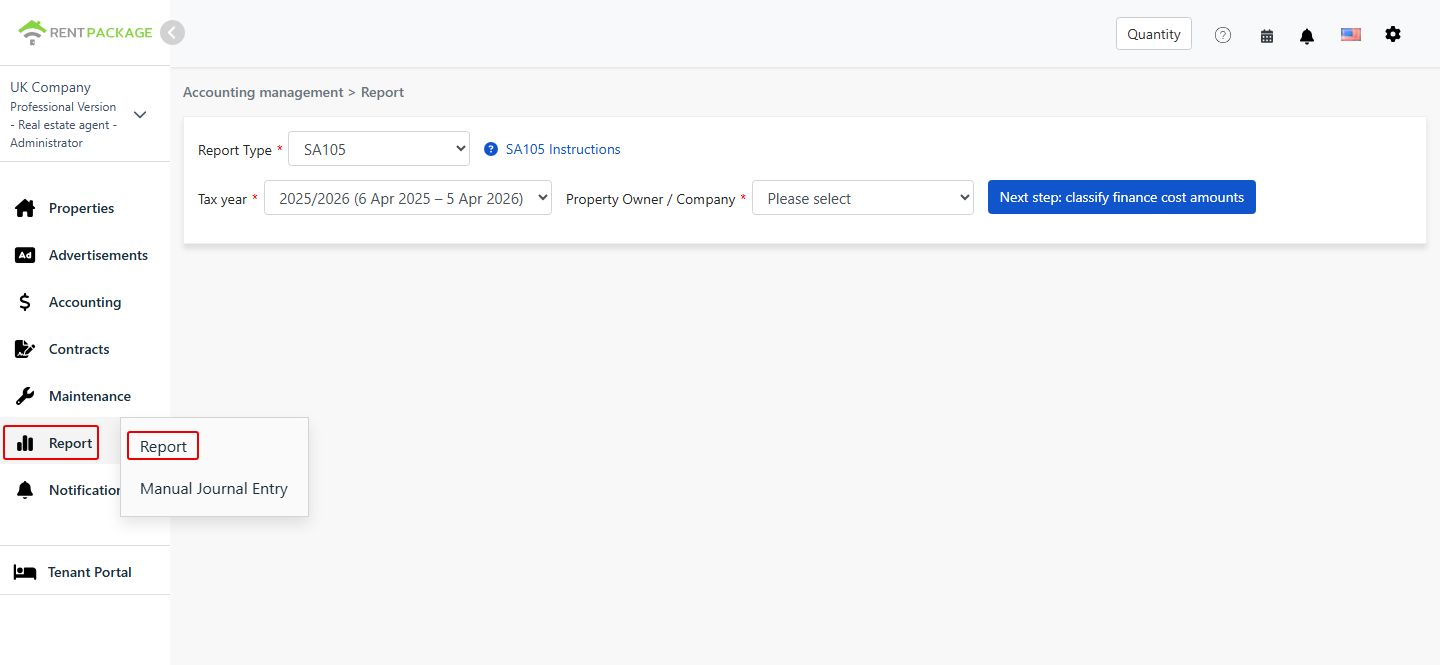
Step 2: Select Owner or Company
In the 'Owner/Company' dropdown, select the entity for which you want to generate the report:
- Company:If you hold properties under a company name, select the corresponding company
- Owner:If you are a self-managing landlord or sublandlord, select the corresponding owner name
After selection, click 'Next step: classify finance cost amounts'.
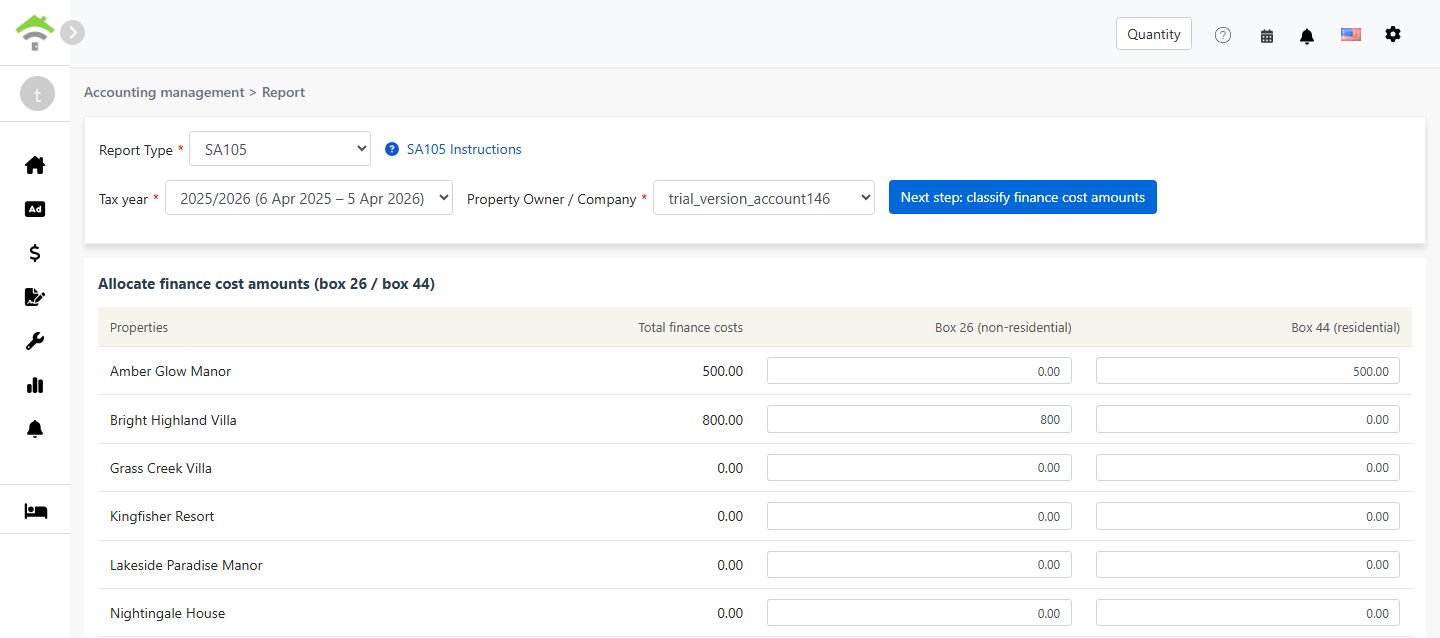
Step 3: Allocate Finance Costs (Box 26 / Box 44)
When you click 'Next step: classify finance cost amounts', the system retrieves the total amount from all accounts mapped to 'Box 26/44 Finance Costs' and displays a screen for you to allocate the amount between Box 26 and Box 44:
| Property | Total Finance Costs | Box 26 (Non-Residential) | Box 44 (Residential) |
|---|---|---|---|
| 123 High Street | 0.00 |
Allocation Rules:
- Box 26 (Non-Residential):Fully deductible as an expense against rental income
- Box 44 (Residential):Not directly deductible; instead receives a 20% tax credit
- The system defaults all amounts to Box 44. For each property, Box 26 + Box 44 must equal the total finance costs
- For mixed-use properties, both residential and commercial, allocate the amounts proportionally based on usage
Step 4: Generate Report
- After confirming the finance cost allocation is correct, click 'Generate Report'
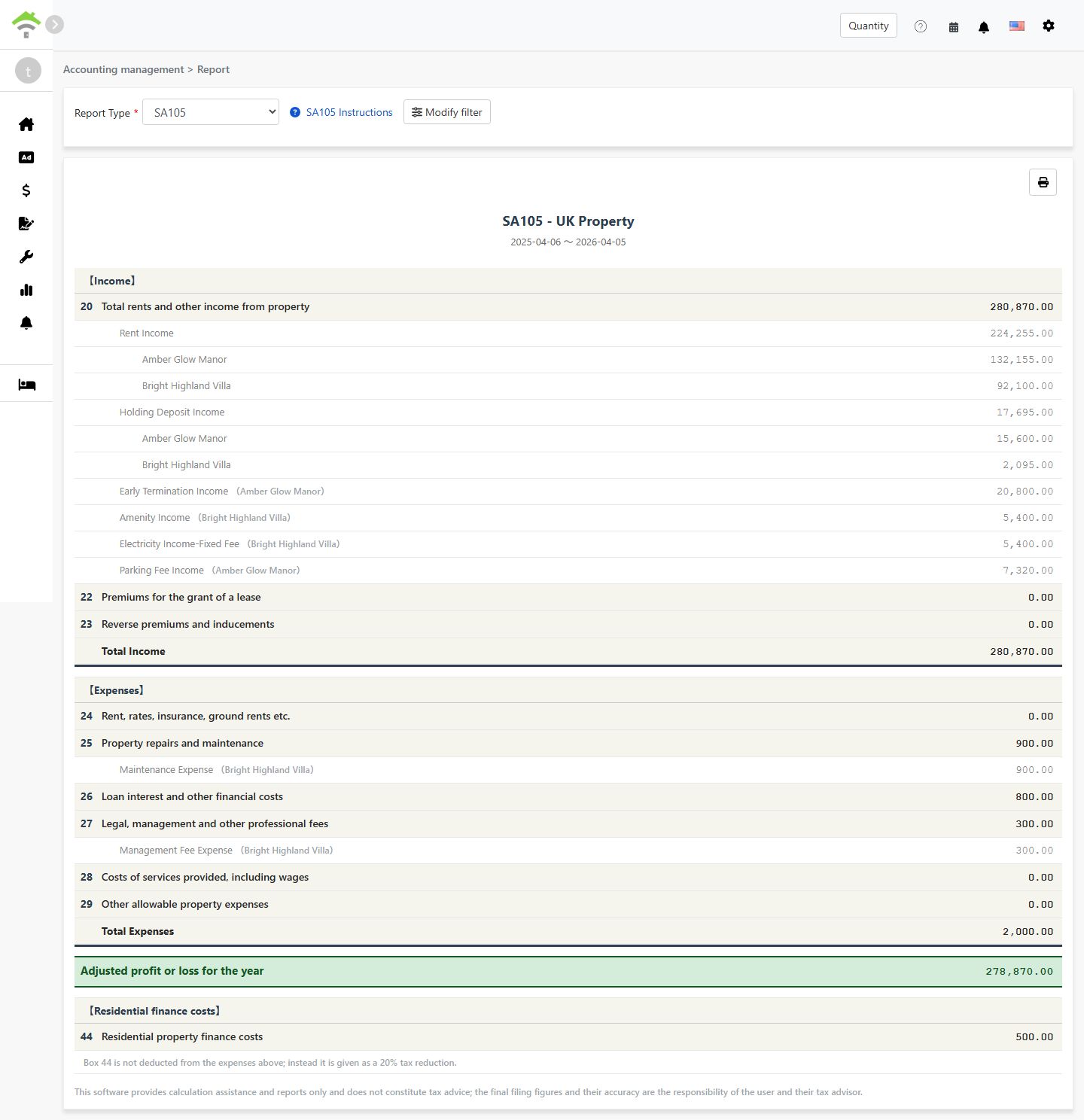
- The system will generate an SA105 report showing:
- Income:Boxes 20-23 - Rental income, lease premiums and similar items
- Expenses:Boxes 24-29 - Allowable property expenses
- Adjusted Profit or Loss for the Year:Total income - total expenses
- Residential Finance Costs:Box 44 - Residential mortgage interest, which receives a 20% tax credit
- You can print the report or export it as a PDF for your tax preparation records
Box 26 vs Box 44 Explained
| Item | Box 26 (Non-Residential) | Box 44 (Residential) |
|---|---|---|
| Property Type | Commercial properties, offices, shops and similar premises | Residential lettings |
| Tax Treatment | Fully deductible as an expense | Not deductible; receives a 20% tax credit instead |
| Report Location | Box 26 - Loan interest and other financial costs | Box 44 - Residential property finance costs |
Example:
Suppose you have a mixed-use property with total loan interest of £10,000, where 30% is for commercial use and 70% is for residential use:
- Box 26 (Non-Residential):£10,000 × 30% = £3,000(fully deductible)
- Box 44 (Residential):£10,000 × 70% = £7,000(20% tax credit = £1,400)
How to Set Up Chart of Accounts for SA105?
To map an account to finance costs:
- Go to [Accounting Management → Account Settings]
- Find the account you want to classify (e.g. loan interest)
- Set the account's SA105 box to 'box 26/44 Finance costs'; its amount will then be included in the finance costs total automatically
To add finance cost transactions, there are two methods:
- Add a payment to a billing period:add a payment in the property billing period and select an account already set to 'box 26/44 Finance costs'
- Add a manual journal entry:add an entry under [Manual Journal Entries] and likewise select an account already set to 'box 26/44 Finance costs'
Amounts added through either method will be automatically included in the finance costs total.
Frequently Asked Questions
Does UK tax allow depreciation deductions?
No. Unlike the US Schedule E, UK property income tax does not have a depreciation field. In the UK, property depreciation is typically only relevant when calculating Capital Gains Tax upon sale of the property.
Why is my total finance cost showing as 0?
Please ensure your chart of accounts is correctly configured with the SA105 Box set to 'Box 26/44 Finance Costs'. If not configured, the system will not include that account's amounts in the finance costs total.
Can Box 26 + Box 44 exceed the total finance costs?
No. The system validates that for each property, Box 26 + Box 44 must equal the total finance costs for that property.
Can I manually enter the total finance cost amount on the report page?
No. Unlike Schedule E depreciation, SA105 finance cost totals can only come from billing period payments or manual journal entries. This design ensures accuracy and prevents discrepancies with your actual accounting records.
Why does the UK tax year run from 6 April to 5 April?
This is the official UK tax year as defined by HMRC. Unlike the standard calendar year from January to December, the UK tax year begins on 6 April each year and ends on 5 April of the following year.
SA105 Field Reference
【Income】
| Box | Field Name | Description |
|---|---|---|
| 20 | Total rents and other income from property | Total rental income and other property income |
| 22 | Premiums for the grant of a lease | Premiums received for granting a lease |
| 23 | Reverse premiums and inducements | Reverse premiums and inducements received |
【Expenses】
| Box | Field Name | Description |
|---|---|---|
| 24 | Rent, rates, insurance, ground rents etc. | Ground rent, rates and insurance premiums |
| 25 | Property repairs and maintenance | Repairs and maintenance costs |
| 26 | Loan interest and other financial costs | Finance costs for non-residential properties, fully deductible |
| 27 | Legal, management and other professional fees | Legal fees, property management fees and accountant fees |
| 28 | Costs of services provided, including wages | Service costs including employee wages |
| 29 | Other allowable property expenses | Other allowable expenses not listed above |
【Residential Finance Costs】
| Box | Field Name | Description |
|---|---|---|
| 44 | Residential property finance costs | Finance costs for residential properties, which receive a 20% tax credit |
Summary
If you keep doing it the current way, next year you will again pick a whole year of income and expenses out by hand, add them up box by box against SA105 and work out finance costs separately. Once your accounts are mapped in RentPackage, you simply keep your books each month; at filing time, select the tax year and the owner and the report is ready.
Start with one account you use often, such as repairs, set its SA105 box, and generate the report once to see the result.
Try RentPackage for freeRelated articles
- RentPackage Tenant Billing Periods: Payment Reconciliation, Partial Payments, Meter Reading, and Deposits. All routine rent collection in one place.:The rent and charges recorded in billing periods are where the SA105 income and expenses come from.
- RentPackage Manual Journal Entry: Repairs, Insurance, Depreciation – Record Income and Expenses Outside Tenant Billing Periods Too:Record loan interest, insurance and other items outside billing periods with manual journal entries.
- RentPackage Income Statement: Rental income and expenses for each property and owner, with profit calculated automatically:See income, expenses and net profit per owner and per property for any period.