
Anlage V Germany Rental Income Tax Report User Guide
Quick Links
1. What is Anlage V?
Anlage V (Einkünfte aus Vermietung und Verpachtung, income from renting and leasing) is a German property income form that must be submitted to the tax office (Finanzamt) with the income tax return (Einkommensteuererklärung). If you have rental income in Germany, you need to fill out an Anlage V annually for each property to report the rental income and associated expenses.
RentPackage offers an Anlage V report feature, automatically aligning rental income and expenses by the actual receipt date (complying with Germany's Zufluss-/Abflussprinzip cash basis principle) to make German tax preparation easier and more efficient.
2. Select report type, tax year and property
Follow these steps to open the report:
- Open Report:Click 'Reports' in the left menu → Select 'Anlage V' from the report type dropdown
- Select Tax Year:Choose the calendar year you are filing for, e.g., '2026'
- Select Property:Choose the property this report pertains to
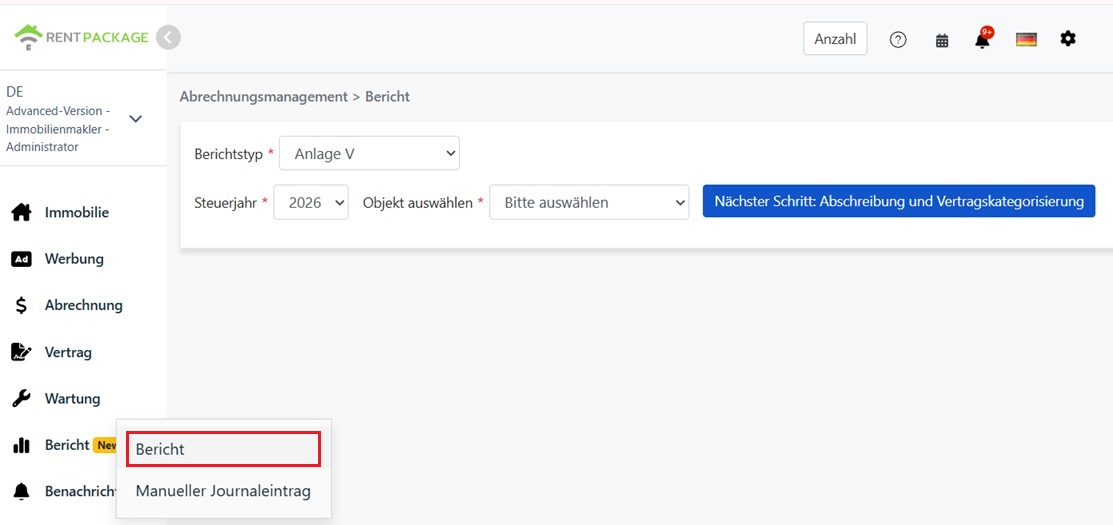
After selecting, click 'Next: Depreciation & Contract Classification'.
3. Enter depreciation amount and classify contracts
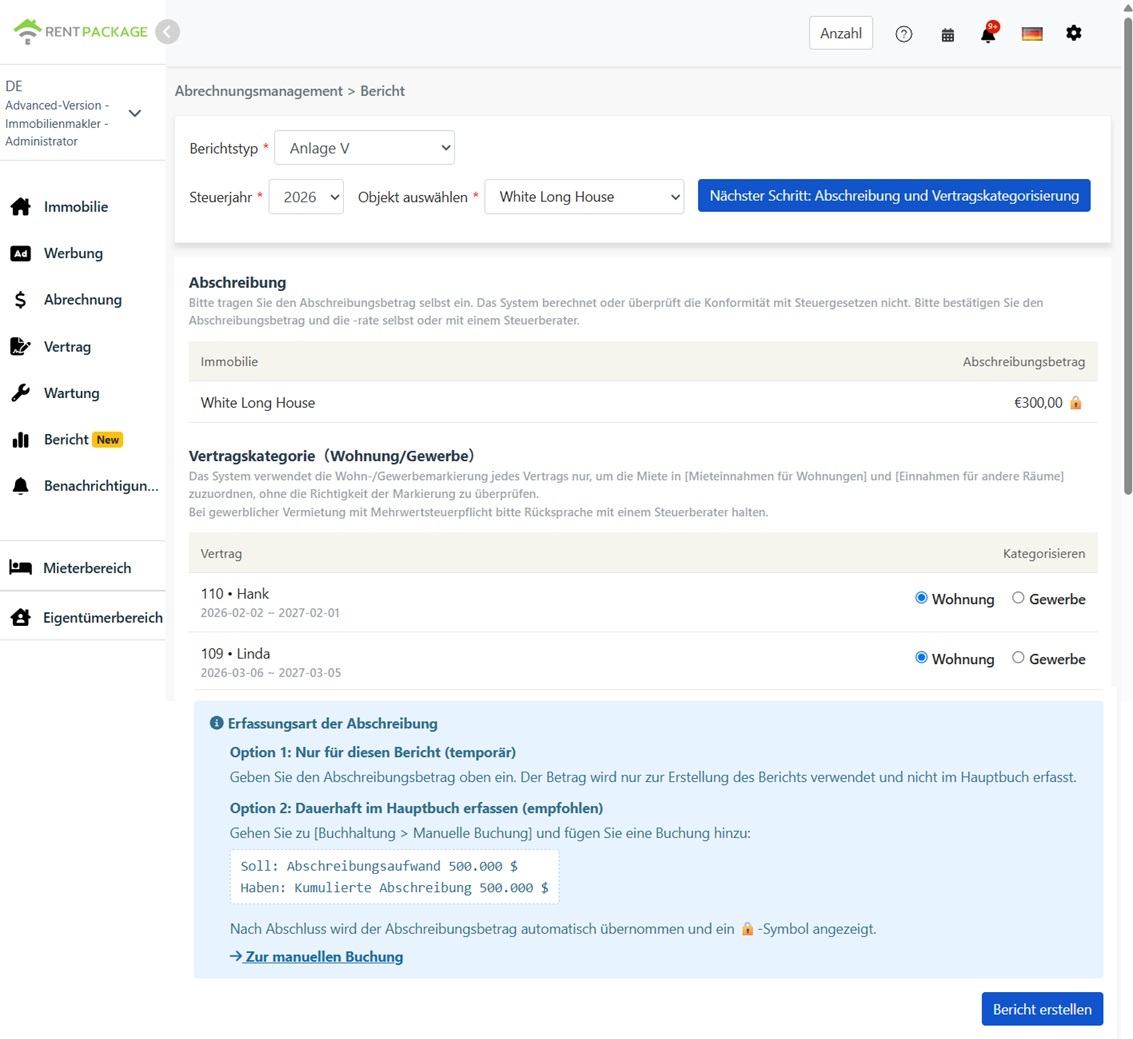
Depreciation (Absetzung für Abnutzung, AfA)
Please enter the depreciation amount manually. The system will not auto-calculate, apply depreciation rates, or verify compliance with German tax laws. There are multiple forms of depreciation for German buildings (e.g., different straight-line rates depending on construction year, special depreciation schemes available). Please ensure the correct amount and rate, or consult your tax advisor (Steuerberater).
Contract Classification (Residential/Commercial)
The report will split rental income into two fields based on your classification of each contract in this screen:
- Residential:This contract's rent is included in 'Mieteinnahmen für Wohnungen' (Residential Unit Rental Income)
- Commercial:This contract's rent is included in 'Einnahmen für andere Räume' (Income from Other Spaces, e.g., offices, shops)
4. Generate report
After confirming the depreciation amount and contract classification, click 'Generate Report'.
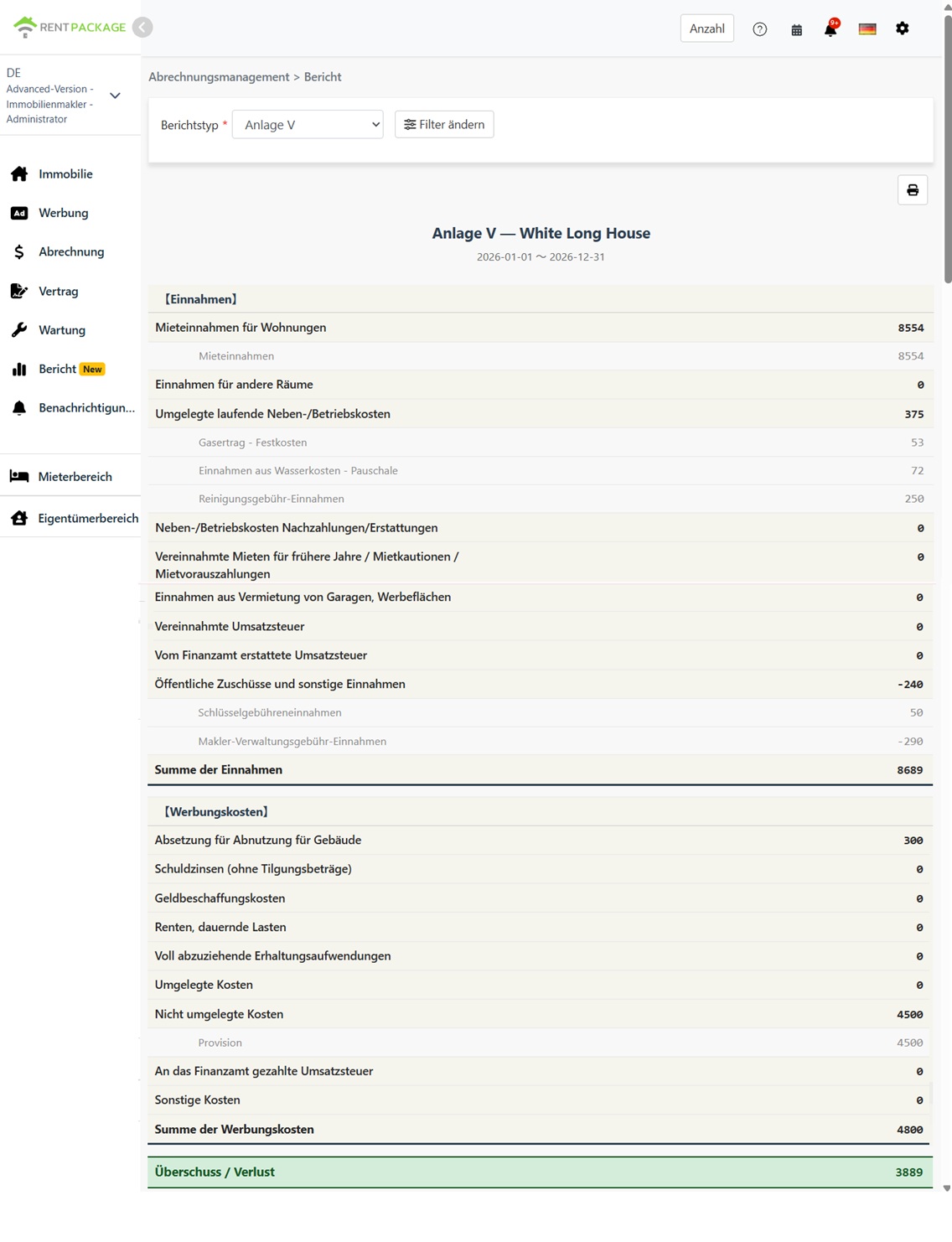
The system will generate an Anlage V report, displaying the following:
- Income (Einnahmen):Residential Rent, Commercial Rent, Recoverable Expenses, and Other Income Fields
- Expenses (Werbungskosten):Depreciation, Loan Interest, Repair Costs, and Other Expense Fields
- Surplus / Loss (Überschuss / Verlust):Total Income - Total Expenses
Each field displays the accounts and amounts included, helping you trace each figure's origin.
5. Two methods of recording depreciation
Method 1: Report Use Only (Temporary)
Enter the depreciation amount directly on the report screen. This amount is for this report only and will not be recorded in the accounts.
Method 2: Record in Accounts (Recommended)
Go to 'Accounting Management' → 'Manual Entries' to create an entry:
- Debit: Depreciation Expense
- Credit: Accumulated Depreciation
Once the journal entry is created, the depreciation amounts will automatically populate the report screen and display the 🔒 lock icon, indicating amounts are sourced from accounting records. To modify locked amounts, edit the journal entry instead of changing them on the report screen.
6. Residential and commercial rent classification
| Item | Residential | Commercial |
|---|---|---|
| Contract Type | Residential Lease (Apartments, Houses) | Offices, Retail, Other Non-residential Spaces |
| Report Field | Mieteinnahmen für Wohnungen | Einnahmen für andere Räume |
| VAT (Umsatzsteuer) | Typically VAT-exempt | Opting in may involve VAT; consult a tax advisor |
How the system categorizes rent: Categories are per contract, not payment. Rent for contracts classified as residential goes to 'Mieteinnahmen für Wohnungen'; rent for commercial contracts goes to 'Einnahmen für andere Räume'.
7. FAQ
Does the system automatically calculate depreciation?
No. Enter depreciation manually; the system does not verify compliance with German tax law. German building depreciation (AfA) varies by construction year and type. Confirm correct amounts or consult a tax advisor.
Why is depreciation locked (🔒) on the report page?
The lock icon indicates the amount is from a depreciation entry in accounting. To edit, go to 'Accounting' → 'Manual Entries', adjust the entry and the report will update.
Where to record back rent collection?
Strictly, back rent should be in 'Vereinnahmte Mieten für frühere Jahre / verrechnete Mietkautionen / Mietvorauszahlungen'. The system doesn't auto-detect this—all rent is classified as residential or commercial per contract. Total income remains correct; manually adjust if needed when transferring to official forms.
Will the report apply the 10-day rule (Zehn-Tage-Regel)?
No. Reports allocate income and expenses based on actual payment dates within the calendar year. If you have frequent transactions around year-end and apply the 10-day rule, please confirm and adjust amounts with a tax advisor before filing.
Can I select multiple properties in one report?
No. Each report covers only one property, following the German practice of submitting a separate Anlage V for each rental property.
Why does my rental income only appear in one field?
Check the contract classification in Step 3. If all contracts are classified as residential, all rent will be listed under 'Mieteinnahmen für Wohnungen', and the commercial field will show 0, and vice versa.
8. Anlage V field comparison table
Income (Einnahmen)
| Field Name | Description |
|---|---|
| Mieteinnahmen für Wohnungen | Rental income from residential units (contracts classified as residential) |
| Einnahmen für andere Räume | Income from other premises (contracts classified as commercial) |
| Umgelegte laufende Neben-/Betriebskosten | Operating expenses passed to tenants (e.g., utilities, management fees) |
| Neben-/Betriebskosten Nachzahlungen/Erstattungen | Operating expenses: reimbursement or refund |
| Vereinnahmte Mieten für frühere Jahre / Mietkautionen / Mietvorauszahlungen | Collected previous years' rent, applied deposits, prepaid rent |
| Einnahmen aus Vermietung von Garagen, Werbeflächen | Income from rented garages, advertising spaces, etc. |
| Vereinnahmte Umsatzsteuer | Collected VAT |
| Vom Finanzamt erstattete Umsatzsteuer | VAT refunded by tax office |
| Öffentliche Zuschüsse und sonstige Einnahmen | Public subsidies and other income |
Expenses (Werbungskosten)
| Field Name | Description |
|---|---|
| Absetzung für Abnutzung für Gebäude | Building depreciation (AfA) - entered or journaled amount |
| Schuldzinsen (ohne Tilgungsbeträge) | Loan interest (excluding principal repayment) |
| Geldbeschaffungskosten | Financing costs (e.g. loan fees) |
| Renten, dauernde Lasten | Annuity and recurring burdens |
| Voll abzuziehende Erhaltungsaufwendungen | Fully deductible maintenance expenses |
| Umgelegte Kosten | Expenses passed on to tenants |
| Nicht umgelegte Kosten | Unpassable expenses to tenant |
| An das Finanzamt gezahlte Umsatzsteuer | VAT paid to tax authorities |
| Sonstige Kosten | Other expenses |