
How to generate Hungarian SZJA rental income report data in RentPackage and compile eSZJA entry numbers with one click.
In Hungary, rental income must be included in the annual personal income tax (SZJA) return. The eSZJA system's draft does [ not include ] rental income. Landlords must calculate and fill in income, expenses, profit, and quarterly prepayment amounts themselves. RentPackage automatically compiles your annual rental finances into numbers that correspond with eSZJA fields—just fill them in according to the report, no need to go through ledgers at year-end.
Quick Links
1. What is SZJA rental income reporting?
SZJA (személyi jövedelemadó) is Hungary's personal income tax. Private landlords must report long-term residential rental income in [ line 708 ] (real estate rental income) of the annual tax return: column a for income (bevétel), column b for expenses (költség), column c for profit (jövedelem), taxed at 15%. During the year, taxes must also be prepaid quarterly (adóelőleg).
RentPackage summarizes accounts for the selected tax year (January 1 to December 31) based on the [ cash method ] (recognized by receipt date), with the landlord as the reporting unit, producing figures that can be directly compared against eSZJA fields.
2. Key points of Hungarian rental income taxation
Before generating a report, understand some Hungarian tax rules affecting figures:
- Tax Rate 15%: Rental income (income minus expenses) is subject to a 15% personal income tax rate.
- Choose One of Two Expense Calculation Methods: [ A: 10% Fee Rate ]— A flat fee of 10% of income, no itemized deductions, simple but no depreciation or actual expenses can be deducted; [ B: Itemized Verification ]— Deductions based on actual expenses, including depreciation, suitable for landlords with higher expenses.
- Quarterly Prepayment: For individual tenants, landlords must calculate and prepay taxes quarterly; if the tenant (payer) is a company, the payer withholds, and the landlord does not need to prepay quarterly.
- Utilities collection excluded from income: According to Hungarian SZJA regulations, tenant payments for third-party utilities (water, electricity, etc.) are considered pass-through and not landlord income; however, fixed monthly utilities without corresponding expense count as income. Different tax treatments apply, hence the system asks you to verify each account when generating reports.
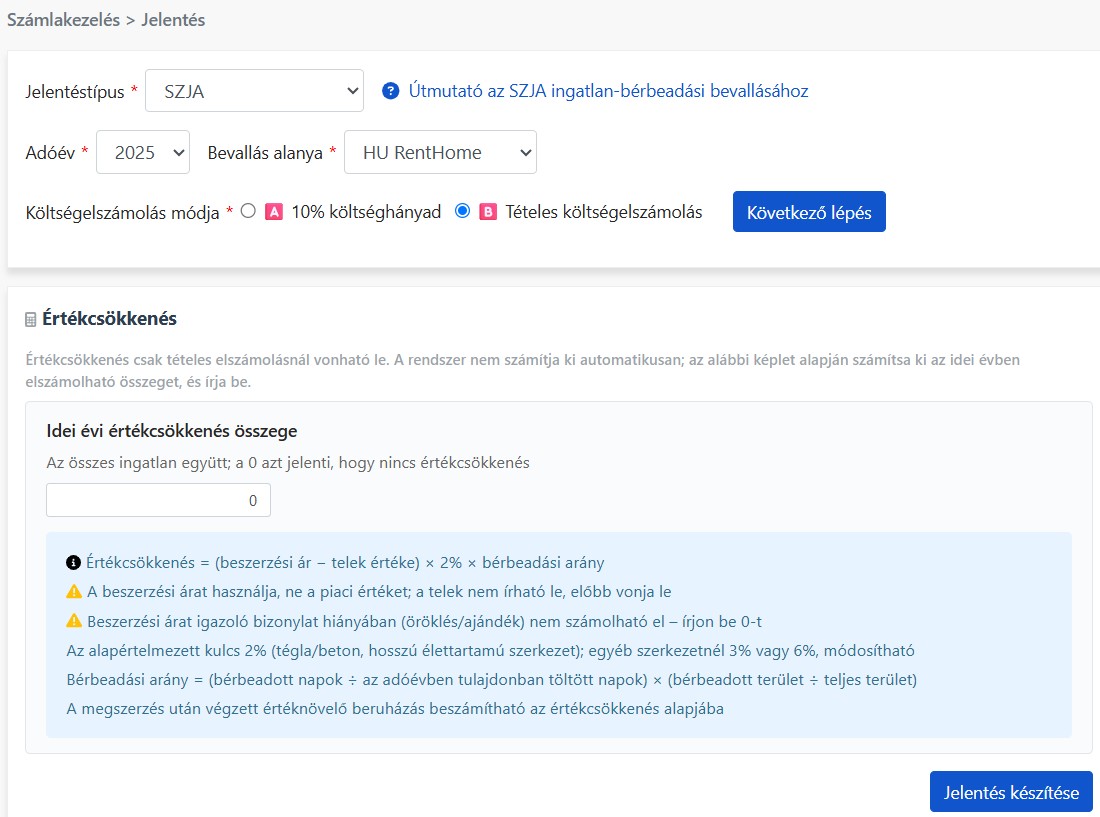
- Depreciation (értékcsökkenés): Only itemized verification (B) allows deduction. Annual deductible = (Purchase price - Land value) × Depreciation rate × Rental ratio. Note: Calculated on [ acquisition cost ], not market value; land is non-depreciable and must be excluded; no depreciation without acquisition proof (inheritance, gift); default rate is 2% (brick/concrete and long-life structures), others are 3% or 6%; Rental ratio = (Days rented ÷ Holding days in the year) × (Rented area ÷ Total area); improvements post-acquisition can be added to the depreciation base.
- eSZJA draft excludes rental income: NAV's pre-filled draft covers only income declared by employers, etc., rental income must be added by the landlord, which is what this report prepares for you.
3. Pre-setup: SZJA reporting line account mapping
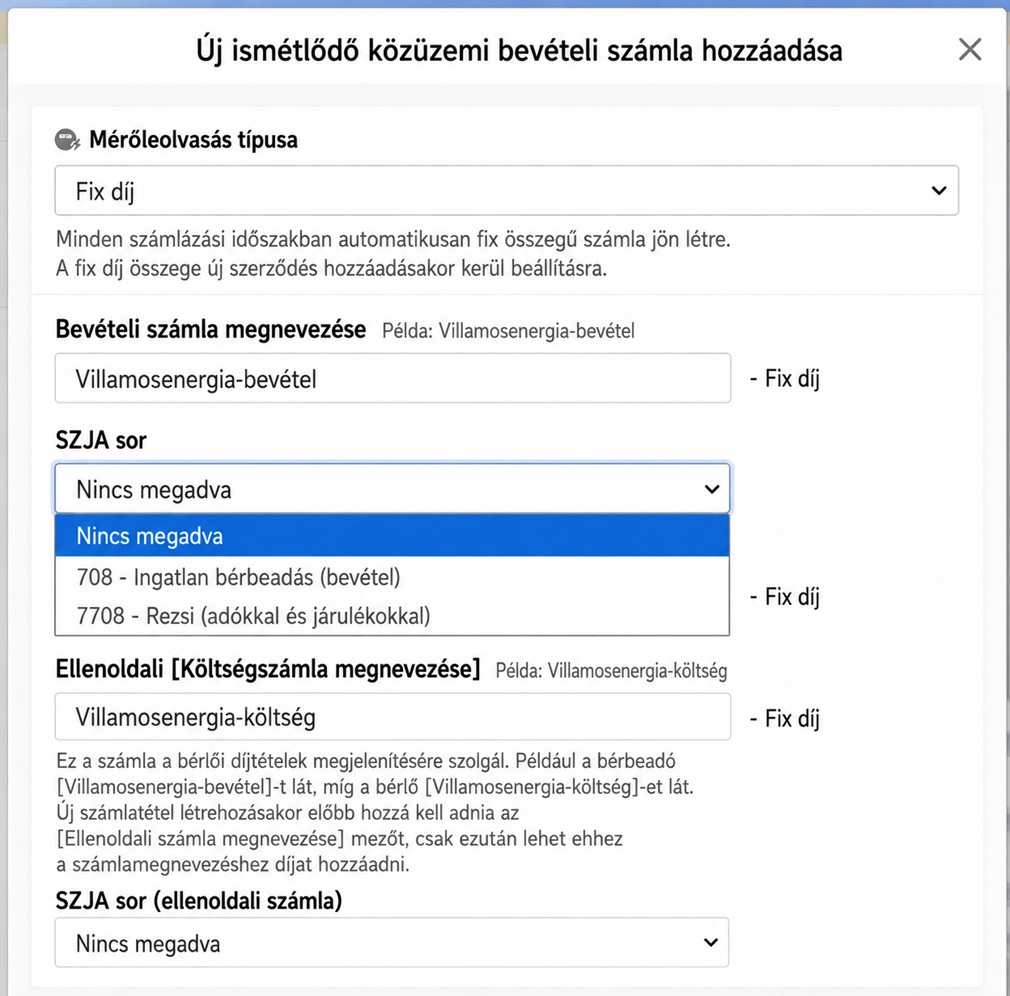
In accounting subject settings, each subject can be categorized via the [ SZJA sor ] dropdown: [ 708 - Property Rental Income (bevétel) ]— General rental income, mapped to line 708 column a; [ 7708 - Utilities (automatic check) ]— Utility subjects, system initiates special handling during report generation, confirming pass-through or income nature. 'No specification' excludes from report aggregation.
IV. Generate Report
This feature requires the [ Advanced ] plan, and the user must have [ View/Print Reports ] permissions.
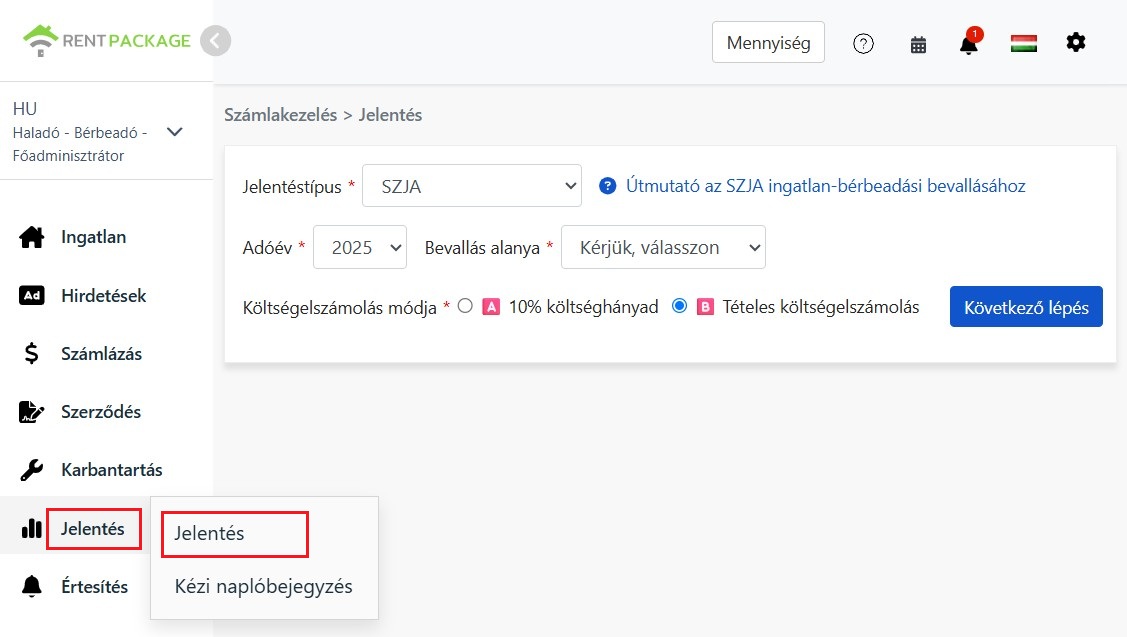
Go to the left menu and click [ Reports ] → [ Reports ], select [ SZJA ] report type, and set the following:
- Tax Year: The Hungarian tax year is the calendar year (January 1 to December 31).
- Taxpayer: Choose either an individual owner or company-declared subletters/self-managed properties. The report summarizes by selected taxpayer.
- Expense Calculation Method: Select A (10% expense rate) or B (itemized verification). Not sure which is better? No worries—after generating the report, you can switch and compare in the top right corner, and the numbers will recalculate instantly.
After setting up, click [ Next ].
V. Verify Utilities and Depreciation
This step lists items requiring your manual judgment, divided into two sections:
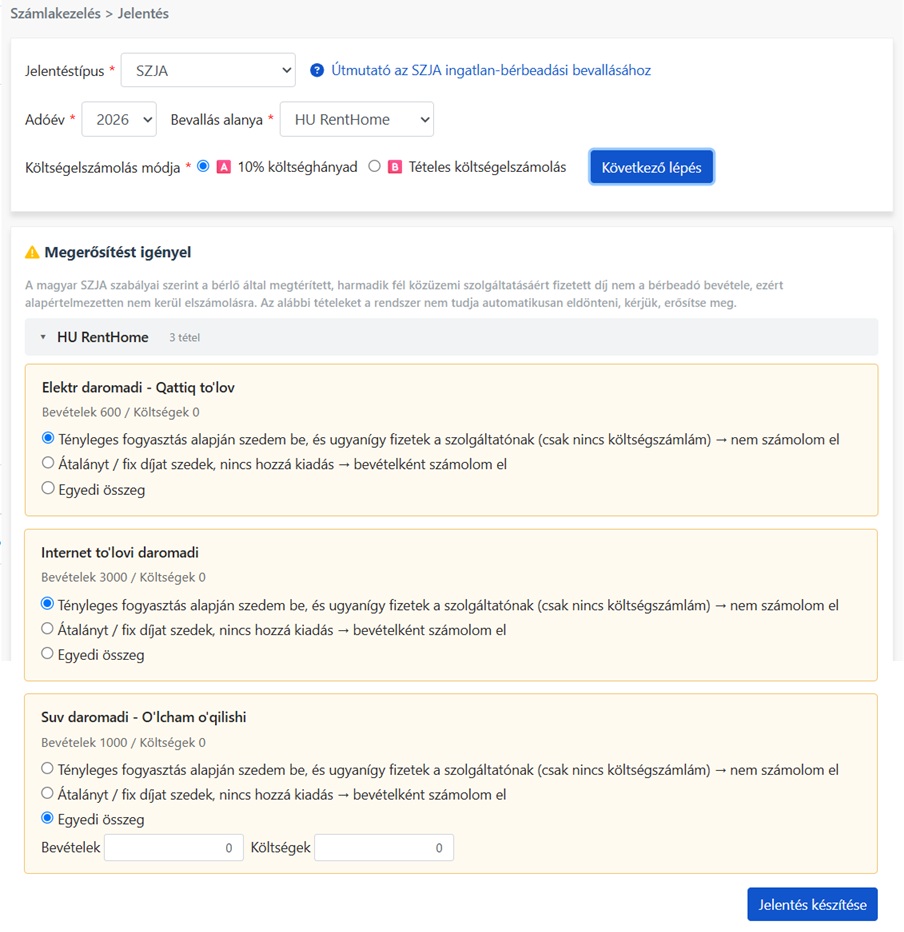
- Utility Fee Confirmation: Utilities categorized under 7708 will be listed per property (collapsible if many). Each category shows income and expenses during the period with three options: [ Actual Usage Charge, Also Pay Supplier ]—pass-through, not income; [ Monthly/Fixed Charge, No Corresponding Expense ]—recorded as income; [ Custom Amount ]—enter income and expense amounts. System doesn't determine fee nature, select based on actual situation.
- Depreciation Amount for Current Year: Only appears if expense calculation method B (itemized verification) is selected. System doesn't auto-calculate, manually compute using "(Purchase Price − Land Value) × Depreciation Rate × Rental Ratio", and enter total deductible for all properties this year. Enter 0 to indicate no depreciation deduction.
VI. How to Read This Report
Report is not an official form; it organizes numbers for eSZJA into corresponding fields, split into three parts:
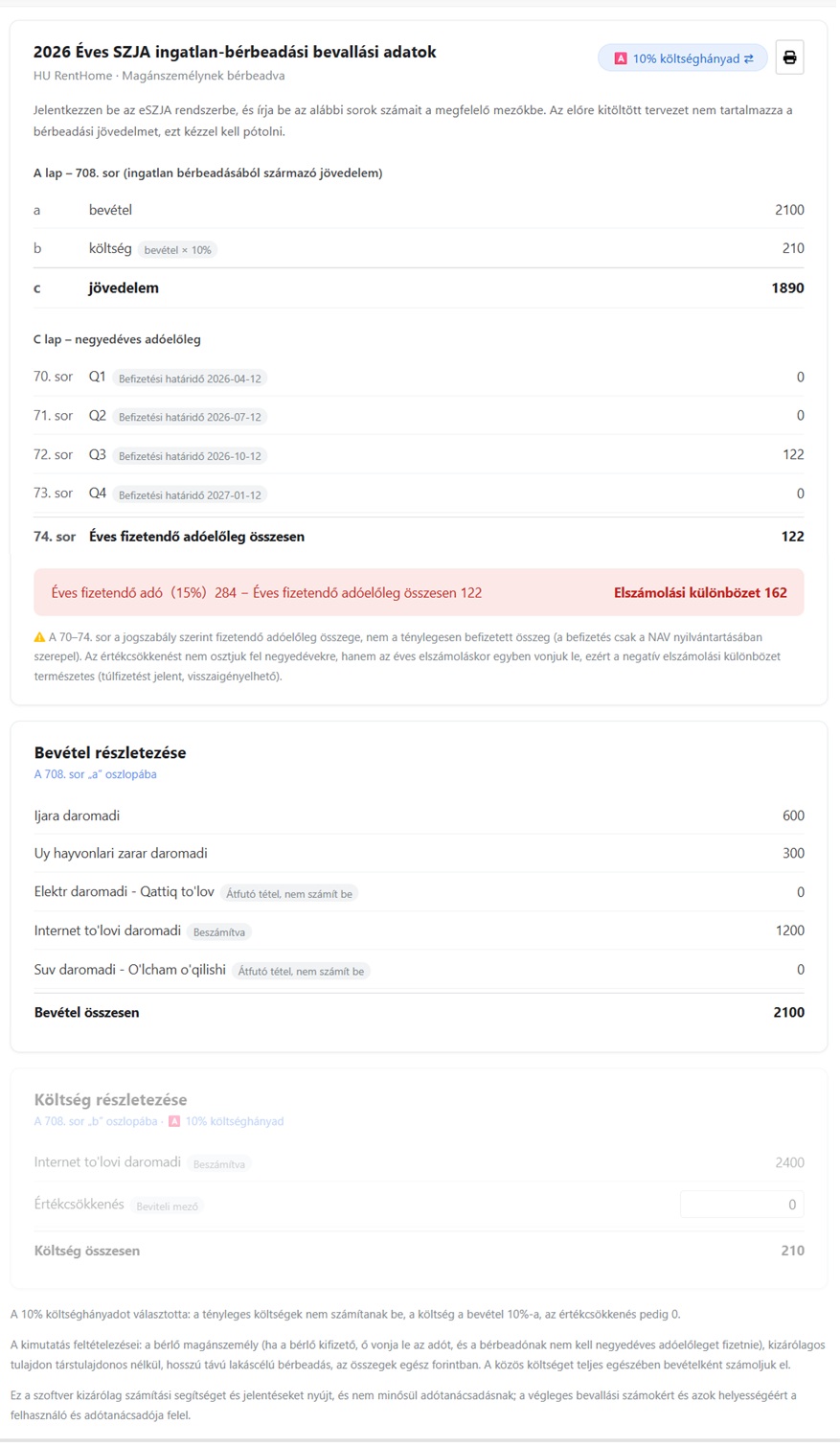
- Main Data: Corresponding to [ Form A, Line 708 ]: income (a column), expenses (b column), income (c column); and [ Form C, Lines 70–73 ] quarterly prepayment amounts (with each quarter's due date) and [ Line 74 ] total annual prepayment. Bottom calculates adjustment using “Annual Tax Due (15%) − Total Annual Prepayments”. Toggle A/B expense methods anytime to compare tax savings—A excludes depreciation from expenses.
- Income Details: List all income components for line 708 a column. Utility methods marked in step five—pass-through labeled "Exclude", monthly charge labeled "Include"; every amount traceable.
- Expense Details: List the expense breakdown for cell b, line 708. The depreciation amount entered in Step 5 will be imported, but you can still edit it here, and the report recalculates instantly. When switched to A (10% expense rate), this section fades, and expenses are calculated as income × 10%.
VII. Notes
- Quarterly prepayment is the statutory amount due: Lines 70–74 are the legally calculated prepayment amounts, not the actual amounts you've paid (actual payment records are in your NAV account).
- Depreciation is deducted once at annual settlement: Depreciation is not spread across quarterly prepayments; it is deducted once during the annual settlement. A negative settlement difference is normal and indicates overpayment, which can be refunded.
- Underlying Assumptions of the Report: This report assumes: tenant is an individual (if payee is a company, taxes are withheld by them, not requiring quarterly prepayment by the landlord), landlord holds property solely (no joint ownership), long-term residential rental, amounts are whole numbers in forint; communal costs (közös költség) paid by tenant are fully included in income.
- This software provides calculation aid and reports only: It does not constitute tax advice; users and their tax consultants are responsible for the final reported figures and their accuracy. Tax laws may change annually, actual filing should comply with the prevailing rules of the filing year.
VIII. FAQs
10% Expense Rate or Itemized Verification, which should I choose?
Principle: Choose A if actual expenses (including depreciation) are less than 10% of revenue for simplicity; choose B if expenses are higher or if depreciation applies. No need to guess in advance—after generating the report, use the toggle button in the top right corner to calculate both ways and directly compare income and tax in column C.
Why is tenant-paid utilities not considered income?
When you charge tenants based on actual usage and pay the utility company the same amount, this money is a pass-through and not landlord income according to Hungarian SZJA rules. However, if you charge a fixed monthly fee without corresponding expenses, it counts as your income. Since the system can't determine billing nature from records, you need to confirm for each item when generating reports.
Why do I have to calculate depreciation myself? Can't the system do it automatically?
Depreciation requires purchase price, land value, building structure type, rental days, and area proportion—often not in routine records, and inherited or gifted properties can't depreciate by law. You must calculate and input it to ensure correct reporting. Enter 0 if no depreciation is claimed this year.
Is it normal that my rental income isn't in the pre-filled eSZJA draft?
Yes, it's normal. The NAV draft only pre-fills income reported by employers, etc. Landlords must manually fill in line 708 for rental income. Open this report and enter the figures from columns a, b, c, and quarterly prepayments into the corresponding fields.
The settlement difference is negative. Is it incorrect?
No, it's correct. Quarterly prepayments are based on income excluding depreciation, which is deducted at year-end. A negative settlement means you've overpaid and can request a refund per the guidelines.