
Enter manual journal entries: repairs, insurance, depreciation. Record transactions outside of the billing period.
Quick Links
What can manual journal entries do for you?
Tenant billing automatically records rent and utilities tied to the lease, but rentals involve more than rent collection: repairs, insurance, property tax, depreciation—expenses outside the billing period are part of profit and loss. Manual entries allow you to record these in the system.
Once recorded, nothing else is needed: entries automatically reflect in the income, balance, cash flow, and tax reports. The more complete the records, the closer reports are to true business performance.
Operation Method
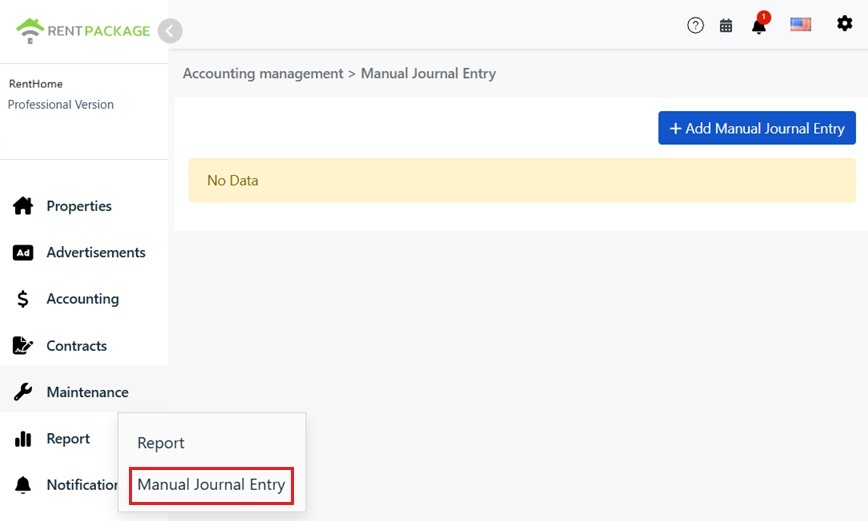
Step 1: Enter Manual Journal Entry Page
Click 'Reports' in the left menu, then 'Manual Journal Entry'. Once on the page, click 'Add Manual Entry' at the top right.
Step 2: Fill in Entry Details
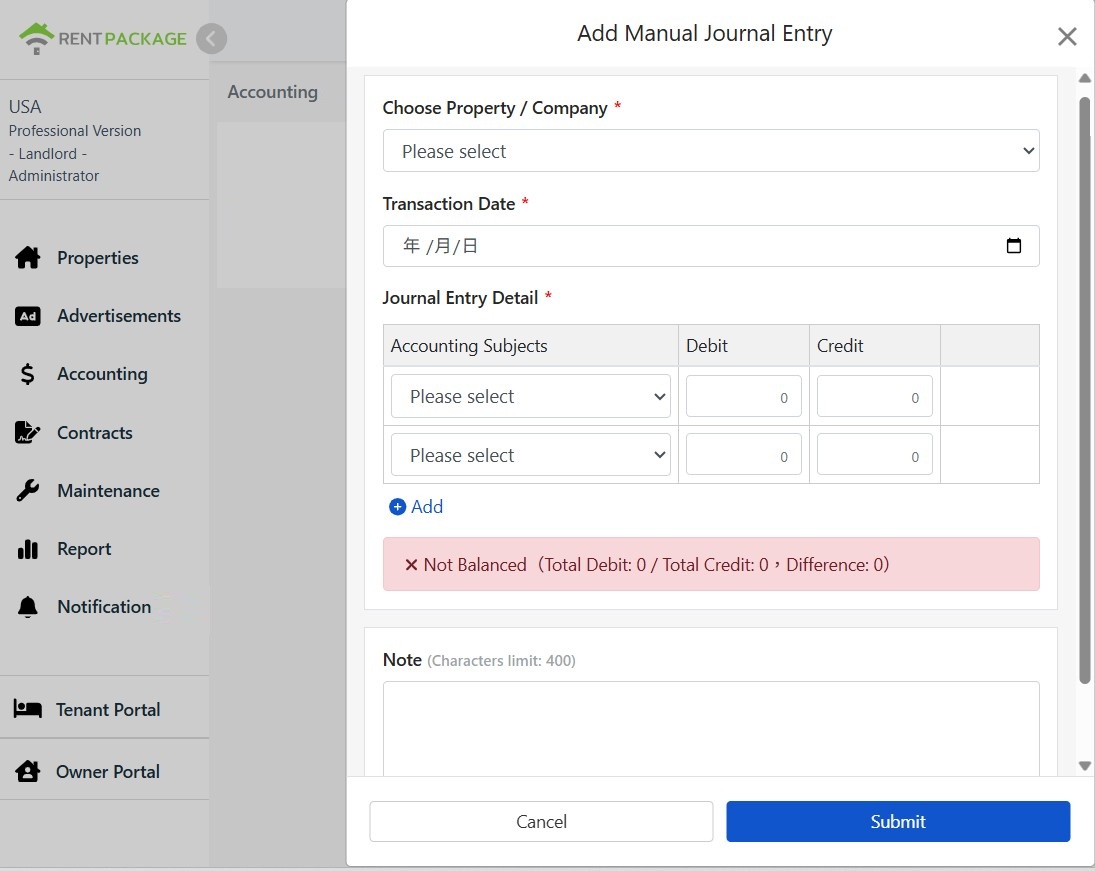
In the 'Add Manual Entry' window, complete the following:
- Select Property/Company: Specify to which property or company this entry belongs for report aggregation.
- Transaction Date: The actual date of the transaction for reporting purposes.
- Entry Details: Choose an account for each row and enter debit or credit amounts. Default is two rows; click 'Add' to insert more.
- Note: Record the purpose or voucher information for this transaction (max 400 characters) so you won't have to guess during reconciliation.
How to fill common entries?
Three most common manual entries for rental management:
| Scenario | Debit | Credit |
|---|---|---|
| Pay repair expenses (e.g., replace water heater) | Repair Expenses | Bank Deposits |
| Pay Property Insurance | Insurance Expense | Bank Deposits |
| Record Current Period Property Depreciation | Depreciation Expense | Accumulated Depreciation |
Simple Rule: Expenses go on the debit side; where money leaves (bank deposit decreases) or assets offset (accumulated depreciation increases) goes on the credit side. Equal amounts balance the books.
Where Will the Recorded Entry Appear?
Once submitted, it immediately reflects in P&L (expense accounts), balance sheet (assets and liabilities), and cash flow statement. If accounts match tax forms (e.g., US Schedule E, UK SA105, Germany Anlage V, Canada T776), it auto-fills during tax prep, eliminating re-entry.
FAQ
Why is There a Red Imbalance; Unable to Submit?
Debits and credits are unequal. The hint bar shows totals and the difference. Balance by adjusting one side to equal the other. Every entry must balance; this is double-entry bookkeeping protocol, and the system prevents incorrect entries.
Which transactions require manual entries, and which should be recorded under tenant billing?
Transactions directly related to leases should be recorded under tenant billing: rent, utilities, cleaning fees, etc. Transactions unrelated to leases require manual entries: repair costs, insurance fees, property taxes, depreciation, etc., which are landlord expenses and account adjustments.
Can an entry have more than two lines?
Yes, click 'Add' below the entry details to add account lines. There is no line limit as long as total debits equal total credits.
Does the date of the entry affect reports?
Yes, reports are based on the transaction date: the income statement and cash flow statement depend on which period the transaction date falls, while the balance sheet checks if the transaction date is before the report date. Enter the actual transaction date, not today's date.