
What is an opening balance? Must-read for brokerages!
Opening Balance feature guide
- what is an opening entry? a quick guide from the accounting perspective
- why is an opening entry needed?
- who needs to create an opening entry?
- How to set up an opening balance
- view / edit / delete opening entry data
- what is the difference between opening entries and deposits?
- Can the opening balance be negative?
- Can I skip the opening balance?
What is an opening balance? First, the accounting definition
In accounting and finance, an opening balance is an account’s beginning balance at a specified time—the amount before the system starts recording.
For example, if before using this system the owner’s account already had a balance (e.g., tracked in Excel or another system and not yet remitted to the owner), enter it via Opening Balance so the system starts with the correct amount.
With an opening balance, the system can correctly calculate subsequent income/expenses, carryforwards, and invoices, ensuring seamless continuity.
Many brokerages starting our property management system have a common question:
What is an opening balance, and why is it needed?
The Opening Balance feature lets you set a financial starting point for each property. For example, if a property’s trust account already holds owner funds, you can enter that amount via Opening Balance.
This amount excludes deposits and prepaid rent, which should be generated later by the tenant lease.
Who should use Opening Balance
- Applies to:Brokerage property management (accounting features).
- Not applicable to:Landlord version, self-managing landlords, or a brokerage’s “sublandlord mode.”
How to set up an opening balance
When adding a property, turn on “Should the owner deposit funds into the trust account?” to see the following fields:
- Opening balance date:The system starts accounting from this date.
- Trust account opening balance:The actual amount the owner has deposited.
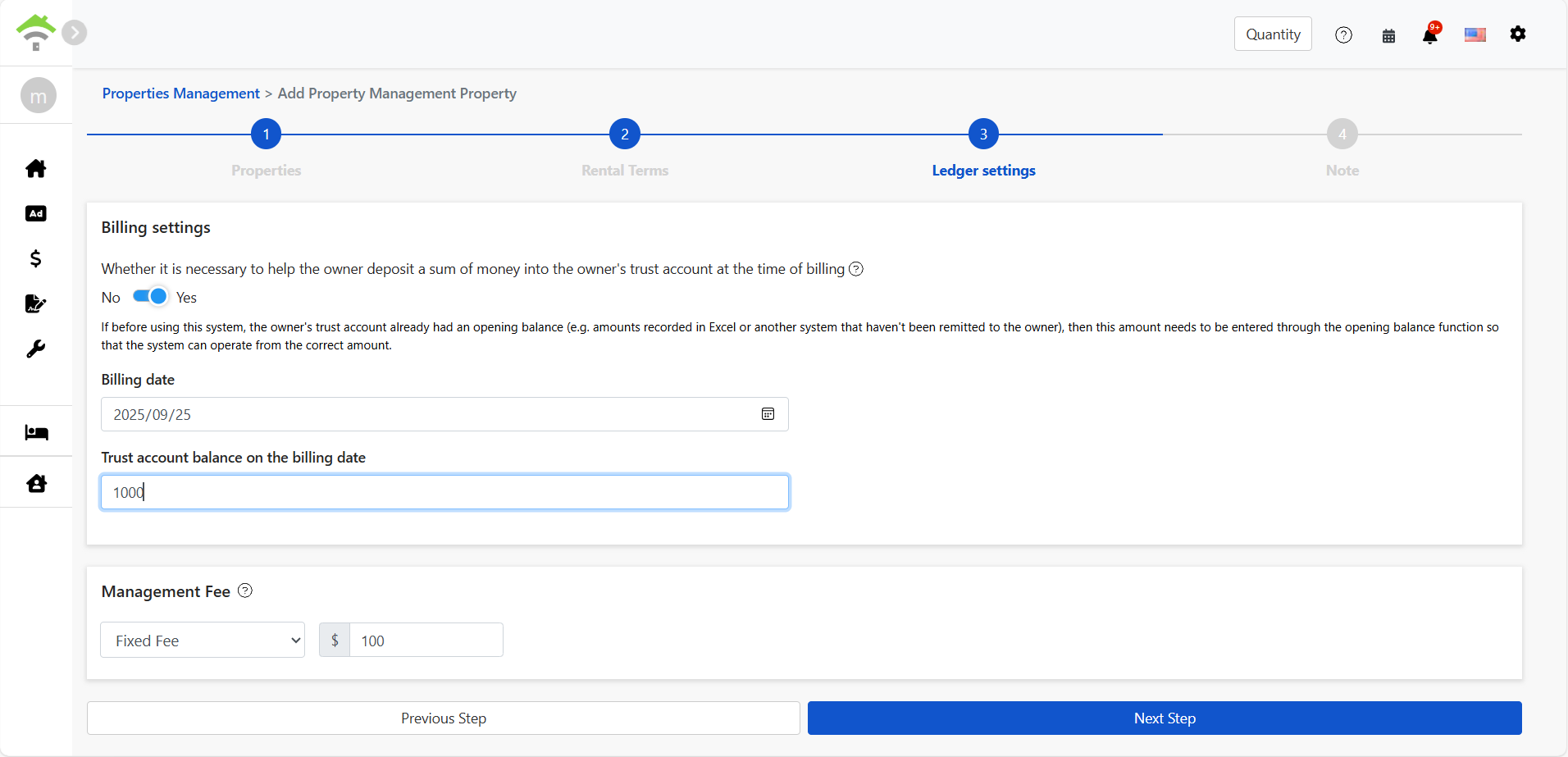
After creating it, where can I view / edit / delete it?
Go to:
[ Accounting ] → [ Owner carryforward ] → [ Carried forward ]
Here you can view all opening balance entries, and you can edit or delete them.
Difference between opening balance and deposit
- Opening balance amount:Funded by the owner as the initial account balance, similar to OWNER CONTRIBUTION.
- Security deposit, advance receipts:From the tenant, and should be created when adding a lease.
Can the opening balance be negative?
Yes. The system supports entering a negative amount when setting the opening balance.
A negative opening amount is treated as money the owner still needs to repay the agency and will be auto-offset in subsequent rollover invoices, helping you clearly manage advances and the owner’s balance.
Please make sure your entries are correct to avoid accounting discrepancies.
Can I skip the opening balance?
Yes.Opening balance is optional,If you plan to record everything starting with the first lease, you can skip the opening setup. The system will auto-post from the lease effective date.