📄 Interface Environment Overview: Understand the main screen in five minutes, knowing where to handle everything. 📄 How to Use the Property Overview in RentPackage to Quickly Grasp the Status of the Entire Building 📄 Add Managed Property: Complete property setup, owner details, account opening, and online signing in one go. 📄 Tenant Move-in & Lease Signing: Set rental period, deposit, utilities, and billing cycle in one go. 📄 Tenant Ledger Actions: Payment Reconciliation, Partial Payments, Meter Reading, and Deposits. All routine rent collection in one place. 📄 Owner transfer feature guide 📄 Custom rental notifications: rent reminders, lease expiration, sent to the right person at the right time 📄 How to Quickly Estimate Next Month and Year’s Rental Income with Forecast Receipts in RentPackage 📄 Compliance assistance and responsibility statement 📄 Contract templates overview 📄 Sublandlord feature guide 📄 Partial payment feature guide 📄 Advance Receipts feature guide 📄 Rent billing periods feature guide 📄 Start billing feature guide 📄 Recurring billing periods feature guide 📄 Booking feature overview 📄 E-contract setup guide 📄 Management fee setup guide for property management companies 📄 Why are deposits and advance receipts liability accounts in accounting? 📄 RentPackage General Edition overview 📄 Commission split setup guide 📄 why do all landlords and agents need tenant management automation software? 📄 How to handle exchange rates for Euro-denominated rent? 📄 US Tax Filing - Schedule E Instructions 📄 UK Tax Filing - SA105 Instructions 📄 How to Enable Stripe Online Rent Payments in RentPackage 📄 How to use Calendar to schedule tenant notifications: Power outage example 📄 How to set the agency logo to display your brand on Email notifications and contract PDFs 📄 What is Rent Insurance? Compensation for unpaid rent; policy managed with the lease 📄 How to Use the German Rental Income Tax Statement (Anlage V) in RentPackage 📄 T776 Canada Rental Income Tax Report User Guide 📄 PIT-28 Polish Rental Income Tax Report User Guide 📄 How to Generate an Australian Rental Schedule in RentPackage, Auto-Match Income and Expenses to ATO Categories 📄 How to Use the Romanian Rental Income Tax Report (Declarația Unică 212) in RentPackage 📄 How to generate Hungarian SZJA rental income report data in RentPackage and compile eSZJA entry numbers with one click. 📄 Profit and Loss Statement: Auto-calculates income per property, per owner 📄 Balance Sheet: How much of the bank balance is tenant's? View deposits and prepayments at a glance. 📄 Cash Flow Statement: How much did actual cash increase during the rent period? 📄 How to generate a General Ledger in RentPackage, automatically summarizing rent and property accounts 📄 Enter manual journal entries: repairs, insurance, depreciation. Record transactions outside of the billing period. 📄 Custom rental notifications: rent reminders, lease expiration, sent to the right person at the right time 📄 Why can property management software dramatically save time and cost?

How to Use the Romanian Rental Income Tax Report (Declarația Unică 212) in RentPackage


Quick Links


1. What is Declarația Unică 212?

The Declarația Unică (Single Declaration) is an annual income tax form mandated by the Romanian Tax Authority ANAF. Landlords must declare rental income from the previous year by May 25th each year.

The report in RentPackage automatically calculates for each lease:

  • Venitul brut (Gross Rent):Total rental income for the year
  • Deductible Expenses (Estimated Expenses):Gross Rent × 20% (Fixed Rate)
  • Annual Net Income (Net Income):Gross Rent - Estimated Expenses
  • Tax (Income Tax Due):Net Income × 10%
Romanian Rental Income Tax Formula:
Income Tax Due = (Gross Rent × 80%) × 10% = Gross Rent × 8%


2. Open Report

Please follow these steps to open the report:

  1. Click on the left menu [ Report ]
  2. Click on the sub-menu [ Report ]
  3. Select [ Declarația Unică 212 ] from the "Report Type" dropdown
  4. Select [ Fiscal Year ]
  5. Select [ Company / Owner ]
  6. Click [ Next ] to proceed to tax rate settings
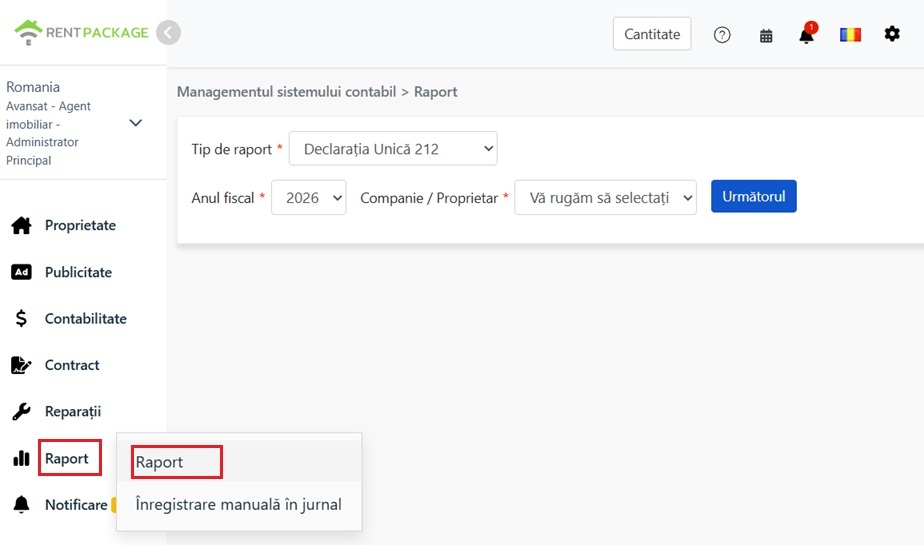
Click on Report from the left menu to access the reporting feature

3. Set Tax Rate Parameters

After proceeding to the next step, you can set the following parameters:

  • Flat expense rate :Default is 20%, meaning 20% of gross rent can be deducted as expenses.
  • Income tax rate :Default is 10%, applicable to net income.
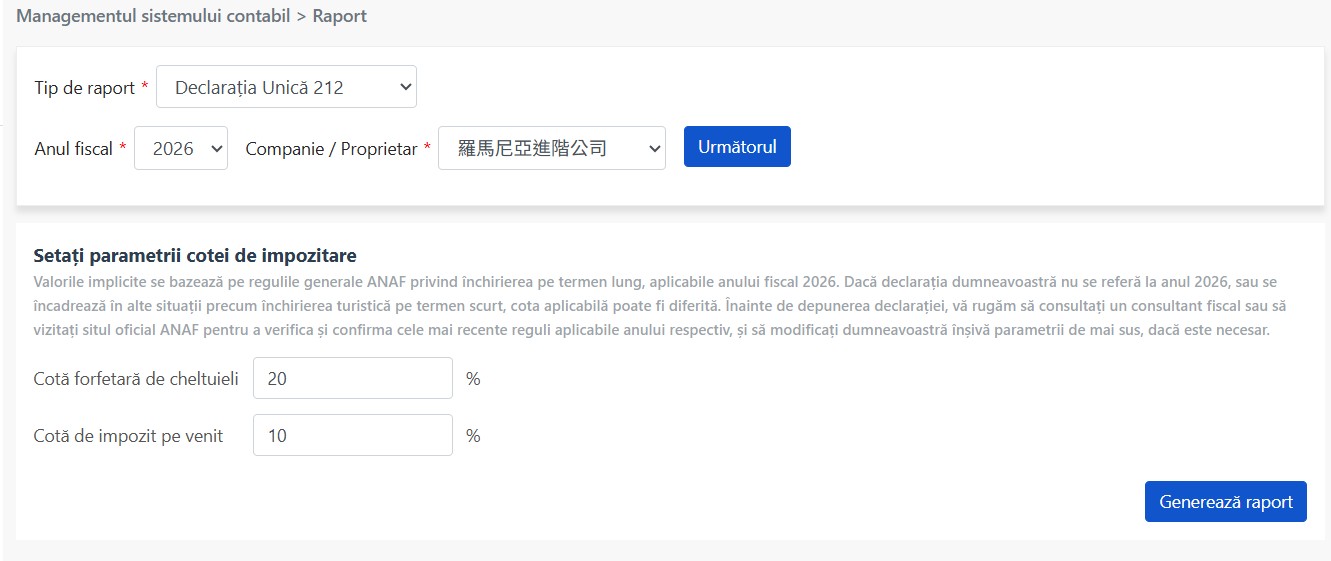
Tax rate settings screen allows adjustment of expense and income tax rates
Reminder: Default values are based on ANAF 2026 general long-term rental regulations. If the declaration is not for 2026, or if it concerns short-term tourist rentals, actual applicable rates may vary. Be sure to consult your tax advisor or check ANAF's official site for the latest regulations for the relevant year, and adjust the parameters as necessary.

After confirming the parameters, click [ Generate Report ].


4. Summary Block Description

The top of the report shows the total for the selected year:
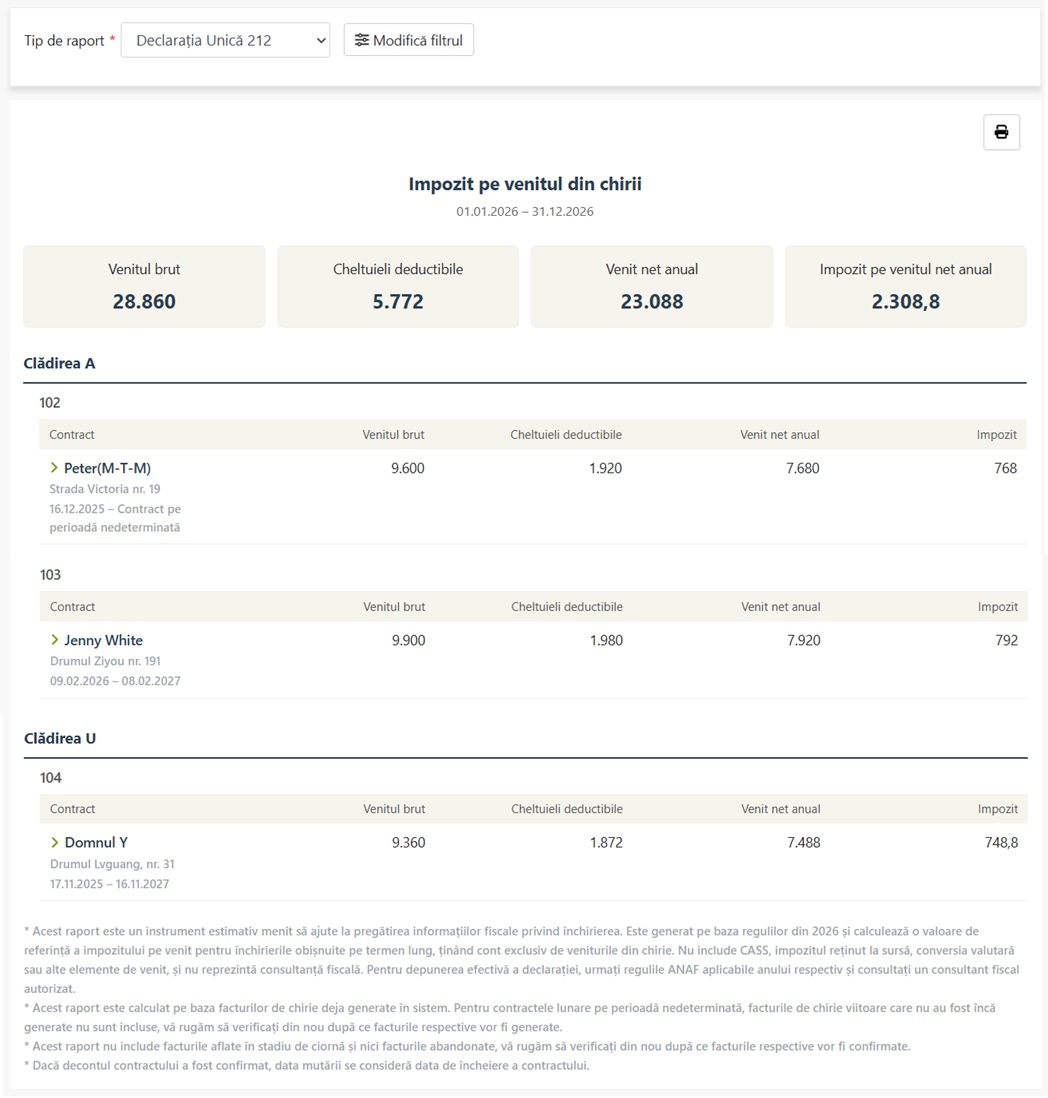
Summary block displaying gross rent, estimated expenses, net income, and payable income tax
Field Romanian Description
Total Gross Rent Venitul brut Total annual rental income from all contracts
Estimated Expenses Cheltuieli deductibile Gross Rent × 20% (fixed deduction)
Total Net Income Venit net anual Gross Rent - Estimated Expenses
Payable Income Tax Impozit pe venitul net anual Net Income × 10%


5. Contract Details Description

Details are shown below the summary block in the hierarchy of [ Property → Unit → Lease ]:

  • Property (Clădirea):e.g., Clădirea A, Clădirea U
  • Unit Number:e.g., 102, 103, 104
  • Lease:Displays tenant name, address, lease start and end dates

Each lease will show the following information:

  • Tenant Name
  • Address set at signing
  • Lease Start Date
  • Lease End Date/Move-out Date (if on month-to-month and billing cycle not generated, displays 'Contract pe perioadă nedeterminată')
  • Total Gross Rent for Contract
  • Total Estimated Expenses for Contract
  • Total Net Income for Contract
  • Income Tax Due for Contract


6. Expand Billing Period Details

Click the expand arrow on the left of the contract row to view [ periodic financial details ] for the year:
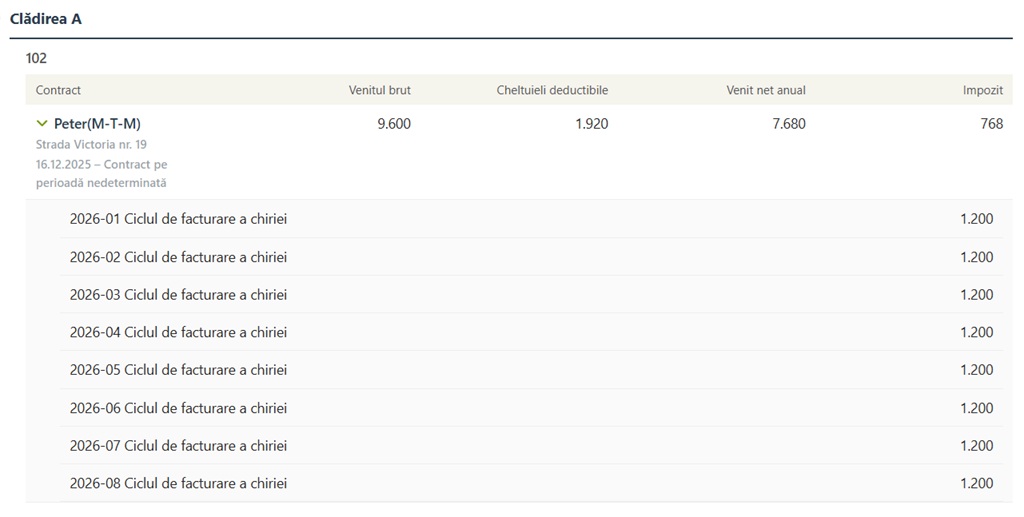
Expand contract to show rental details for each period

Upon expansion, displays:

  • Billing Period Name:e.g., '2026-01 Ciclul de facturare a chiriei' (January 2026 Rent Billing Cycle)
  • Amount:Rental Income for the Period
Reminder: Expand details to verify each amount's origin, ensuring report figures align with system records.


7. Notes

The following disclaimer is shown at the bottom of the report, please read carefully:

  • This report is a tool for preparing rental tax data estimates, based on 2026 regulations. It provides reference figures for income tax on general long-term rentals, excluding CASS, withholding tax, currency conversion, and other income items. It does not constitute tax advice. For actual filing, refer to ANAF's current regulations and consult a licensed tax specialist.
  • This report calculates based on rental periods already generated in the system. Future rental periods not yet generated for non-fixed term contracts are not included. Verify after periods are generated.
  • This report excludes draft and discarded periods. Verify after confirming related periods.
  • If the contract is settled, the move-out date is considered the contract end date.
About CASS (Health Insurance Fee)

This report calculates only income tax, [ excluding CASS Health Insurance Fee ]. If your annual net income exceeds 6 minimum wages (approximately 24,300 Lei in 2025), you must pay CASS separately. CASS calculation brackets are as follows:

Annual Net Income Range CASS Calculation Base CASS Amount (10%)
6-12 Minimum Wages 6 minimum wages Approx. 2,430 RON
12-24 minimum wages 12 minimum wages Approx. 4,860 RON
Over 24 minimum wages 24 minimum wages (cap) Approx. 9,720 RON
About Contract Registration (C168)

According to Romanian regulations, lease contracts must be registered with ANAF within 30 days of signing (Form C168). Ensure your contract is registered to avoid penalties.

✅ Open the Declarația Unică 212 form now to quickly see your annual rental income tax estimates!