📄 Interface Environment Overview: Understand the main screen in five minutes, knowing where to handle everything. 📄 How to Use the Property Overview in RentPackage to Quickly Grasp the Status of the Entire Building 📄 Add Managed Property: Complete property setup, owner details, account opening, and online signing in one go. 📄 Tenant Move-in & Lease Signing: Set rental period, deposit, utilities, and billing cycle in one go. 📄 Tenant Ledger Actions: Payment Reconciliation, Partial Payments, Meter Reading, and Deposits. All routine rent collection in one place. 📄 Owner transfer feature guide 📄 Custom rental notifications: rent reminders, lease expiration, sent to the right person at the right time 📄 How to Quickly Estimate Next Month and Year’s Rental Income with Forecast Receipts in RentPackage 📄 Compliance assistance and responsibility statement 📄 Contract templates overview 📄 Sublandlord feature guide 📄 Partial payment feature guide 📄 Advance Receipts feature guide 📄 Rent billing periods feature guide 📄 Start billing feature guide 📄 Recurring billing periods feature guide 📄 Booking feature overview 📄 E-contract setup guide 📄 Management fee setup guide for property management companies 📄 Why are deposits and advance receipts liability accounts in accounting? 📄 RentPackage General Edition overview 📄 Commission split setup guide 📄 why do all landlords and agents need tenant management automation software? 📄 How to handle exchange rates for Euro-denominated rent? 📄 US Tax Filing - Schedule E Instructions 📄 UK Tax Filing - SA105 Instructions 📄 How to Enable Stripe Online Rent Payments in RentPackage 📄 How to use Calendar to schedule tenant notifications: Power outage example 📄 How to set the agency logo to display your brand on Email notifications and contract PDFs 📄 What is Rent Insurance? Compensation for unpaid rent; policy managed with the lease 📄 How to Use the German Rental Income Tax Statement (Anlage V) in RentPackage 📄 T776 Canada Rental Income Tax Report User Guide 📄 PIT-28 Polish Rental Income Tax Report User Guide 📄 How to Generate an Australian Rental Schedule in RentPackage, Auto-Match Income and Expenses to ATO Categories 📄 How to Use the Romanian Rental Income Tax Report (Declarația Unică 212) in RentPackage 📄 How to generate Hungarian SZJA rental income report data in RentPackage and compile eSZJA entry numbers with one click. 📄 Profit and Loss Statement: Auto-calculates income per property, per owner 📄 Balance Sheet: How much of the bank balance is tenant's? View deposits and prepayments at a glance. 📄 Cash Flow Statement: How much did actual cash increase during the rent period? 📄 How to generate a General Ledger in RentPackage, automatically summarizing rent and property accounts 📄 Enter manual journal entries: repairs, insurance, depreciation. Record transactions outside of the billing period. 📄 Custom rental notifications: rent reminders, lease expiration, sent to the right person at the right time 📄 Why can property management software dramatically save time and cost?

How to Quickly Estimate Next Month and Year’s Rental Income with Forecast Receipts in RentPackage

Quick Links

1. What is Forecast Receipts?

For agencies and self-managing landlords, the common concerns are: What payments are due next month? How much will be received once all collections are made? What is the projected rental income for the entire year? 'Forecast Receipts' is designed to answer these questions—automatically summing receivables for each rental unit based on your selected properties and period. The expected total is clearly visible, no need to check contracts or use a calculator.

The report highlights the most common income and expense items as fields, such as rent, agency fees, management fees, and other charges, summarizing the net amount for the period below. For agencies, this report also serves as the 'Owner Statement', which can be used for reconciliation and disbursement with owners.


2. Open Report: Select Properties and Period

Follow these steps to open the Forecast Receipts report:

  1. Go to the Report page:In the left menu, click [ Reports ] → [ Estimated Collection ].
  2. Select Property:Use the dropdown at the top left to select the property for reconciliation. Only one property owner's statement is shown at a time.
  3. Select Period:View by 'Month', 'Year', or use 'Custom' to specify any date range. To estimate next month’s collection, select next month; for the total rent for the year, switch to 'Year'.
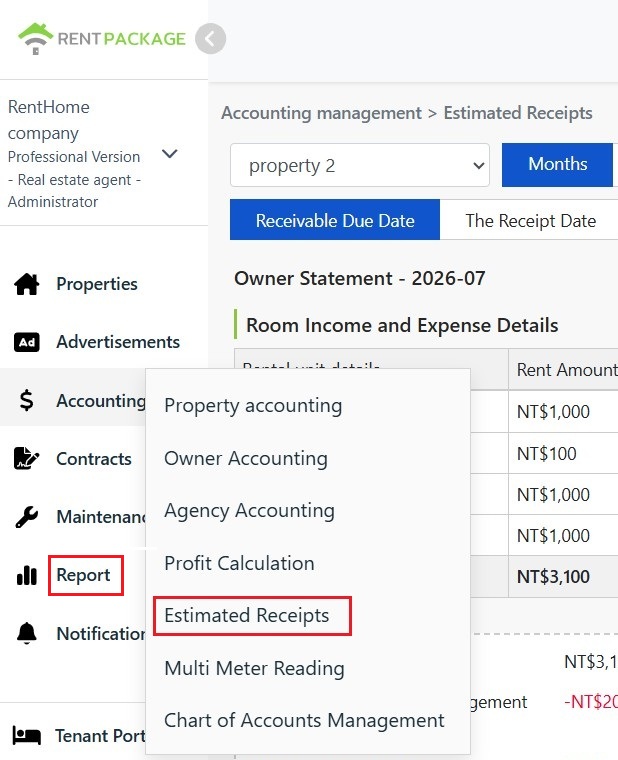
From the billing management menu, click estimated collection to open the owner’s statement.

3. Due Date vs Actual Receipt Date

Two date criteria are provided at the top of the report to determine which invoices are included for the selected period:

  • Accounts Receivable Date:Assigns invoices to the period based on their due date. Regardless of tenant payment status, invoices due within the period are included—this is the "estimated" basis: select future periods to see expected receipts.
  • Actual Receipts Date:Assigns receipts to the period based on the actual receipt date, including only payments received within the period. This is suitable for finalizing actual collections and amounts payable to owners at period end.
Recommended Usage: At the start of the month (or end of the previous month), use the 'Receivables Date' to estimate collections for the period; after collections are completed at the end of the month, switch to 'Actual Receipts Date' to view actual collections. The difference is the uncollected amount for the period.


4. Room Income & Expense Details

The detailed report lists income and expenses for each room by rental unit during the period:

Field Name Description
Rental Unit Details Room Number and Tenant Name.
Rent Amount The rent income for the unit during the period.
Agency Fee The agency fee charged to the owner by the agency, deducted from the owner's income. (Displayed only for agencies)
Management Fee Management fee for property management services, deducted from the owner's income. (Displayed only for agencies)
Other Fees Other income and expenses attributed to the unit.
Subtotal Amount after deductions from the unit's revenue.

Red negatives indicate deductions from owner income; the 'Total' at the bottom is for the whole property.
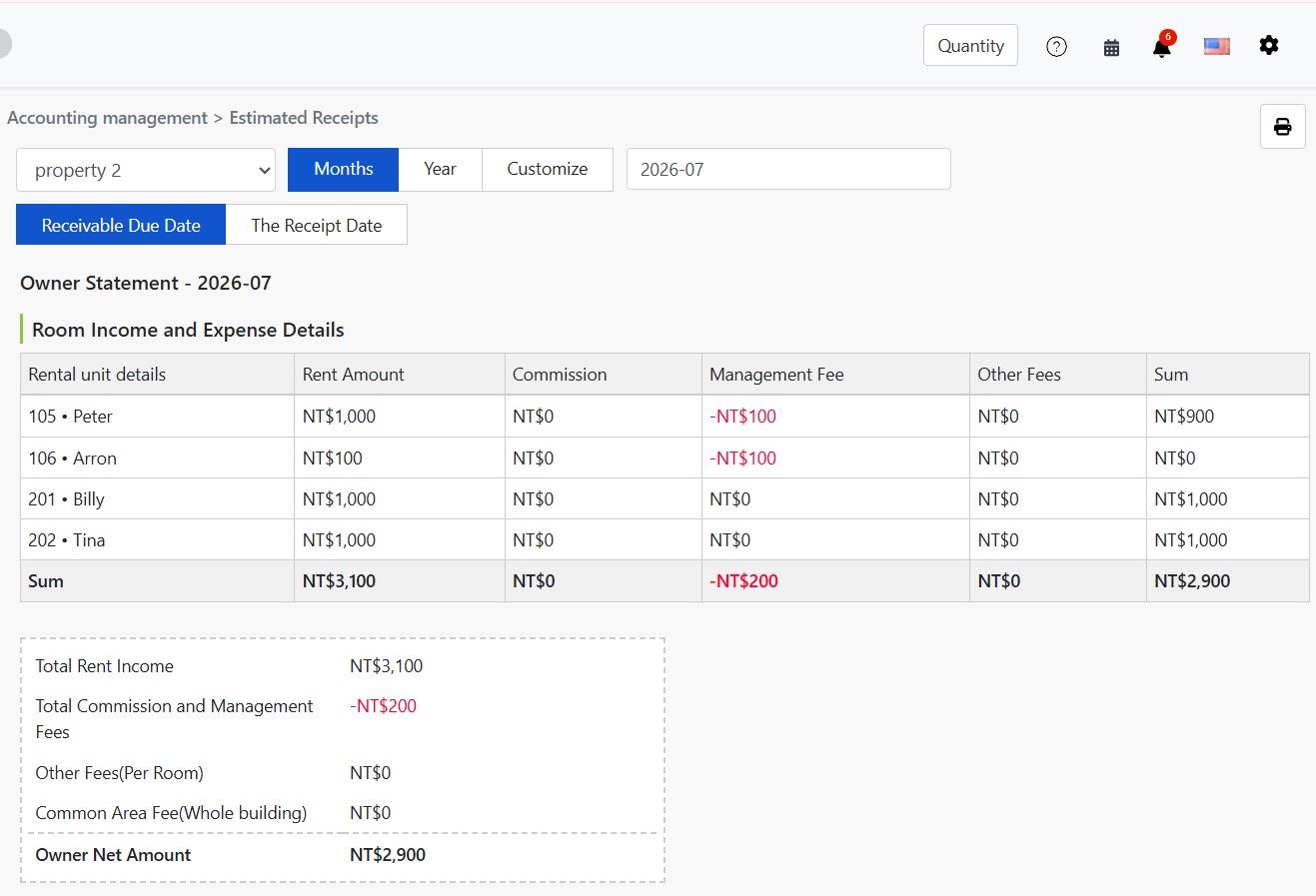
Agency Owner Statement: Room income and expenses with fees columns.

The detail table adjusts based on context: Agencies see 'Agency Fees' and 'Management Fees'; these columns are hidden for direct landlords and sublessors, as shown.
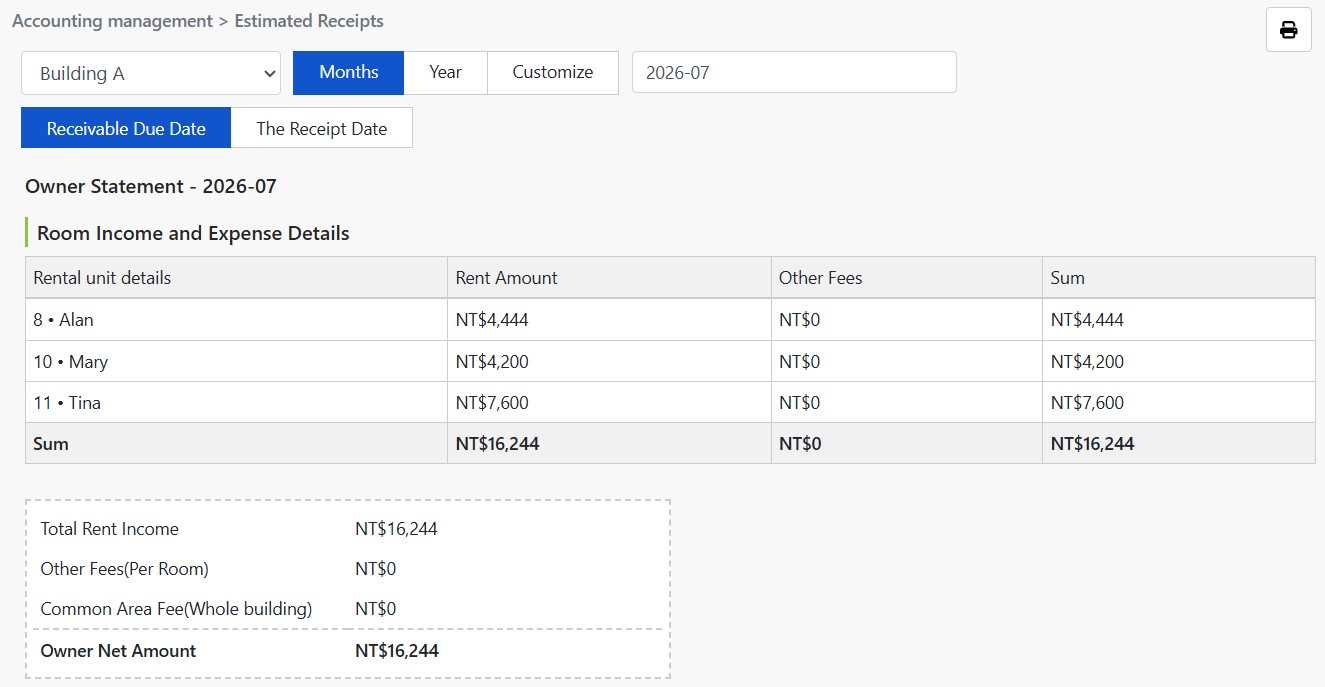
Direct Landlord/Sublessor Report: Excludes fees columns.

5. Owner Settlement Summary

Summary box below the detail table shows the final balance:

  • Total Rental Income:Total rental income for all units.
  • Total Agency and Management Fees:Total fees to be deducted. (Displayed for agencies only)
  • Other Fees (Per Room):Total other charges attributed to individual rooms.
  • Common Area Expenses (Entire Building):Shared expenses for the whole building not attributed to any single room, such as common electricity or cleaning fees.
  • Owner's Net Amount:Net amount to be remitted to the owner after deducting all the above expenses from rental income.


6. Print Statement

Click the print icon at the top right to print the current owner's statement or save it as a PDF to email to the owner as a reference for each disbursement.


7. FAQs

Q1: Amounts differ between "Receivable Date" and "Collection Date". Which is correct?

Both are correct, answering different questions. "Receivable Date" shows potential income for the month, while "Collection Date" shows actual income received. A difference indicates outstanding receivables to track in the financial management.

Q2: Why are agency fees and management fees shown as red negatives?

This report presents from the owner's perspective. Agency and management fees are payments by the owner to the agency, thus deducted from rental income, shown as negatives.

Q3: If a room subtotal is NT$0, is this an error?

Not necessarily. If the unit's rental income exactly equals the deductible expenses for the period (e.g., rent NT$100, management fee NT$100), the subtotal is NT$0. Click details for each unit to verify transaction components.

Q4: How is this report different from 'Profit Calculation'?

'Estimated Receivables' answers 'How much money is expected to be received', quickly summing up accounts receivable during the period; 'Profit Calculation' answers 'How much money was actually earned', separating deposits, prepayments, and actual profit. Use Estimated Receivables for cash flow estimation, and Profit Calculation for reviewing operational results.

Q5: Can reports for multiple properties be generated at once?

Reports are generated per property, displaying one at a time. If you manage multiple properties, switch in the dropdown menu to view or print each separately.

Q6: Why do my reports not have 'Agency Fee' and 'Management Fee' columns?

Agency and Management Fees are charges collected by agencies from property owners, shown only in property management scenarios. If you are a self-managing landlord or sublessor, these fees are not applicable, and the report automatically hides these columns and related summary items.

✅ Open Estimated Receivables now to quickly estimate next month's rental income and annual rent total in one report!