
How to use Property Overview in RentPackage for a quick grasp of the full building status.
Quick Links
1. What is Property Overview?
The Property Overview is like a hotel's 'Room Status Chart', consolidating all rooms' rental status, rent, deposits, and lease information on one page, so you can grasp the whole picture without clicking into each room.
The property overview is ideal for:
- Daily inspections: Quickly see overdue payments, upcoming rent collections, and vacant units available for lease.
- Company meetings: Use the overview to report property status during meetings, such as expiring leases, reserved units, and showings needed.
- Print archives: One-click print of the entire property status for meetings and archiving.
2. Access Property Overview
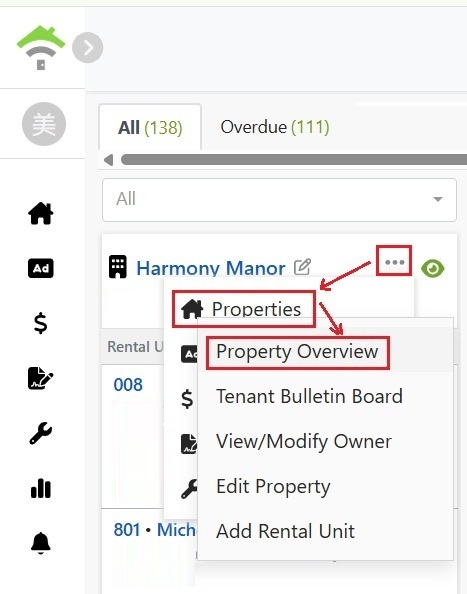
First, [ follow ] the property by clicking the eye icon at the top right of the property card. You can add employees to follow and manage; only followers can view the property overview.
Then, click the "⋯" menu on the property card and select [ Property ] → [ Property Overview ] to open.
3. Explanation of Overview Page Contents
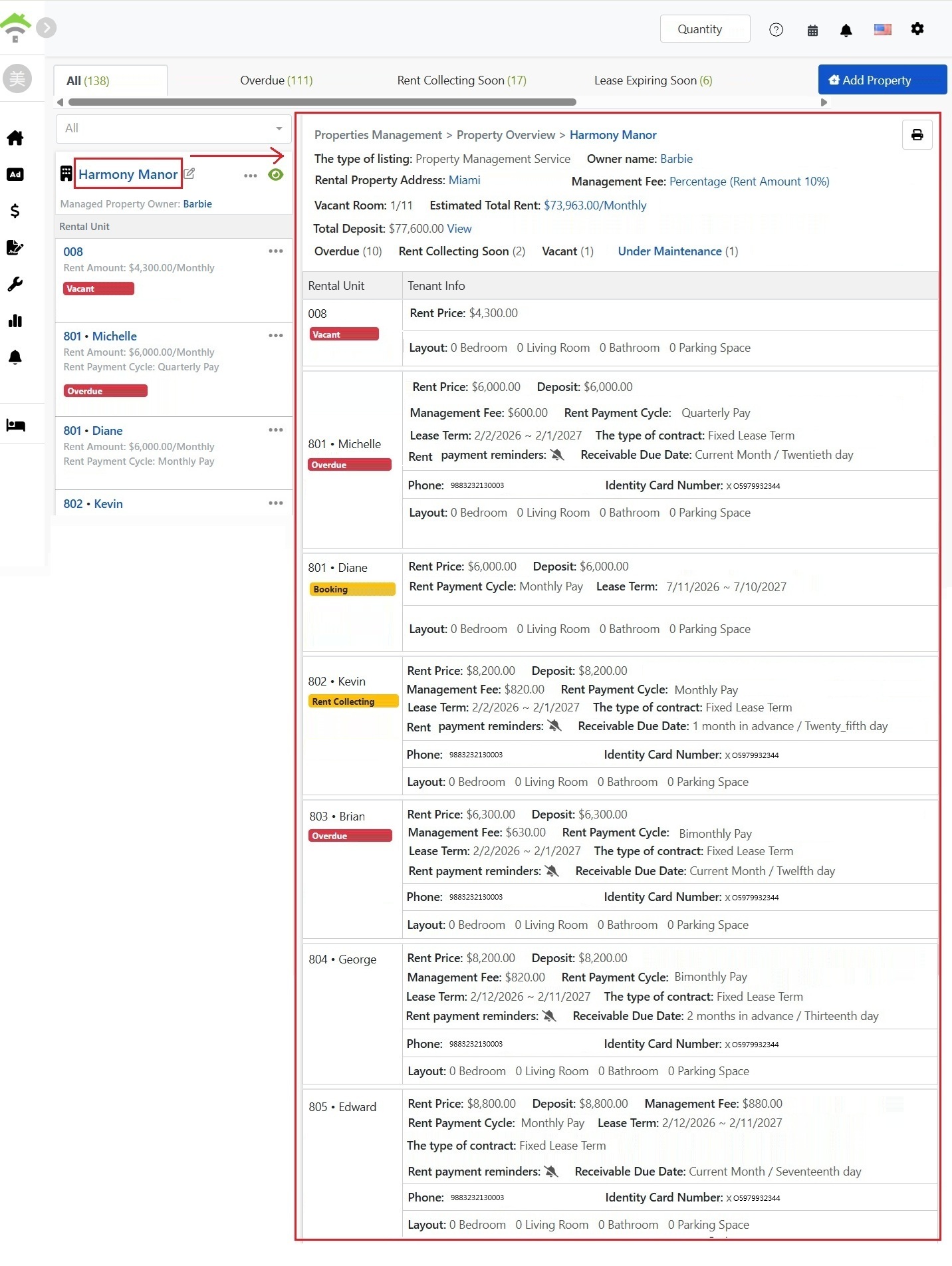
The top of the overview page shows basic property info and overall stats:
- Basic property information: Listing Type, Owner Name, Property Address, Management Fee Calculation Method.
- Vacancies: Shows current vacant rooms / total rooms, e.g., 1/11.
- Estimated Total Rent: Estimated total monthly rent for the entire building.
- Total Deposit: Total amount of deposits currently collected for the entire building. Click [ View ] to access "Owner Settlement" → "Deposit Account" for deposit details.
- Status Statistics: Clear view of room counts by status, including Overdue, Rent Due, Vacant, Reserved, Under Maintenance, and Pending Meter Reading.
4. Room Detail Table
The overview page lists detailed information for each room at the bottom:
- Room Status: Status tags like Vacant, Overdue, Upcoming Rent, Reserved, with overdue days displayed.
- Rent & Deposit: Rent, deposit, and management fee for each room.
- Lease Info: Rent cycle (monthly, bi-monthly, quarterly, yearly), lease start/end date, contract type.
- Rent Reminder & Accounts Receivable Date: Shows rent reminder settings and expected collection date, e.g., "Notify 3 days in advance (both parties) | Expected collection date: 1st of each month."
- Tenant Contact Info: Phone, ID number, registered address.
- Layout: Room, living room, bathroom and parking configuration.
5. Print Overview Table
Click the [ Print ] button in the upper-right corner of the overview page to print the entire overview. For easy printing and reading, the overview data will not paginate, and the entire property status will be shown in a single report.