
 Support
RentPackage Management Fees: Agencies Bill Owners Automatically Every Period and Deduct the Fee When Rent Comes In

Contents
- Why calculate management fees in RentPackage
- How are management fees calculated? Three billing methods to choose from
- Where to set management fees? Right when you add the managed property
- Billing periods auto-generate when creating a tenant lease
- Mark the management fee as received when the tenant pays rent
Why calculate management fees in RentPackage
Many property management companies handle fees like this: after the tenant pays rent each month, they work out each owner's fee by hand (a flat amount for some, 10% of rent for others, sometimes with a minimum), then create a bill and deduct it from the rent. With more properties, it is easy to miscalculate or miss a deduction, and every owner question means digging through files.
- Set it once, calculated every period
When you [Add Property Management Property], choose flat fee, percentage, or percentage + flat fee; with a percentage you can also set a [Minimum amount] and [Maximum amount]. The fee is then calculated from the rent every period. - Management fee billing periods created for you
After you add a tenant lease, the system creates [Management Fee Billing Periods] alongside each [Rent Billing Periods], so there is no monthly manual billing. - Deduct the fee when rent comes in
When you [Mark as Received] a [Rent Billing Periods], the [Management Fee Billing Periods] for the same period can be marked as received too, deducted automatically from the [Owner Trust Account]. If the rent is not paid in full, you can edit the amount and reduce the fee. - Every transaction itemized
[Owner Distribution Details] lists each rent income and the matching management fee expense, so reconciliation needs no extra work.
How are management fees calculated? Three billing methods to choose from
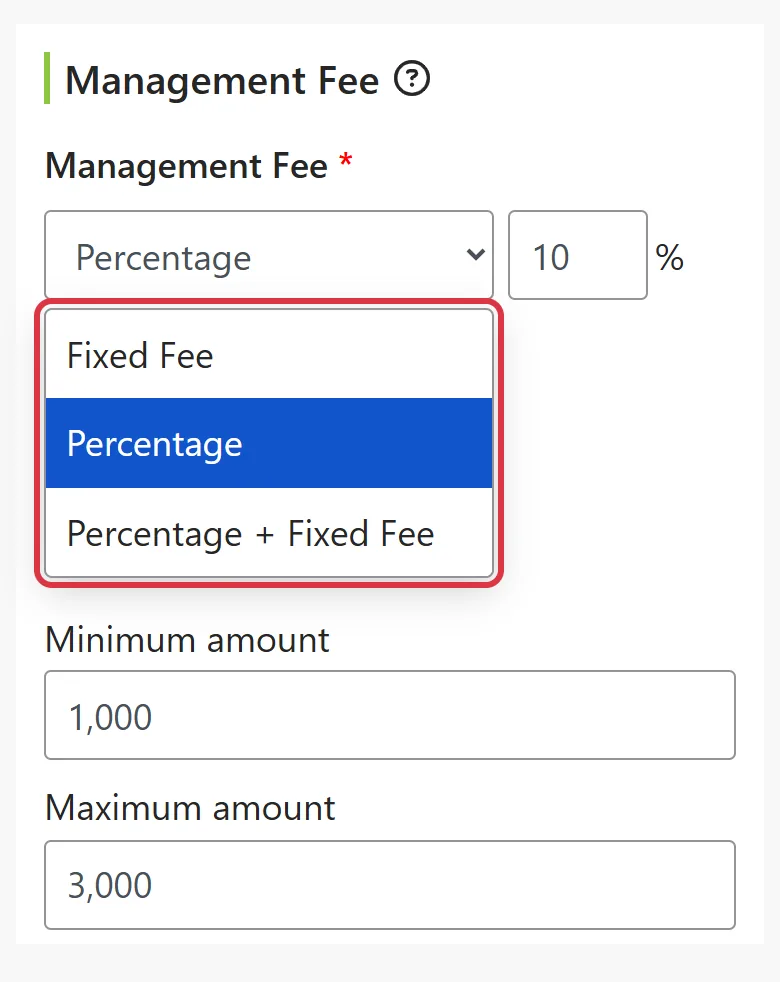
In RentPackage, you set the management fee formula when you [Add Property Management Property]. Three common methods are supported:
- Flat fee:Collect a fixed amount every month, e.g., 1,000.
- Percentage:Calculate as a share of rent (e.g., 10%); you can also set a [Minimum amount] and [Maximum amount].
- Percentage + flat fee:For example, 10% plus 300.
Where to set management fees? Right when you add the managed property
In [Property Management] > [Add Property Management Property], set the management fee method in the [Ledger settings] step. It works for single units and whole buildings. To change it later, go to [Management Fee Setting] in [Edit Property].
These settings auto-apply to future tenant leases for that property, saving re-entry time.
Billing periods auto-generate when creating a tenant lease
Just go to the room's [More Actions] > [Add Lease] and enter the following:
- Rent amount
- Payment frequency (e.g., weekly / monthly / quarterly)
- Lease start and end dates
The system will automatically generate:
- Tenant rent schedule: lists each period’s rent due and payment deadline.
- Owner management fee schedule: calculates the amount due using the fee formula set when you [Add Property Management Property].
Mark the management fee as received when the tenant pays rent
- Go to [Tenant Billing Periods] and click [Mark as Received] on the tenant's [Rent Billing Periods].
- Tick [Do the related billing periods also need to be marked as received] (ticked by default). The [Management Fee Billing Periods] for the same period is marked as received too, and the amount is deducted automatically from the [Owner Trust Account].
- If the rent is not paid in full, you can edit the amount under [Management Fee] to reduce the fee. If you change it to 0, that period's management fee is set to no charge.
Summary
Keep calculating by hand, and next month you will again work out every owner's fee, create the bills and make the deductions. Once it is set up in RentPackage, management fee billing periods are created every period, the fee is deducted when rent is marked as received, and every transaction is recorded.
Pick one managed property, set its management fee in [Ledger settings], then add a tenant lease and see the management fee billing periods the system creates.
Try RentPackage for freeRelated articles
- RentPackage Owner Distribution: Property Managers Pay Owners After Deducting Fees, With Security Deposits Kept Separate:After the management fee is deducted, pay the remaining rent to the owner.
- RentPackage Tenant Billing Periods: Payment Reconciliation, Partial Payments, Meter Reading, and Deposits. All routine rent collection in one place.:How marking as received and partial payments work.
- RentPackage Commission Split: Calculate Commissions, Tax, and Agent Bonuses in One Place After Every Rental Deal:How to split commissions and staff bonuses after an agency closes a rental deal.