
 Support
RentPackage Telegram Notifications: Rent Reminders and Alerts for Landlords and Property Managers, Sent Straight to Tenants', Owners' and Employees' Phones
Set it up once and RentPackage automatically sends payment notifications, receipts and reminders to Telegram on the phones of tenants, property owners and employees, so you no longer message people one by one. Emails still go out as usual; Telegram adds a channel people see the moment they pick up their phone.
Contents
Why receive notifications on Telegram
The payment notification went out, yet the tenant says they never saw it: some rarely open their inbox, others have no email at all. Notices go unread, and the landlord still ends up chasing rent one message at a time. Employees have the same problem: reminder emails from the system get buried in the inbox, and things slip through.
- Tenants see payment notifications as soon as they open their phone
The notification pops up on the phone just like a message from a friend, instead of waiting for the tenant to remember to check email. On the rent reminder date the system sends it automatically, so you don't have to chase anyone. - Tenants without email still get notified
In many countries tenants use Telegram far more than email. Even if a tenant has no email address, once they link Telegram they receive every payment notification and receipt. - Employees see it right away, even out of the office
While employees are out on viewings, system notifications such as maintenance requests, owner distribution reminders and contract signing go straight to their phones instead of getting lost in the inbox. - Emails still go out, plus one more channel
Your existing email notifications don't change; Telegram is an extra channel. There is no separate fee for Telegram messages and no limit on how many are sent.
Who gets notified, and when
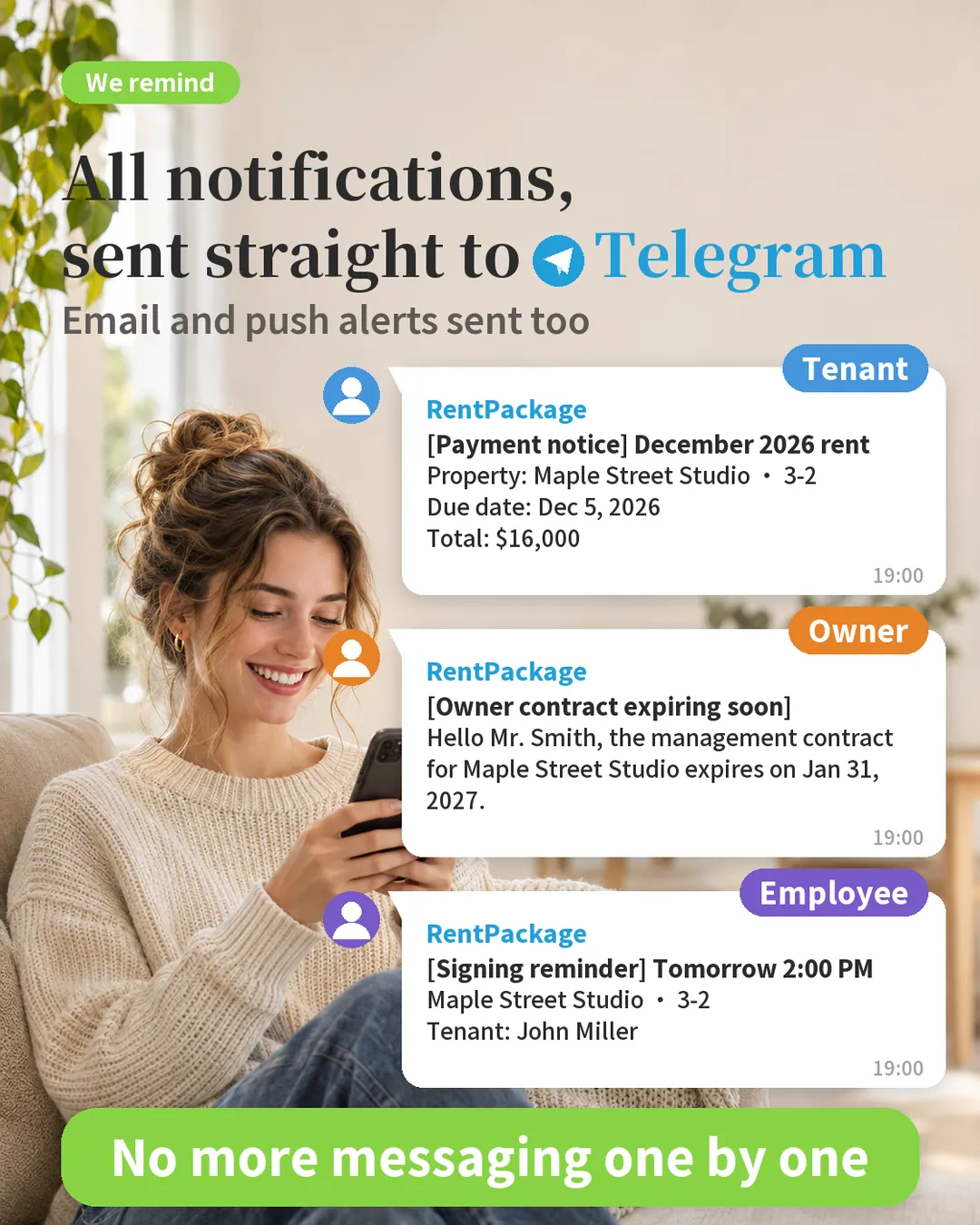
Tenants without email, or living abroad, still get notified; employees out on viewings get notifications straight on their phones. Here are the notifications tenants, property owners and employees commonly receive, with where each one comes from in brackets:
Tenants
- A payment notification before the rent due date, and a receipt after paying (Rent payment reminders)
- If rent is overdue, the system chases it automatically (overdue notice)
- When the lease is about to end, asking whether the tenant wants to renew; notice before a rent increase ([Custom Notification Rule])
Property owners
- A reminder to the owner when the management contract is about to end ([Custom Notification Rule], based on the owner contract end date)
- Contract and billing period information every month ([Custom Notification Rule], sent to the owner)
Employees
- A lease signing or viewing tomorrow (Calendar)
- A tenant moving out next week, so the handover needs arranging ([Custom Notification Rule], 7 days before the move-out date)
Which notifications are sent to Telegram
The rule is simple: any notification you receive by email, you can also receive on Telegram. This includes:
- Payment notifications and receipts (tenants)
- Notifications sent by custom notification rules (tenants, property owners, employees)
- Owner distribution reminders, meter reading reminders and maintenance notifications
- Notifications the system sends to employees: calendar, bulletin board, contract signing, overdue summaries, vacancy notices and more
Account security emails, such as login verification codes and email address changes, are sent by email only, not to Telegram.
Telegram messages are plain text: tables in the email become one line per row, and buttons in the email become buttons under the message that open RentPackage when tapped.
Everything custom notification rules send also goes to Telegram
When a notification set up in [Custom Notification Rule] is emailed to a tenant, property owner or employee who has linked Telegram, it is sent to Telegram at the same time. No extra setup needed.
For example, set up a rule that reminds tenants to renew 60 days before the lease ends, and tenants who linked Telegram will receive that reminder on Telegram.
To learn how to set up rules, see: RentPackage Custom Notifications: Automatic Lease Renewal, Rent Increase and Insurance Expiry Reminders for Landlords and Property Managers
How to link: tap the link, then tap [Start]
No login and no forms: tap the binding link or scan the QR Code, open Telegram and tap [Start]. When the RentPackage bot (@RentPackageBot) replies "Linked successfully", you're done. Binding links are valid for 7 days. Tenants, owners and employees each get their link from a different place:
Tenants
- Add a new tenant lease and choose [Tenant Signs Now] or [No Contract, Move-in Data Only] as the signing method.
- After the lease is created, the "Let the Tenant Receive Payment Notices" window opens. Have the tenant scan the QR Code on the spot; if they're not there, tap [Copy binding link] and send it through a messaging app.
- For tenants who have already moved in: open [Tenant Info] and, at the top of [Basic Settings], copy the link under "Telegram Link" and send it to the tenant.
Property owners
- On the property card, tap [More Actions] > [View/Modify Owner].
- Copy the link under "Telegram Link" and send it to the owner. Once the owner opens it and taps [Start] in Telegram, they're linked.
Employees
- Tap the gear icon at the top right > [Notification Settings] > [Personal Notification Settings].
- Under "Telegram Link", tap [Link now]; when Telegram opens, tap [Start].
Frequently asked questions
How do I stop receiving them?
Block the RentPackage bot in Telegram and the messages stop. After blocking, Telegram notifications from all companies stop; emails continue as usual.
What if a tenant changes phones or Telegram accounts?
Send the tenant the binding link again and have them link once more. The old Telegram account receives a notice that the link has moved, and nothing more is sent there.
What if the binding link has expired?
Links are valid for 7 days. After that, go back to the same place, copy a new link and send it again.
Can tenants reply to the bot?
The bot only sends notifications and does not reply to messages. If tenants have questions, they should contact you the usual way.
Which companies can use it?
Companies on a paid plan, or companies that have activated online rent payment, can use Telegram linking.
Summary: send notifications where tenants will see them
If nothing changes, next month you'll send payment notifications and some tenants will still say they never saw them, and you'll still be chasing them one message at a time. Once Telegram is linked, payment notifications, receipts and reminders reach tenants', owners' and employees' phones automatically every period, so you don't have to chase anyone.
Start with one tenant: send the binding link to a tenant who often says they didn't get the notice, and you'll see the difference next period.
Try RentPackage for freeRelated articles
- RentPackage Custom Notifications: Automatic Lease Renewal, Rent Increase and Insurance Expiry Reminders for Landlords and Property Managers:Set reminders for lease expiry, rent increases, insurance expiry and more; tenants, owners and employees who linked Telegram also receive them on Telegram.
- RentPackage Employee Management: Team Collaboration for Agency and Property Management Teams, Split by Property and Role:Set which properties each employee is responsible for, so system notifications go to the right person.
- RentPackage Online Rent Collection: Landlords and Agents Connect Stripe, Tenants Pay Online and Bills Are Marked as Received Automatically:After receiving a payment notification, tenants can pay online by credit card.