
 Support
RentPackage for Taiwan Social Housing Sublease and Management: Government Lease Templates Filled In Automatically, Monthly Rent Receipts Printed in One Go
Contents
Save the contract once and the social housing contracts are filled in for you; after collecting rent each month, pick the month and every tenant's rent receipt is ready to print.
Why use RentPackage for social housing
In Taiwan's social housing sublease and management program (社會住宅包租代管), every case needs several government contracts, and you retype the landlord, tenant, address and rent into each one. Every month you also handwrite a rent receipt for each tenant, and one wrong character in the name, national ID number, lease period, number of months or amount means starting over. With many cases, the paperwork alone takes up half your day.
- No retyping contracts
When creating a contract, enter the landlord, tenant and lease terms once and choose a social housing contract template. The system fills them into the contract and generates a PDF once it is signed. - No handwritten receipts
Your rent collection records are the data for the rent receipts. Each month, pick the month and the system fills in the tenant, national ID number, lease period, number of months and amount, one tenant per page, ready to print. - Only fully paid tenants are printed
Tenants whose rent has not been fully collected cannot be selected, so you never print a receipt saying “received in full” for money you have not received yet.
5 social housing contract templates
The system includes the 5 social housing contract templates revised by Taiwan's Ministry of the Interior on September 24, 2025 (ROC year 114). When you choose a template while creating a contract, they appear under [Default contract] (visible only to companies in Taiwan):
- New tenant contract: 社會住宅 轉租契約 (social housing sublease contract), 社會住宅 住宅租賃契約 (social housing residential lease contract)
- New sublease (master lease) owner contract: 社會住宅 包租契約 (social housing master lease contract)
- New property management owner contract: 社會住宅 委託管理契約 (social housing management agreement), 社會住宅 委託租賃契約 (social housing leasing agreement)
Filled in automatically: landlord, tenant, company name, address, phone, lease term, rent, deposit, bank account for payment, signatures and signing time.
To fill in yourself: land lot number, building number, floor area, program phase, how many months of deposit, license number, property condition and equipment list, and other details that differ for each case. Type them directly in the contract editor.
Tip: fill in the content that is always the same for your company (for example the program phase, registration certificate number and how electricity is charged) and save it as your own template. You can also save one for a specific unit and reuse it when the tenant changes, so at signing time almost only the dates are left to fill in.
Contracts can be signed electronically by email, by signing link or in person on a tablet, and the system generates a PDF once both sides have signed.
Enter the social housing match number
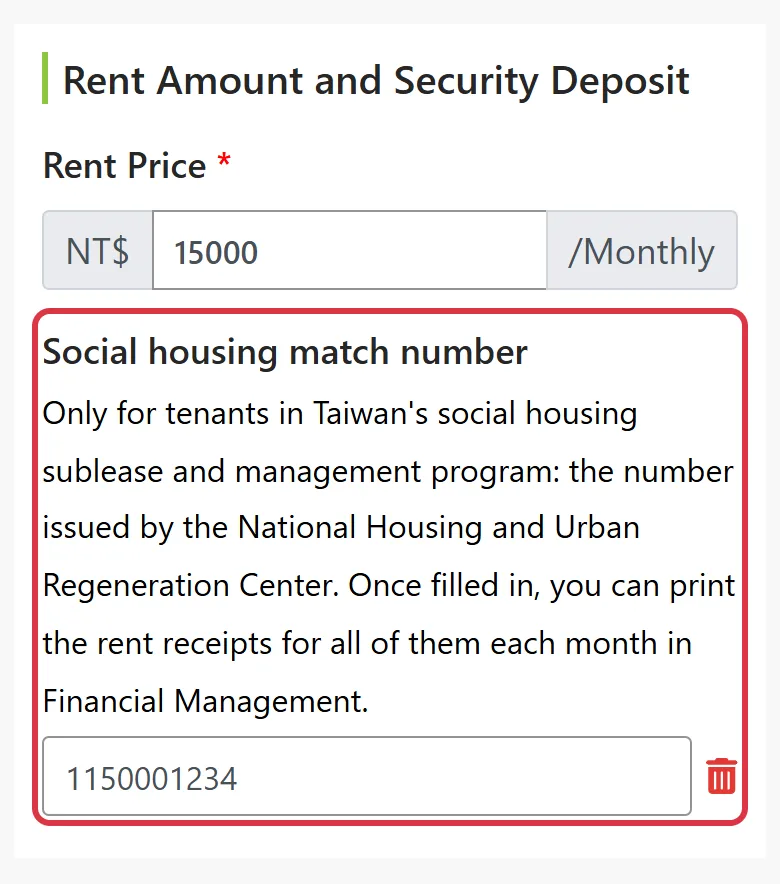
Once a tenant contract has a social housing match number (the number issued by the National Housing and Urban Regeneration Center, 國家住宅及都市更新中心), the system knows the tenant is a social housing case: the tenant appears in the rent receipt list every month, and the number is printed on the receipt.
- New contract or renewal: under [Rent Price], click [⊕ Social housing match number] and enter the number. A renewal carries over the number from the previous contract.
- Contracts already signed: go to [Contract Management] > More Actions > [View/Edit Contract] and press the pencil in the [Social housing match number] section to add it. You can still add it after the contract has been settled.
Print rent receipts every month (Attached Form 7)
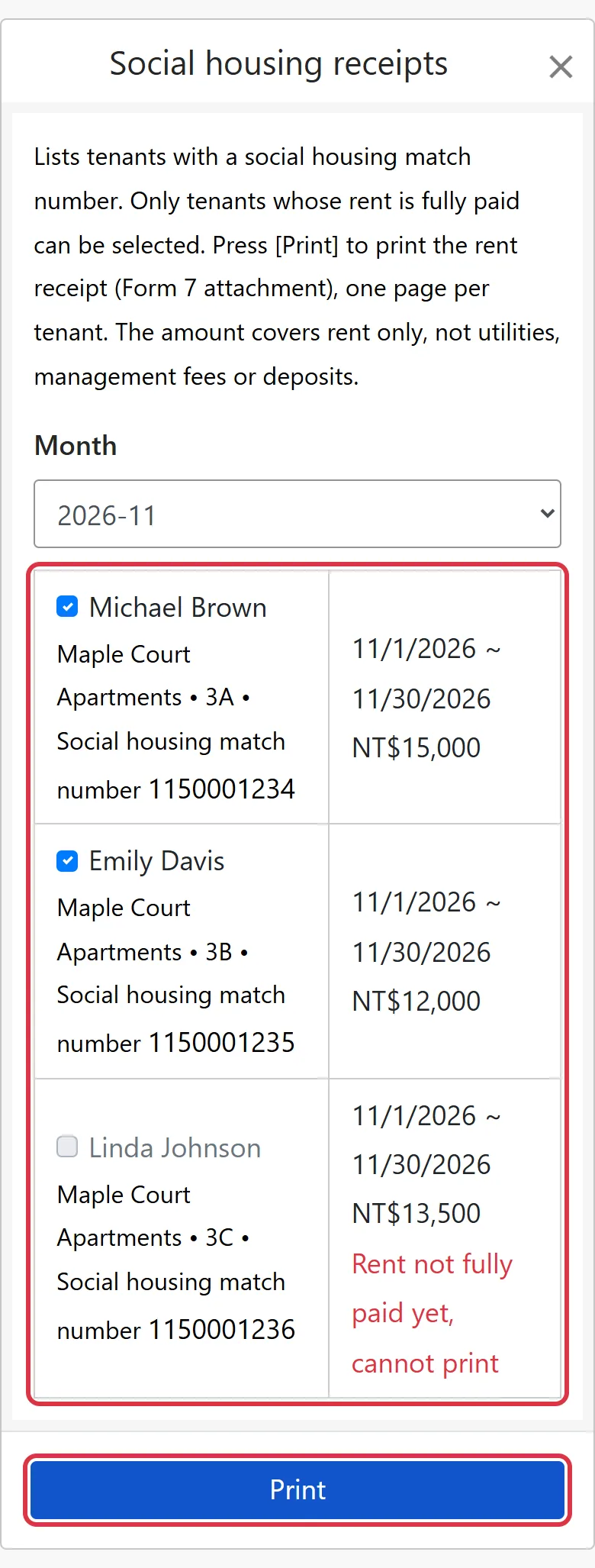
- Go to [Accounting] > [Property accounting] and press [Social housing receipts] in the top-right corner (on mobile, only the receipt icon is shown).
- Choose a month. The system lists the social housing tenants whose rent period starts in that month.
- Select the tenants to print and press [Print]. A new tab shows the rent receipts, one tenant per page, ready to print or save as PDF.
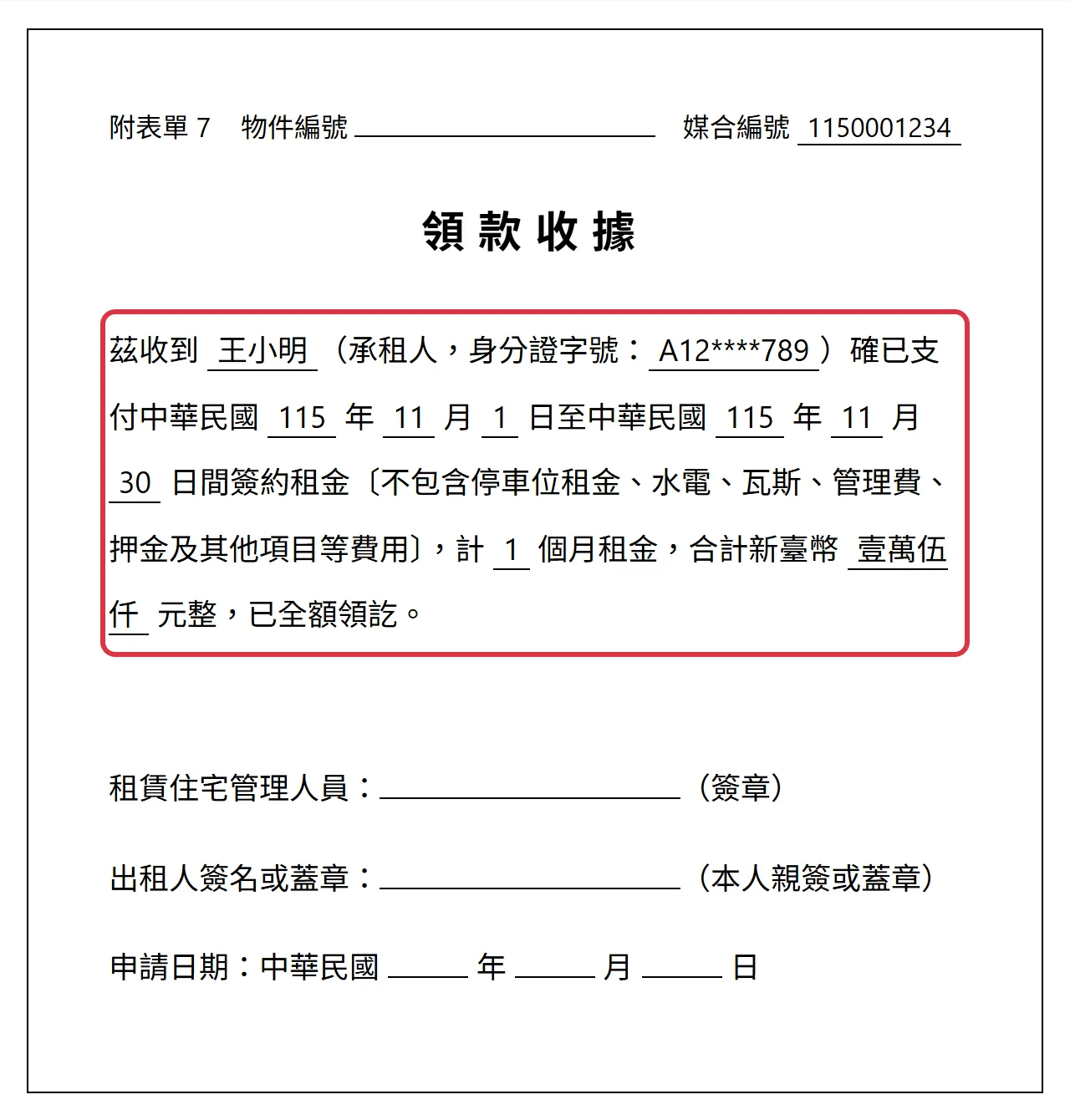
The system fills in the tenant's name, national ID number, lease period (in Taiwan (ROC) calendar years), number of months, amount (in formal Chinese numerals) and match number. The amount covers rent only, without utilities, management fees or deposit, as Attached Form 7 requires.
- A tenant can be selected only when the rent is fully collected. For a partial payment, the remaining amount must also be received; waived bills and payments still processing do not count as fully collected.
- When a month has two rent periods, they are combined into one receipt: the period runs from the start date of the first to the end date of the last, and the months are added together.
- Tenants who pay quarterly or every six months are listed in the month their rent period starts, with the actual number of months (for example 6 for six-monthly payment).
The property number, the signatures of the rental housing manager and the lessor, and the application date are handwritten after printing.
Frequently asked questions
The government subsidy goes to the tenant. How should I record it?
Record it like any other contract. In the social housing sublease and management program, the rent subsidy is paid by the government directly to the tenant. The tenant pays you the full rent under the contract, bills are generated as usual, and you do not need to record the subsidy separately.
Social housing management does not charge the owner a management fee. How do I set that up?
For social housing, the operator's service fee is paid by the government. When creating the tenant contract, choose [No] for [Whether to generate property management fee collected by agency?] in the [Management Fee] section, and the system will not generate management fee bills.
Can companies in other countries see these features?
No. The social housing contract templates, the social housing match number and social housing receipts are visible only to companies whose country is Taiwan, whatever the interface language.
Summary: one less stack of receipts to write every month
If you keep working the way you do now, next month you will again retype contracts one by one and handwrite receipts one by one. Once your tenant contracts have their match numbers, each month you only pick the month and press Print: the data on the contracts and receipts is all filled in by the system.
Start with one social housing tenant: enter the social housing match number on their contract, and after collecting rent next month, print one rent receipt to see how it works.
Try RentPackage for freeRelated articles
- RentPackage Contract Templates: Landlords and Property Managers Write the Lease Once, Tenant and Rent Details Fill In at Signing:Save the social housing contract templates as your own versions with your company's fixed content.
- RentPackage E-Contracts: Landlords and Agents Sign Leases and Owner Appointment Agreements Online, No Meetings Needed:Sign social housing contracts by email, signing link or in person on a tablet.
- RentPackage Bank Statement Import: Landlords and Property Managers Reconcile a Month of Rent in One Upload:Upload your online banking statement to mark tenants' rent transfers as received in one go; once rent is fully collected, you can print the rent receipts.