
คู่มือการใช้งานแบบฟอร์ม SA105 สำหรับรายได้ค่าเช่าในสหราชอาณาจักร
ลิงก์ด่วน
SA105 คืออะไร
SA105 คือแบบฟอร์มเสริมสำหรับรายได้จากอสังหาริมทรัพย์ที่กรมสรรพากรและศุลกากรแห่งสหราชอาณาจักร (HMRC) กำหนด และยื่นพร้อมกับแบบแสดงรายการภาษีแบบประเมินตนเอง (Self Assessment Tax Return) หากคุณมีอสังหาริมทรัพย์ให้เช่าในสหราชอาณาจักร คุณต้องกรอกแบบฟอร์มนี้ทุกปีเพื่อแสดงรายได้ค่าเช่าและค่าใช้จ่ายที่เกี่ยวข้อง
RentPackage มีฟังก์ชันรายงาน SA105 ที่สรุปรายได้และค่าใช้จ่ายจากการให้เช่าโดยอัตโนมัติ ทำให้การเตรียมยื่นภาษีในสหราชอาณาจักรง่ายและมีประสิทธิภาพ
วิธีใช้งาน
ขั้นตอนที่ 1: เลือกประเภทรายงานและปีภาษี
- เปิดรายงาน:ไปที่รายการฟังก์ชัน → รายงาน → เลือก 'SA105' เป็นประเภทรายงาน
- เลือกปีภาษี:เมนูแบบเลื่อนลงจะแสดงช่วงปีภาษีแบบเต็ม เช่น '2025/2026 (6 เม.ย. 2025 - 5 เม.ย. 2026)'
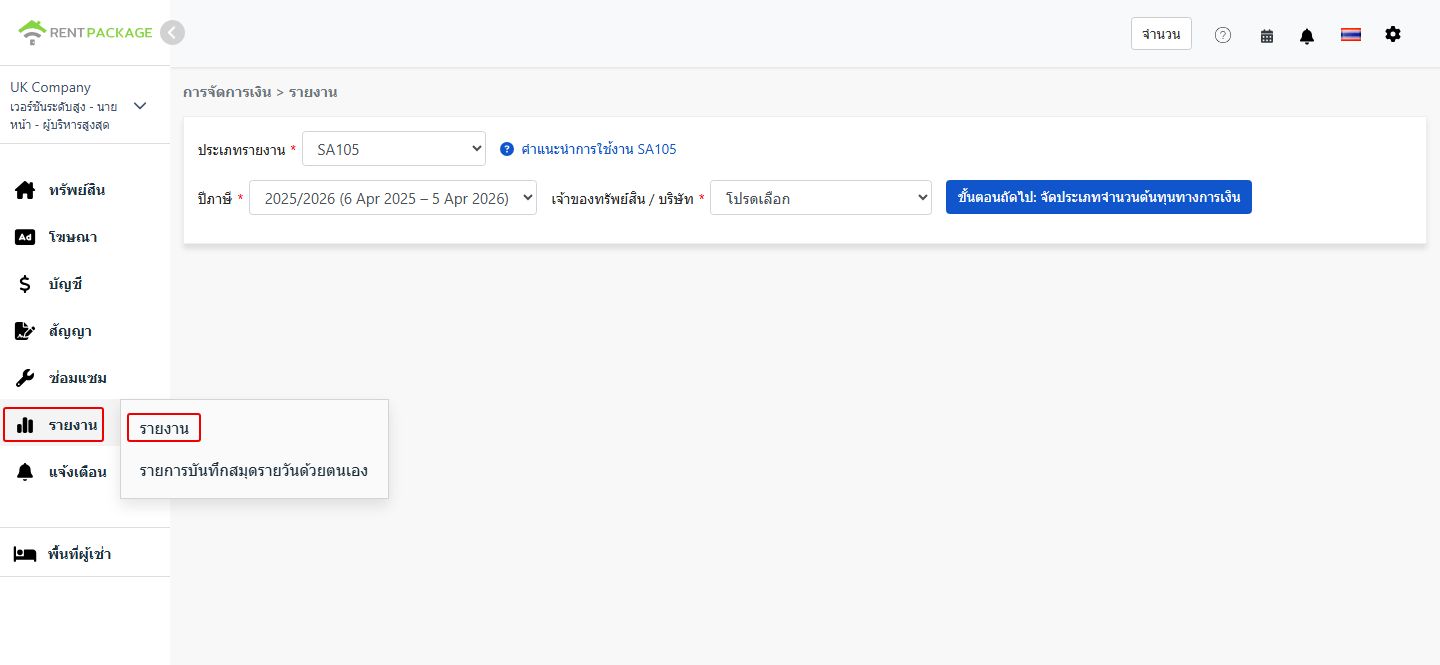
ขั้นตอนที่ 2: เลือกเจ้าของหรือบริษัท
ในเมนูแบบเลื่อนลง 'เจ้าของ/บริษัท' ให้เลือกนิติบุคคลหรือบุคคลที่ต้องการสร้างรายงาน:
- บริษัท:หากถือครองอสังหาริมทรัพย์ในนามบริษัท ให้เลือกบริษัทที่เกี่ยวข้อง
- เจ้าของ:หากคุณเป็นผู้ให้เช่าที่บริหารจัดการเอง หรือผู้ให้เช่าช่วง ให้เลือกชื่อเจ้าของที่เกี่ยวข้อง
เมื่อเลือกเสร็จแล้ว ให้คลิก 'ถัดไป: ปันส่วนต้นทุนทางการเงิน'
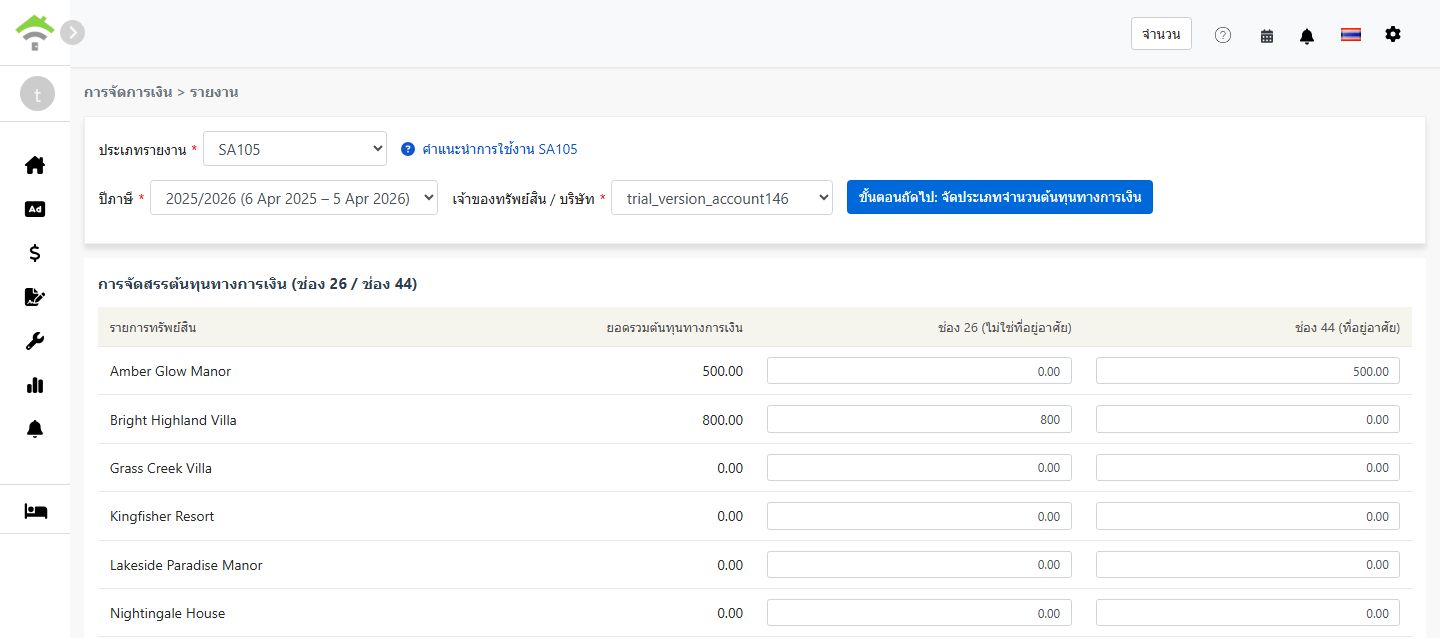
ขั้นตอนที่ 3: ปันส่วนต้นทุนทางการเงิน (ช่อง 26 / ช่อง 44)
เมื่อคลิก 'ปันส่วนต้นทุนทางการเงิน' ระบบจะดึงยอดรวมจากบัญชีทั้งหมดที่ผูกกับ 'ต้นทุนทางการเงินช่อง 26/44' และแสดงหน้าจอให้ปันส่วนจำนวนเงินระหว่างช่อง 26 กับช่อง 44:
| อสังหาริมทรัพย์ | ต้นทุนทางการเงินรวม | ช่อง 26 (ไม่ใช่ที่อยู่อาศัย) | ช่อง 44 (ที่อยู่อาศัย) |
|---|---|---|---|
| 123 High Street | 0.00 |
กฎการปันส่วน:
- ช่อง 26 (ไม่ใช่ที่อยู่อาศัย):หักเป็นค่าใช้จ่ายจากรายได้ค่าเช่าได้เต็มจำนวน
- ช่อง 44 (ที่อยู่อาศัย):หักโดยตรงไม่ได้ แต่ได้รับเครดิตภาษี 20% แทน
- ระบบจะกำหนดยอดทั้งหมดไว้ที่ช่อง 44 เป็นค่าเริ่มต้น สำหรับแต่ละอสังหาริมทรัพย์ ช่อง 26 + ช่อง 44 ต้องเท่ากับต้นทุนทางการเงินรวม
- สำหรับอสังหาริมทรัพย์ที่ใช้แบบผสม ทั้งที่อยู่อาศัยและพาณิชย์ ให้ปันส่วนตามสัดส่วนการใช้งานจริง
ขั้นตอนที่ 4: สร้างรายงาน
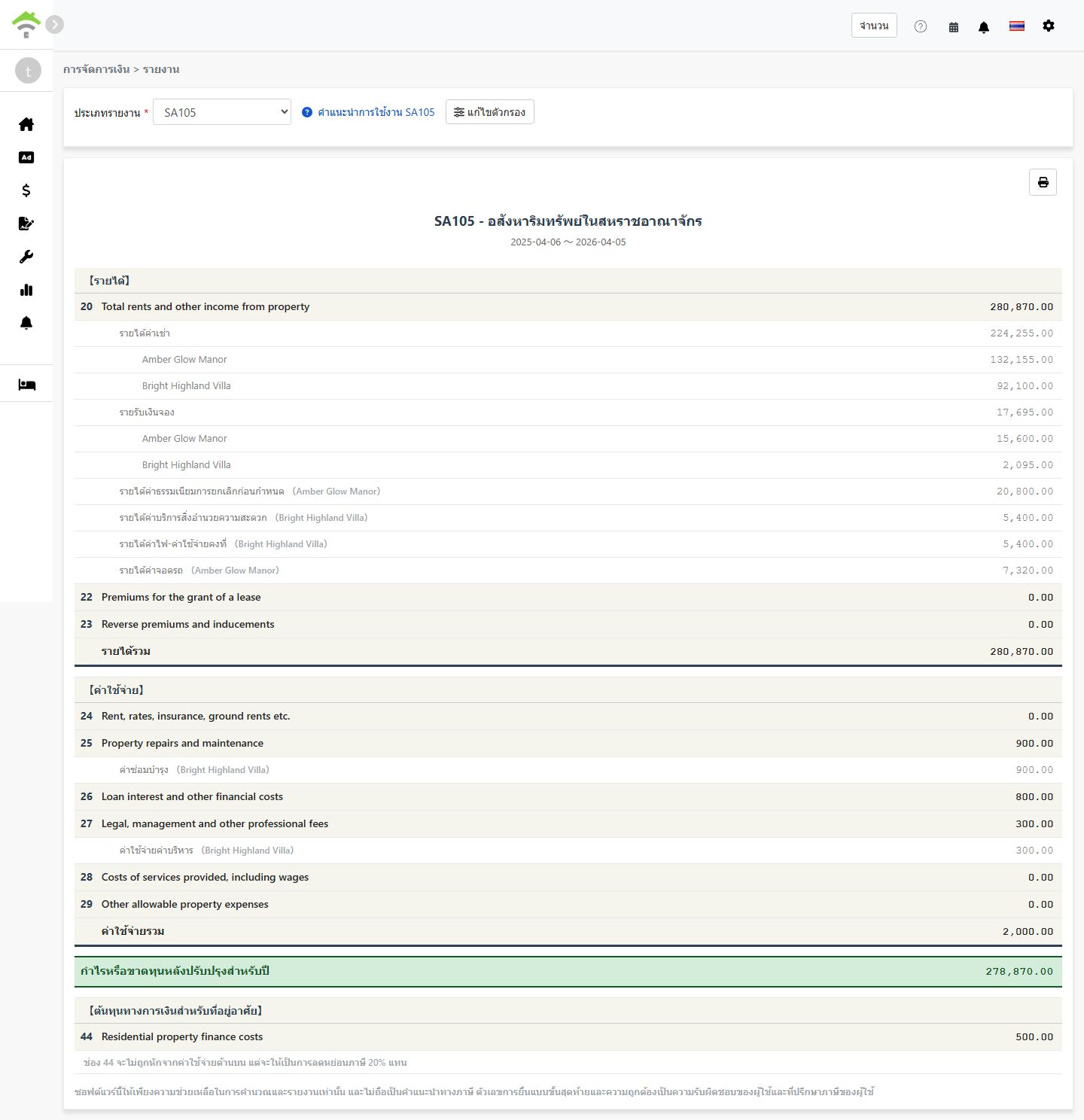
- เมื่อตรวจสอบการปันส่วนต้นทุนทางการเงินแล้ว ให้คลิก 'สร้างรายงาน'
- ระบบจะสร้างรายงาน SA105 ซึ่งแสดง:
- รายได้:ช่อง 20-23 - รายได้ค่าเช่า เงินกินเปล่าจากการให้เช่า และรายการทำนองเดียวกัน
- ค่าใช้จ่าย:ช่อง 24-29 - ค่าใช้จ่ายของอสังหาริมทรัพย์ที่หักลดหย่อนได้
- กำไรหรือขาดทุนหลังปรับปรุงของปี:รายได้รวม - ค่าใช้จ่ายรวม
- ต้นทุนทางการเงินของที่อยู่อาศัย:ช่อง 44 - ดอกเบี้ยสินเชื่อที่อยู่อาศัย ซึ่งได้รับเครดิตภาษี 20%
- คุณสามารถพิมพ์รายงานหรือส่งออกเป็น PDF เก็บไว้เป็นเอกสารประกอบการเตรียมยื่นภาษี
ความแตกต่างระหว่างช่อง 26 กับช่อง 44
| รายการ | ช่อง 26 (ไม่ใช่ที่อยู่อาศัย) | ช่อง 44 (ที่อยู่อาศัย) |
|---|---|---|
| ประเภทอสังหาริมทรัพย์ | อสังหาริมทรัพย์เชิงพาณิชย์ สำนักงาน ร้านค้า และสถานที่ทำนองเดียวกัน | การให้เช่าเพื่อการอยู่อาศัย |
| การปฏิบัติทางภาษี | หักเป็นค่าใช้จ่ายได้เต็มจำนวน | หักไม่ได้ แต่ได้รับเครดิตภาษี 20% |
| ตำแหน่งในรายงาน | ช่อง 26 - Loan interest and other financial costs | ช่อง 44 - Residential property finance costs |
ตัวอย่าง:
สมมติว่าคุณมีอสังหาริมทรัพย์ที่ใช้แบบผสม โดยมีดอกเบี้ยเงินกู้รวม £10,000 ซึ่ง 30% ใช้เพื่อการพาณิชย์ และ 70% ใช้เพื่อการอยู่อาศัย:
- ช่อง 26 (ไม่ใช่ที่อยู่อาศัย):£10,000 × 30% = £3,000(หักได้เต็มจำนวน)
- ช่อง 44 (ที่อยู่อาศัย):£10,000 × 70% = £7,000(เครดิตภาษี 20% = £1,400)
ตั้งค่าผังบัญชีสำหรับ SA105 อย่างไร
วิธีผูกบัญชีเข้ากับต้นทุนทางการเงิน:
- ไปที่บัญชี → ผังบัญชี
- ค้นหาบัญชีที่ต้องการผูก เช่น ดอกเบี้ยเงินกู้
- ตั้งค่าช่อง SA105 เป็น 'ต้นทุนทางการเงินช่อง 26/44' จากนั้นระบบจะรวมจำนวนเงินของบัญชีนั้นเข้ากับต้นทุนทางการเงินรวมโดยอัตโนมัติ
การบันทึกต้นทุนทางการเงินทำได้สองวิธี:
- เพิ่มในช่วงเวลาการเช่า:เพิ่มรายการในช่วงเวลาการเช่าของอสังหาริมทรัพย์ โดยใช้บัญชีที่ผูกกับ 'ต้นทุนทางการเงินช่อง 26/44'
- เพิ่มรายการบัญชี:สร้างรายการบัญชีโดยใช้บัญชีที่ผูกกับ 'ต้นทุนทางการเงินช่อง 26/44'
จำนวนเงินที่เพิ่มด้วยวิธีใดวิธีหนึ่งจะถูกรวมเข้ากับต้นทุนทางการเงินรวมโดยอัตโนมัติ
คำถามที่พบบ่อย
ภาษีของสหราชอาณาจักรหักค่าเสื่อมราคาได้หรือไม่
ไม่ได้ ต่างจากแบบฟอร์ม Schedule E ของสหรัฐฯ ภาษีรายได้จากอสังหาริมทรัพย์ของสหราชอาณาจักรไม่มีช่องค่าเสื่อมราคา ในสหราชอาณาจักร ค่าเสื่อมราคาของอสังหาริมทรัพย์มักเกี่ยวข้องเฉพาะตอนคำนวณภาษีกำไรจากทุนเมื่อขายอสังหาริมทรัพย์เท่านั้น
ทำไมต้นทุนทางการเงินรวมของฉันแสดงเป็น 0
โปรดตรวจสอบว่าผังบัญชีของคุณตั้งค่าช่อง SA105 เป็น 'ต้นทุนทางการเงินช่อง 26/44' อย่างถูกต้อง หากยังไม่ได้ตั้งค่า ระบบจะไม่รวมจำนวนเงินของบัญชีนั้นเข้ากับต้นทุนทางการเงินรวม
ช่อง 26 + ช่อง 44 เกินต้นทุนทางการเงินรวมได้หรือไม่
ไม่ได้ ระบบจะตรวจสอบว่าสำหรับแต่ละอสังหาริมทรัพย์ ช่อง 26 + ช่อง 44 ต้องเท่ากับต้นทุนทางการเงินรวมของอสังหาริมทรัพย์นั้น
กรอกยอดรวมต้นทุนทางการเงินด้วยตนเองในหน้ารายงานได้หรือไม่
ไม่ได้ ต่างจากค่าเสื่อมราคาใน Schedule E ยอดรวมต้นทุนทางการเงินของ SA105 มาจากช่วงเวลาการเช่าหรือรายการบัญชีเท่านั้น การออกแบบเช่นนี้ช่วยให้จำนวนเงินถูกต้องและป้องกันความคลาดเคลื่อนกับบันทึกทางบัญชีจริงของคุณ
ทำไมปีภาษีของสหราชอาณาจักรจึงเริ่ม 6 เมษายน ถึง 5 เมษายน
นี่คือปีภาษีอย่างเป็นทางการของสหราชอาณาจักรตามที่ HMRC กำหนด ต่างจากปีปฏิทินทั่วไปคือมกราคมถึงธันวาคม ปีภาษีของสหราชอาณาจักรเริ่มวันที่ 6 เมษายนของทุกปี และสิ้นสุดวันที่ 5 เมษายนของปีถัดไป
ตารางช่องข้อมูลของ SA105
【รายได้】
| ช่อง | ชื่อช่องข้อมูล | คำอธิบาย |
|---|---|---|
| 20 | Total rents and other income from property | รายได้ค่าเช่าและรายได้อื่นจากอสังหาริมทรัพย์รวม |
| 22 | Premiums for the grant of a lease | เงินกินเปล่าที่ได้รับจากการให้สิทธิการเช่า |
| 23 | Reverse premiums and inducements | เงินกินเปล่าย้อนกลับและเงินจูงใจผู้เช่าที่ได้รับ |
【ค่าใช้จ่าย】
| ช่อง | ชื่อช่องข้อมูล | คำอธิบาย |
|---|---|---|
| 24 | Rent, rates, insurance, ground rents etc. | ค่าเช่าที่ดิน ภาษีท้องถิ่น และเบี้ยประกัน |
| 25 | Property repairs and maintenance | ค่าซ่อมแซมและบำรุงรักษา |
| 26 | Loan interest and other financial costs | ต้นทุนทางการเงินของอสังหาริมทรัพย์ที่ไม่ใช่ที่อยู่อาศัย หักได้เต็มจำนวน |
| 27 | Legal, management and other professional fees | ค่าทนายความ ค่าบริหารจัดการอสังหาริมทรัพย์ และค่าผู้สอบบัญชี |
| 28 | Costs of services provided, including wages | ต้นทุนของบริการที่จัดให้ รวมถึงค่าจ้างพนักงาน |
| 29 | Other allowable property expenses | ค่าใช้จ่ายอื่นที่หักลดหย่อนได้ซึ่งไม่ได้ระบุไว้ข้างต้น |
【ต้นทุนทางการเงินของที่อยู่อาศัย】
| ช่อง | ชื่อช่องข้อมูล | คำอธิบาย |
|---|---|---|
| 44 | Residential property finance costs | ต้นทุนทางการเงินของอสังหาริมทรัพย์เพื่อการอยู่อาศัย ซึ่งได้รับเครดิตภาษี 20% |