📄 インターフェース紹介:5分でメイン画面を理解し、各作業の場所を把握します 📄 RentPackage で物件総覧を使用して建物全体の状態を迅速に把握する方法 📄 管理物件を追加:物件、オーナー、開始会計を作成し、オンライン契約まで一気に完了 📄 借主引越しと契約:賃貸期間、敷金、水道光熱費を一括設定、支払サイクル自動生成 📄 テナント請求操作:収金照合、部分支払い、メーター読み取り、保証金。日常の賃料回収はこのページで行います。 📄 オーナーキャリーオーバー機能説明 📄 カスタム通知設定: 家賃のリマインダーや契約満了通知を適切な時に適切な人へ送信 📄 RentPackageで推定収入を使用して来月および年間の賃料収入を迅速に見積もる方法 📄 コンプライアンス支援と責任説明 📄 賃貸契約テンプレート機能説明 📄 二オーナー機能説明 📄 部分支払い機能説明 📄 前受金機能説明 📄 家賃請求期間の説明 📄 請求開始機能の説明 📄 定期請求期間の説明 📄 予約機能の紹介 📄 電子賃貸契約設定ガイド 📄 管理会社の管理費設定ガイド 📄 なぜ保証金と前受金は会計上負債科目になるのですか? 📄 RentPackage 一般版 の紹介 📄 コミッション分割設定ガイド 📄 なぜすべてのオーナーと仲介業者が入居者管理自動化ソフトを必要とするのか? 📄 賃料がユーロで設定されている場合、為替レートをどのように正しく処理しますか? 📄 米国確定申告 - Schedule E 報告書ガイド 📄 英国確定申告 - SA105 報告書ガイド 📄 RentPackageでStripeオンライン家賃支払いを有効化する方法 📄 カレンダーで入居者通知をスケジュールする方法:停電通知を例に 📄 メール通知や契約PDFにブランドを表示するための代理店LOGO設定方法 📄 賃料保険とは?賃料滞納の補償、保険証券を賃貸契約と一緒に管理 📄 Anlage V ドイツ賃貸所得税ガイド 📄 T776 カナダ賃貸所得税ガイド 📄 PIT-28 ポーランド賃貸所得税レポート使用ガイド 📄 RentPackage でオーストラリアの賃貸税申告書(Rental Schedule)を生成する方法、収支は自動で ATO 申告分類に対応 📄 RentPackageでルーマニアの租税所得報告書(Declarația Unică 212)を使用する方法 📄 eSZJA 申告数字を一括で整えて RentPackage でハンガリーの SZJA 賃貸所得申告データを生成する方法 📄 損益計算書:物件ごと、所有者ごとに収支を計算 📄 貸借対照表:実際に銀行残高のうちいくらが借主のもの?保証金と前受金を一目で確認 📄 キャッシュフロー計算書:この期間に賃料収入がどれだけ現金を増やしたのか? 📄 RentPackageで総勘定元帳を生成する方法、賃貸料と物件会計を自動集計 📄 手動仕訳入力:修繕費、保険料、減価償却費など、期間外の収支も記録可能 📄 カスタム通知設定: 家賃のリマインダーや契約満了通知を適切な時に適切な人へ送信 📄 不動産管理ソフトが大幅に時間とコストを節約する理由は何ですか?

T776 カナダ賃貸所得税ガイド

Quick Navigation

What is T776?

T776 (Statement of Real Estate Rentals) is the Canadian rental income form required by the Canada Revenue Agency (CRA). It is filed as part of your T1 personal income tax return. If you earn rental income in Canada, you need to complete this form each year to report your rental income and related expenses.

📅 Canadian Tax Year: The calendar year, 1 January to 31 December.

RentPackage provides a T776 report feature that automatically summarizes your rental income and expenses by line number, making Canadian tax preparation simple and efficient.

How to Use

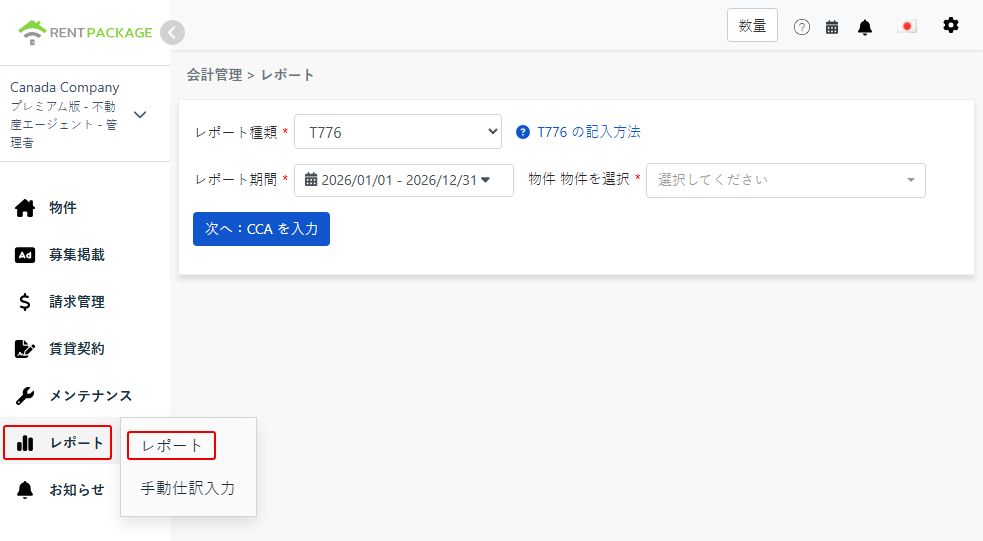
Step 1: Select Report Type, Period and Property
  • Access the Report: Go to function list → Reports → Select "T776" as the report type
  • Select Report Period: Select the calendar year you are filing for, e.g., "2026/01/01 - 2026/12/31"
  • Choose Property: Select the property for this report
Select T776 as the report type

After selection, click "Next: enter CCA".

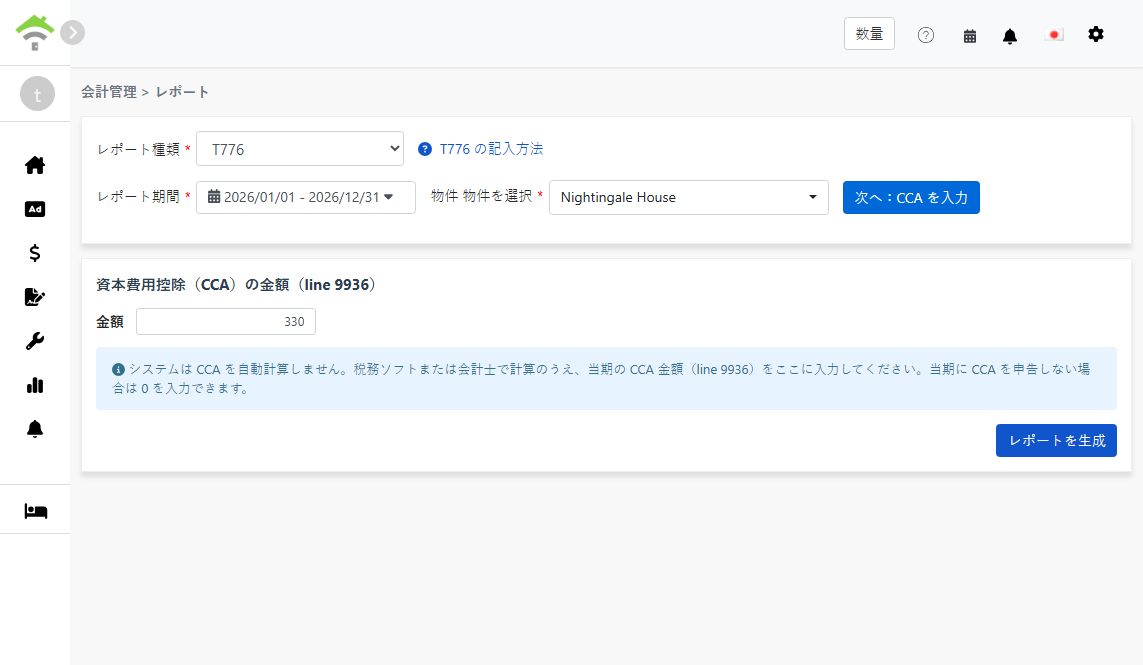
Step 2: Enter Capital Cost Allowance (CCA, Line 9936)
⚠️ Important: The system does not calculate CCA automatically. After calculating it with tax software or an accountant, enter this period's CCA amount here (line 9936). If you are not claiming CCA this period, enter 0.
Enter the CCA amount for line 9936
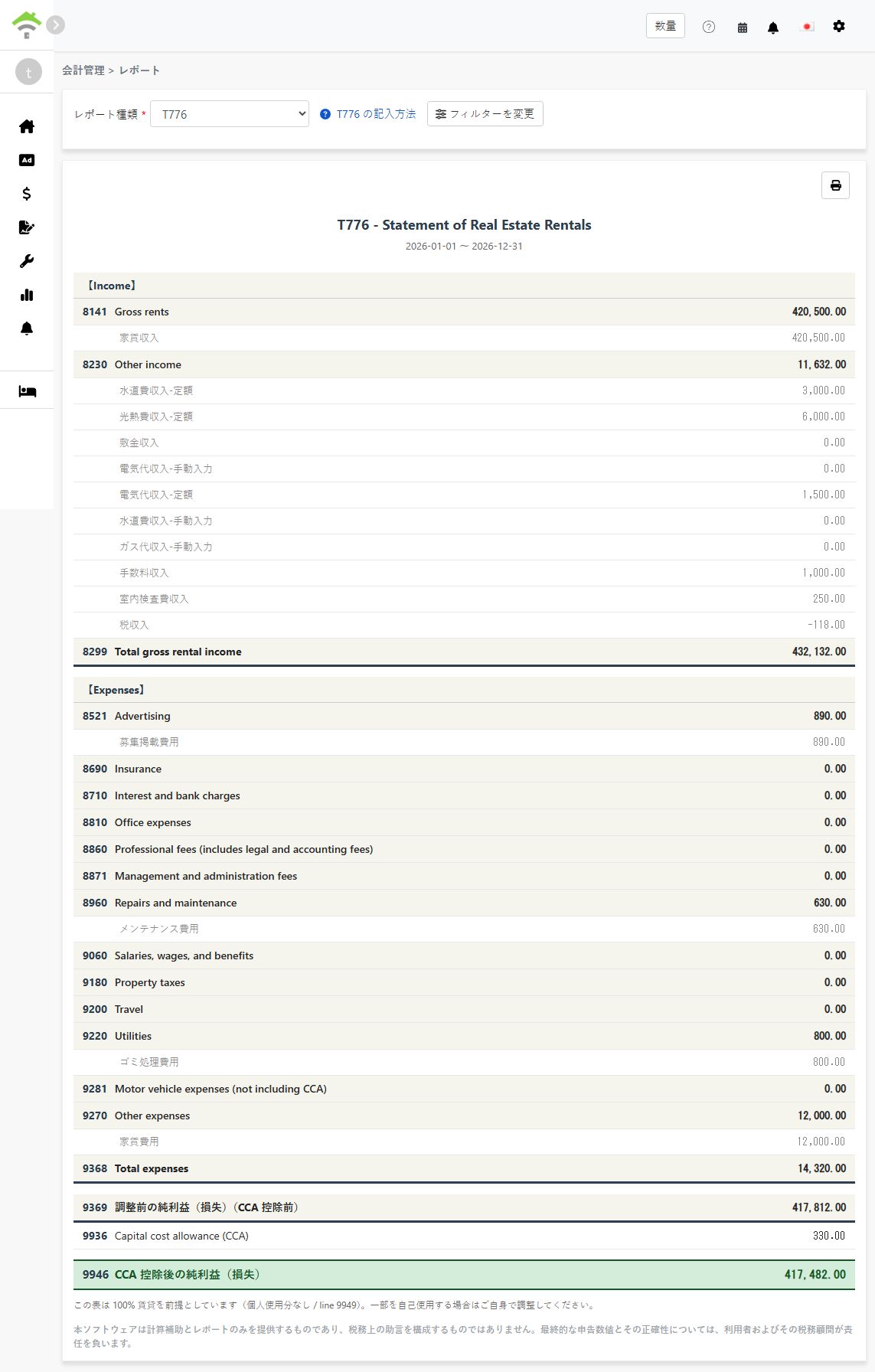
Step 3: Generate Report
  • After confirming the CCA amount, click "Generate Report"
  • The system will generate a T776 report showing:
    • Income: Lines 8141-8299 - Gross rents, other income, and total gross rental income
    • Expenses: Lines 8521-9368 - Advertising, repairs, utilities, and other deductible expenses
    • Line 9369: Net income (loss) before adjustments (before CCA)
    • Line 9936: Capital cost allowance (CCA) - the amount you entered
    • Line 9946: Net income (loss) after CCA
  • Each line shows the accounts and amounts included, so you can trace every figure back to your records
  • You can print the report for your tax preparation records
Generated T776 report
💡 100% rental use assumed: This report assumes the property is fully rented out, with no personal-use portion (line 9949). If you use part of the property personally, adjust the figures manually when transferring them to the official form.

About CCA

Capital cost allowance (CCA) is the Canadian equivalent of depreciation: it lets you deduct the cost of the building and other capital property over multiple years. A few key points:

  • CCA is optional: You decide each year whether to claim it and how much (up to the maximum for the asset's class). Entering 0 simply means you are not claiming CCA this year
  • CCA cannot create or increase a rental loss: CRA rules limit the CCA claim so it cannot turn a rental profit into a loss or make an existing loss larger
  • Recapture on sale: If you sell the property for more than its depreciated value, previously claimed CCA may be added back to your income (recapture)

Because of these trade-offs, calculate your CCA amount with tax software or an accountant, then enter the result in step 2.

Frequently Asked Questions

Does the system calculate CCA for me?

No. CCA depends on the asset class, the undepreciated capital cost carried forward from prior years, and your choice of how much to claim. Calculate it with tax software or an accountant, then enter the amount on the report screen. If you are not claiming CCA this period, enter 0.

Do I have to claim CCA every year?

No. CCA is optional in Canada. Some landlords choose not to claim it to avoid recapture when selling the property. Decide with your accountant based on your situation.

I use part of the property personally. Can I use this report as-is?

Not directly. The report assumes 100% rental use and does not fill in a personal-use portion (line 9949). Adjust the expense figures for the personal-use share manually when transferring them to the official form.

Why is one of my expense lines showing 0?

Please ensure the relevant accounts in your chart of accounts are mapped to the corresponding T776 line, and that the transactions were recorded within the selected report period. Only mapped accounts are included in each line's total.

Can I select multiple properties in one report?

No. Each report covers one property. If you own several rental properties, generate one report per property and combine the figures when completing your return.

T776 Field Reference

【Income】

Line Field Name Description
8141 Gross rents Total rental income received
8230 Other income Other rental-related income (e.g., utility income charged to tenants)
8299 Total gross rental income Sum of gross rents and other income

【Expenses】

Line Field Name Description
8521 Advertising Advertising costs to find tenants
8960 Repairs and maintenance Repairs and maintenance costs
9060 Salaries, wages, and benefits Wages and benefits paid to employees
9180 Property taxes Property taxes paid for the rental property
9200 Travel Travel costs related to managing the rental
9220 Utilities Utility costs paid by the landlord (e.g., fuel, electricity, water)
9281 Motor vehicle expenses (not including CCA) Vehicle costs related to the rental, excluding CCA
9270 Other expenses Other deductible expenses not listed above
9368 Total expenses Sum of all expense lines

【Net Income】

Line Field Name Description
9369 Net income (loss) before adjustments Total income - total expenses (before CCA)
9936 Capital cost allowance (CCA) The CCA amount you entered in step 2
9946 Net income (loss) after CCA Line 9369 - line 9936
✅ Start using the T776 report feature today and make your Canadian rental property tax preparation easier!