📄 Panimula sa Operating Environment: Samantalahin ang limang minuto upang maunawaan ang pangunahing screen, at alamin kung saan gagawin ang bawat bagay 📄 Paano gamitin ang Property Overview sa RentPackage para mabilisang masubaybayan ang estado ng buong gusali 📄 Magdagdag ng managed property: mula sa pagbuo ng property, owner, unang billing hanggang sa online signing, tapusin sa isang proseso 📄 Paglipat at Pagkontrata ng Tenant: Itakda ang rental period, deposito, at utility fees; awtomatikong nalilikha ang cycle ng pagbabayad. 📄 Tenant ledger operations: Payment reconciliation, partial payments, meter readings, and deposits, lahat ng pang-araw-araw na rent collection ay nandirito. 📄 Paglalarawan ng Paglipat ng May-ari 📄 Pasadyang abiso sa pagpaparenta: Mga paalala sa pagbabayad ng renta, pag-expire ng lease, ipapadala sa tamang tao sa tamang oras 📄 Paano mabilisang tantiyahin ang kita sa renta para sa susunod na buwan at buong taon gamit ang Estimadong Koleksyon sa RentPackage 📄 Tulong sa Compliance at Paglilinaw ng Pananagutan 📄 Paliwanag ng tampok ng template ng kontrata 📄 Pagpapaliwanag sa Katangian ng Subleasing 📄 Paglalarawan ng Bahaging Pagbabayad 📄 Paliwanag sa Tampok ng Paunang Bayad na Account 📄 Paglalarawan ng Panahon ng Pag-upa 📄 Paglilinaw ng Tampok ng Pagsingil 📄 Paglilinaw ng Tampok na Periodikong Pagsingil 📄 Panimula ng Tampok ng Reservasyon 📄 Gabay sa Pagsasaayos ng Elektronikong Kontrata 📄 Gabay sa setting ng management fee para sa property management company 📄 Bakit itinuturing na pananagutan ang mga Deposito at Paunang Bayad sa accounting? 📄 Panimula ng RentPackage General Edition 📄 Pagsasanay sa Pagsasaayos ng Komisyon 📄 Bakit kailangan ng bawat landlord at real estate agent ng isang automated tenant management software? 📄 Paano maayos na i-handle ang palitan ng salapi kung ang upa ay nakapresyo sa euro? 📄 Pag-file ng Buwis sa US - Gabay sa Schedule E na Form ng Buwis 📄 Pag-file ng Buwis sa UK - Gabay sa SA105 na Form ng Buwis 📄 Paano paganahin ang Stripe online na koleksyon ng upa sa RentPackage 📄 Paano gamitin ang kalendaryo upang mag-iskedyul ng abiso sa tenant: Sa halimbawa ng anunsyo ng brownout 📄 Paano i-set up ang Logo ng Agency upang makikita ito sa Email notifications at contract PDFs na nagpapakita ng iyong brand 📄 Ano ang insurance sa upa? May kabayaran para sa hindi nabayarang upa, at pinapamahalaan ang polisa kasabay ng kontrata sa pag-upa 📄 Gabay sa User para sa Anlage V German Rental Income Tax Report 📄 Gabay sa User para sa T776 Canadian Rental Income Tax Report 📄 PIT-28 Gabay sa Ulat ng Buwis sa Pag-upa ng Poland 📄 Paano bumuo ng Australian Rental Tax Schedule (Rental Schedule) sa RentPackage na may ATO categorization ng kita at gastos 📄 Paano gamitin ang Romanian Rental Income Tax Report (Declarația Unică 212) sa RentPackage 📄 Paano bumuo ng SZJA rental income declaration data sa RentPackage, isang click para ayusin ang eSZJA report figures. 📄 Pahayag ng Kita at Pagkawala: Rentang kita at gastusin ng bawat ari-arian, bawat may-ari, awtomatikong kinakalkula kung gaano karami ang kita 📄 Balanse ng Yaman: Gaano karaming bank balance ang pag-aari ng tenants? Tingnan agad ang deposito at advance. 📄 Cash Flow Statement: Gaano kalaki talaga ang dinagdag sa cash ng account sa panahon ng pagkolekta ng renta? 📄 Paano bumuo ng General Ledger sa RentPackage, awtomatikong isama ang mga renta at transaksyon ng property 📄 Manual na entry: pag-ayos, insurance, depreciation, mga transaction sa labas ng regular na panahon ng accounting ay pwedeng i-record. 📄 Pasadyang abiso sa pagpaparenta: Mga paalala sa pagbabayad ng renta, pag-expire ng lease, ipapadala sa tamang tao sa tamang oras 📄 Bakit makakatipid ng oras at gastos ang property management software?

Gabay sa User para sa T776 Canadian Rental Income Tax Report

Quick Navigation

What is T776?

T776 (Statement of Real Estate Rentals) is the Canadian rental income form required by the Canada Revenue Agency (CRA). It is filed as part of your T1 personal income tax return. If you earn rental income in Canada, you need to complete this form each year to report your rental income and related expenses.

📅 Canadian Tax Year: The calendar year, 1 January to 31 December.

RentPackage provides a T776 report feature that automatically summarizes your rental income and expenses by line number, making Canadian tax preparation simple and efficient.

How to Use

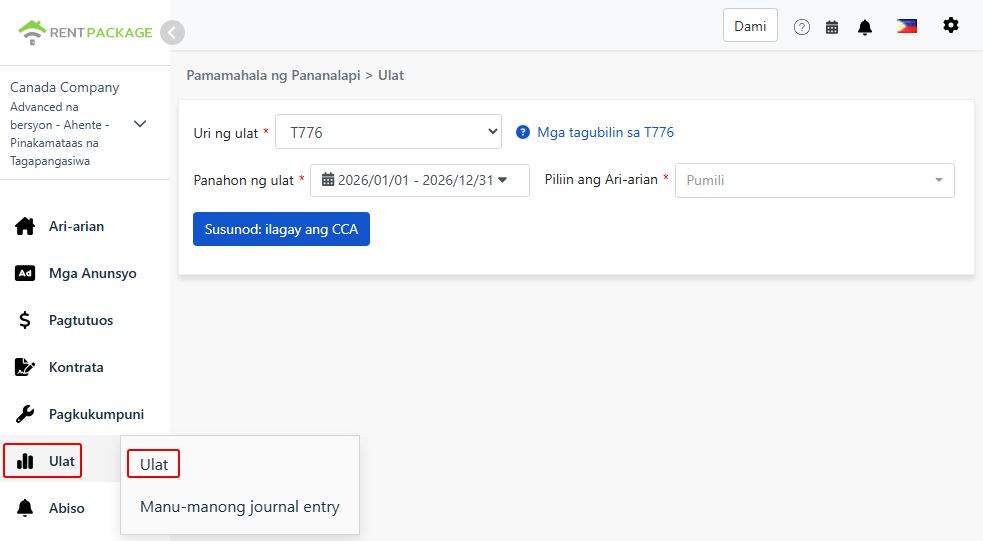
Step 1: Select Report Type, Period and Property
  • Access the Report: Go to function list → Reports → Select "T776" as the report type
  • Select Report Period: Select the calendar year you are filing for, e.g., "2026/01/01 - 2026/12/31"
  • Choose Property: Select the property for this report
Select T776 as the report type

After selection, click "Next: enter CCA".

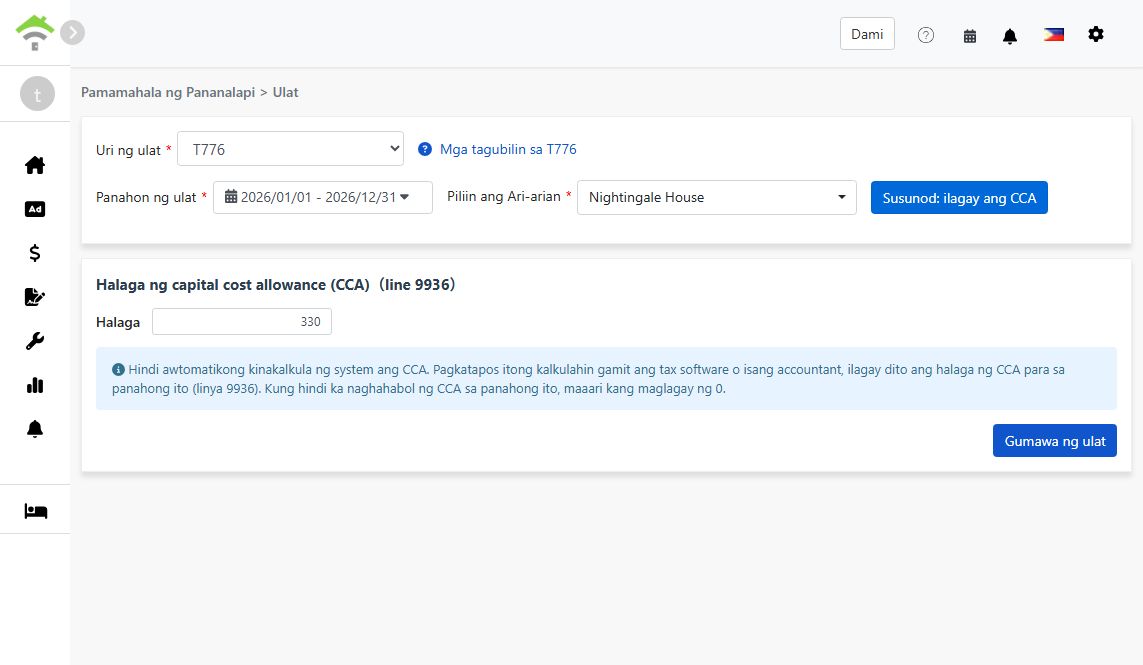
Step 2: Enter Capital Cost Allowance (CCA, Line 9936)
⚠️ Important: The system does not calculate CCA automatically. After calculating it with tax software or an accountant, enter this period's CCA amount here (line 9936). If you are not claiming CCA this period, enter 0.
Enter the CCA amount for line 9936
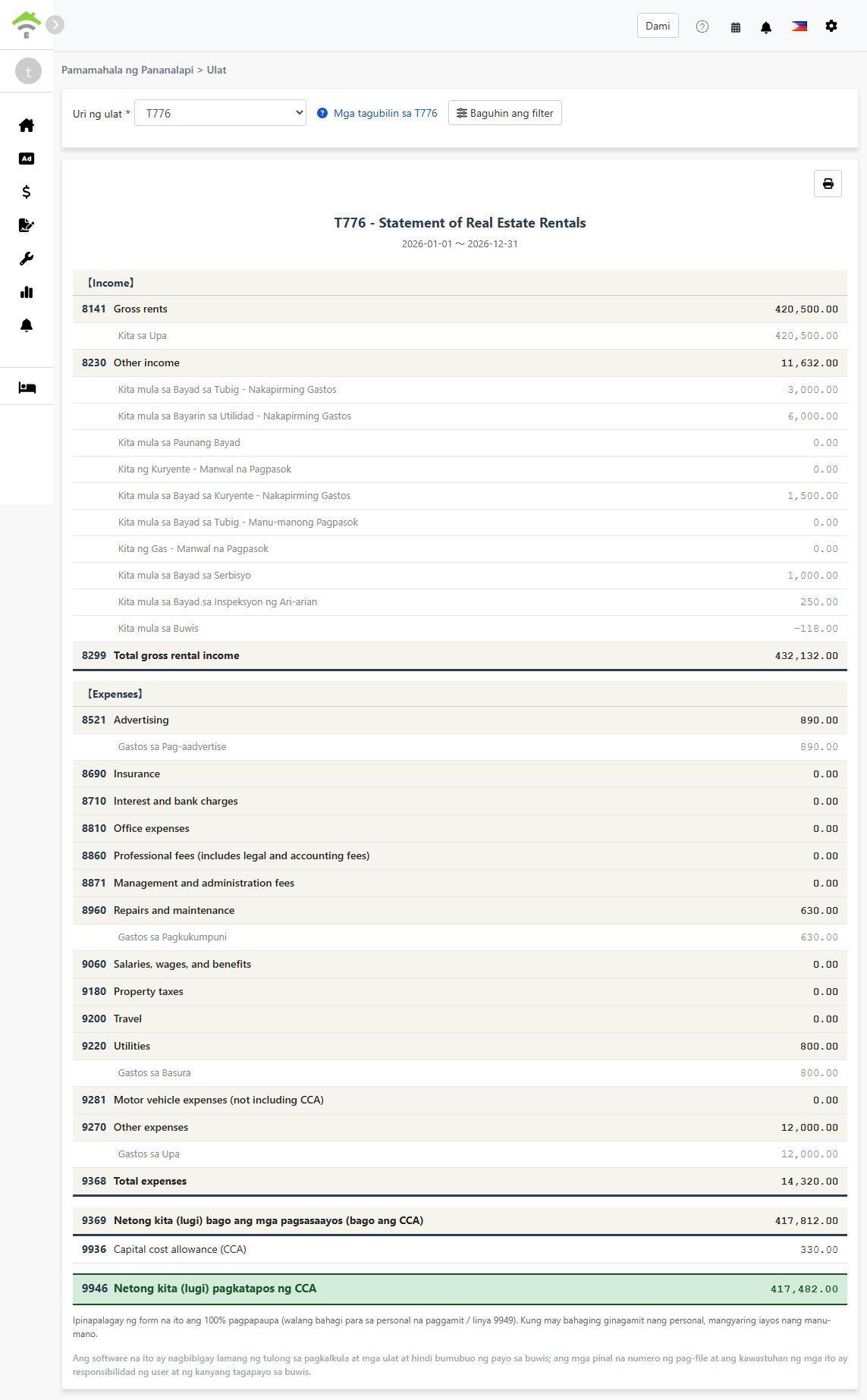
Step 3: Generate Report
  • After confirming the CCA amount, click "Generate Report"
  • The system will generate a T776 report showing:
    • Income: Lines 8141-8299 - Gross rents, other income, and total gross rental income
    • Expenses: Lines 8521-9368 - Advertising, repairs, utilities, and other deductible expenses
    • Line 9369: Net income (loss) before adjustments (before CCA)
    • Line 9936: Capital cost allowance (CCA) - the amount you entered
    • Line 9946: Net income (loss) after CCA
  • Each line shows the accounts and amounts included, so you can trace every figure back to your records
  • You can print the report for your tax preparation records
Generated T776 report
💡 100% rental use assumed: This report assumes the property is fully rented out, with no personal-use portion (line 9949). If you use part of the property personally, adjust the figures manually when transferring them to the official form.

About CCA

Capital cost allowance (CCA) is the Canadian equivalent of depreciation: it lets you deduct the cost of the building and other capital property over multiple years. A few key points:

  • CCA is optional: You decide each year whether to claim it and how much (up to the maximum for the asset's class). Entering 0 simply means you are not claiming CCA this year
  • CCA cannot create or increase a rental loss: CRA rules limit the CCA claim so it cannot turn a rental profit into a loss or make an existing loss larger
  • Recapture on sale: If you sell the property for more than its depreciated value, previously claimed CCA may be added back to your income (recapture)

Because of these trade-offs, calculate your CCA amount with tax software or an accountant, then enter the result in step 2.

Frequently Asked Questions

Does the system calculate CCA for me?

No. CCA depends on the asset class, the undepreciated capital cost carried forward from prior years, and your choice of how much to claim. Calculate it with tax software or an accountant, then enter the amount on the report screen. If you are not claiming CCA this period, enter 0.

Do I have to claim CCA every year?

No. CCA is optional in Canada. Some landlords choose not to claim it to avoid recapture when selling the property. Decide with your accountant based on your situation.

I use part of the property personally. Can I use this report as-is?

Not directly. The report assumes 100% rental use and does not fill in a personal-use portion (line 9949). Adjust the expense figures for the personal-use share manually when transferring them to the official form.

Why is one of my expense lines showing 0?

Please ensure the relevant accounts in your chart of accounts are mapped to the corresponding T776 line, and that the transactions were recorded within the selected report period. Only mapped accounts are included in each line's total.

Can I select multiple properties in one report?

No. Each report covers one property. If you own several rental properties, generate one report per property and combine the figures when completing your return.

T776 Field Reference

【Income】

Line Field Name Description
8141 Gross rents Total rental income received
8230 Other income Other rental-related income (e.g., utility income charged to tenants)
8299 Total gross rental income Sum of gross rents and other income

【Expenses】

Line Field Name Description
8521 Advertising Advertising costs to find tenants
8960 Repairs and maintenance Repairs and maintenance costs
9060 Salaries, wages, and benefits Wages and benefits paid to employees
9180 Property taxes Property taxes paid for the rental property
9200 Travel Travel costs related to managing the rental
9220 Utilities Utility costs paid by the landlord (e.g., fuel, electricity, water)
9281 Motor vehicle expenses (not including CCA) Vehicle costs related to the rental, excluding CCA
9270 Other expenses Other deductible expenses not listed above
9368 Total expenses Sum of all expense lines

【Net Income】

Line Field Name Description
9369 Net income (loss) before adjustments Total income - total expenses (before CCA)
9936 Capital cost allowance (CCA) The CCA amount you entered in step 2
9946 Net income (loss) after CCA Line 9369 - line 9936
✅ Start using the T776 report feature today and make your Canadian rental property tax preparation easier!