📄 操作界面介绍:五分钟看懂主画面,知道每件事去哪里操作 📄 如何在 RentPackage 使用房源总览快速掌握整栋房屋状态 📄 新增代管房源:从建立物业、业主、开账到线上签约,一次完成 📄 房客搬入与签约:租期、押金、水电杂费一次设置,账期自动生成。 📄 房客账期操作:收款核销、部分付款、抄表与押金,日常收租都在这一页 📄 业主结转功能说明 📄 租赁自定义通知:租金提醒、租约到期,系统在合适的时间发送给合适的人 📄 如何在 RentPackage 中使用预估收款快速预测下个月和全年的租金收入 📄 合规协助与责任说明 📄 租约模板功能说明 📄 二房东功能说明 📄 部分付款功能说明 📄 预收款功能说明 📄 租金账期功能说明 📄 开账功能说明 📄 周期性账期功能说明 📄 预定功能介绍 📄 电子合约设定教学 📄 代管公司的管理费设定教学 📄 为什么押金和预收账款在会计上属于负债科目? 📄 RentPackage 通用版介绍 📄 佣金拆分设置教学 📄 为什么每个房东与中介都需要一套租户管理自动化软件? 📄 当租金以欧元定价时,如何正确处理汇率? 📄 美国报税申报 - Schedule E 报税报表使用说明 📄 英国报税申报 - SA105 报税报表使用说明 📄 如何在 RentPackage 开通 Stripe 在线收租 📄 如何使用日历安排通知租客:以停电通知为例 📄 如何设置中介公司LOGO,让Email通知与合约PDF显示您的品牌 📄 什么是租金保险?欠租有补偿,保单与租约一起管理 📄 如何在 RentPackage 中使用德国租金所得税报表(Anlage V) 📄 T776 加拿大出租所得税报告用户指南 📄 PIT-28 波兰出租所得税报告使用指南 📄 如何在 RentPackage 生成澳大利亚租赁报税表(Rental Schedule),收支自动对应 ATO 申报分类 📄 如何在 RentPackage 使用罗马尼亚租金所得税报表(Declarația Unică 212) 📄 如何在 RentPackage 产生匈牙利 SZJA 出租所得申报数据,一键整理 eSZJA 填报数字 📄 Profit and Loss Statement: Auto-calculate rental income and expenses per property, per owner. 📄 资产负债表:银行余额中有多少其实是租客的?押金与预收款一目了然 📄 现金流量表:收租这段期间,账上的现金实际多了多少? 📄 如何在 RentPackage 生成总分类账,自动汇总租金与物业账务 📄 手动输入分录:维修、保险、折旧及账期外的收支也可入账。 📄 租赁自定义通知:租金提醒、租约到期,系统在合适的时间发送给合适的人 📄 为什么物业管理软件可以大幅节省时间与成本?

SA105 UK Property Income Tax Report User Guide

Quick Navigation

What is SA105?

SA105 is the UK property income supplement form required by HM Revenue and Customs (HMRC). It is filed as part of your Self Assessment Tax Return. If you own rental properties in the UK, you need to complete this form each year to report your rental income and related expenses.

📅 UK Tax Year: 6 April to 5 April of the following year. For example, the 2025/2026 tax year runs from 6 April 2025 to 5 April 2026.

RentPackage provides an SA105 report feature that automatically summarizes your rental income and expenses, making UK tax preparation simple and efficient.

How to Use

Step 1: Select Report Type and Tax Year
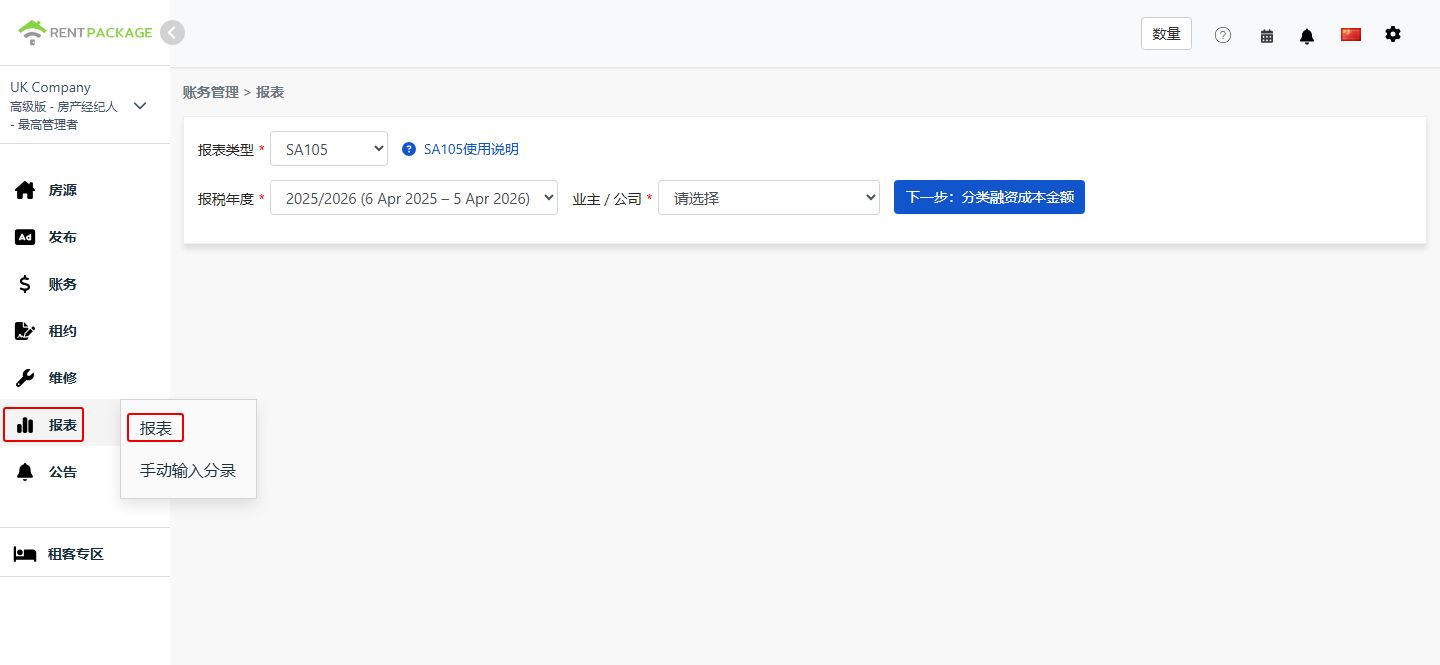
  • Access the Report: Go to function list → Reports → Select "SA105" as the report type
  • Select Tax Year: The dropdown will display complete tax year ranges, e.g., "2025/2026 (6 Apr 2025 - 5 Apr 2026)"
Select SA105 as the report type
💡 Tip: The system defaults to the most recently completed tax year. For example, if it's currently June 2026, the system will pre-select the 2025/2026 tax year.
Step 2: Select Owner or Company

In the "Owner/Company" dropdown, select the entity for which you want to generate the report:

  • Company: If you hold properties under a company name, select the corresponding company
  • Owner: If you are a self-managing landlord or sublandlord, select the corresponding owner name

After selection, click "Next: Allocate Finance Costs".

Step 3: Allocate Finance Costs (Box 26 / Box 44)
⚠️ Important: Unlike the US Schedule E, UK tax returns do not have a depreciation field. However, there is a special requirement: Loan interest and finance costs must be allocated between residential (Box 44) and non-residential (Box 26) properties.

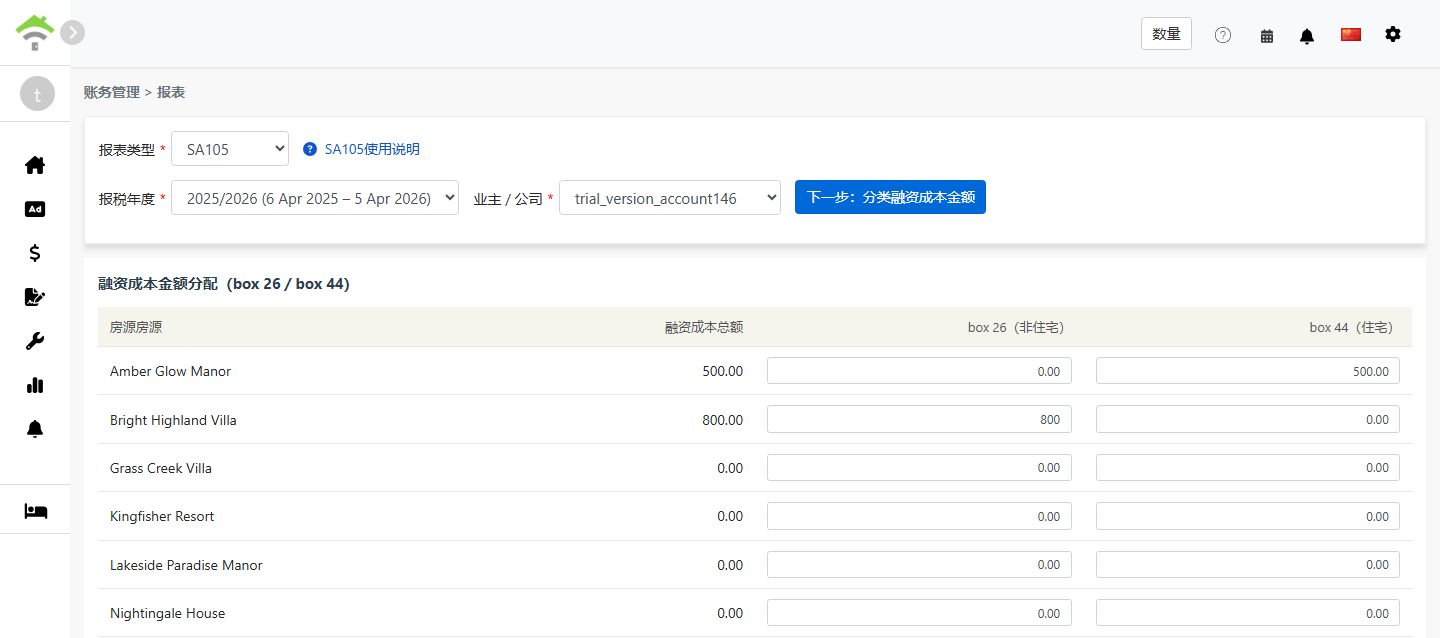
When you click "Allocate Finance Costs", the system retrieves the total amount from all accounts mapped to "Box 26/44 Finance Costs" and displays a screen for you to allocate the amount between Box 26 and Box 44:

Property Total Finance Costs Box 26 (Non-Residential) Box 44 (Residential)
123 High Street 0.00

Allocation Rules:

  • Box 26 (Non-Residential): Fully deductible as an expense against rental income
  • Box 44 (Residential): Not directly deductible; instead receives a 20% tax credit
  • The system defaults all amounts to Box 44. For each property, Box 26 + Box 44 must equal the total finance costs
  • For mixed-use properties (residential and commercial), allocate the amounts proportionally based on usage
Allocate Finance Costs (Box 26 / Box 44)
💡 Different from Schedule E: The total finance cost amount cannot be entered manually on this page. It can only come from lease periods or journal entries. This design ensures accuracy and prevents discrepancies between entered amounts and actual accounting records.
Step 4: Generate Report
  • After confirming the finance cost allocation is correct, click "Generate Report"
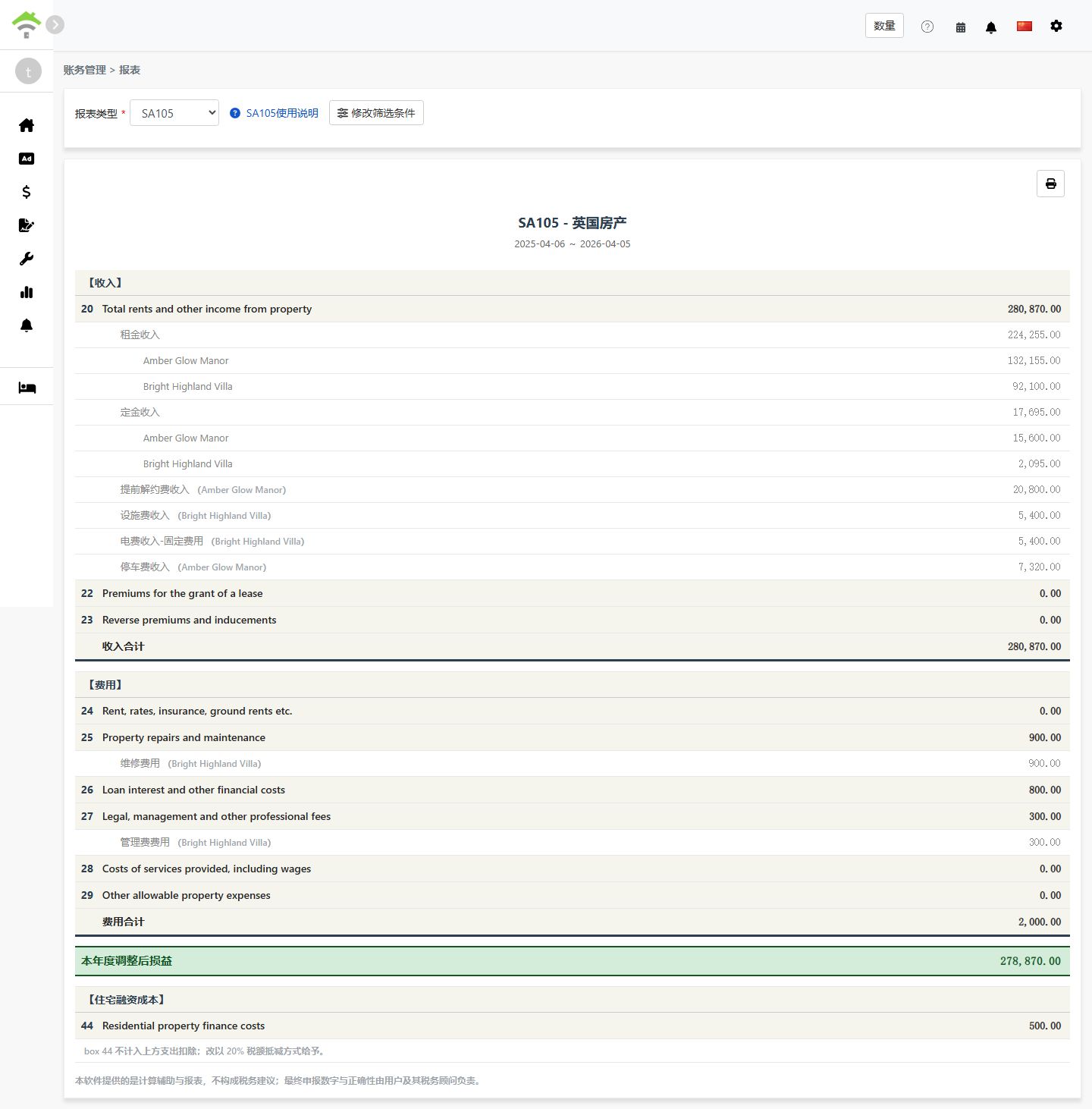
  • The system will generate an SA105 report showing:
    • Income: Lines 20-23 - Rental income, lease premiums, etc.
    • Expenses: Lines 24-29 - Allowable property expenses
    • Adjusted Profit/Loss for the Year: Total Income - Total Expenses
    • Residential Finance Costs: Line 44 - Residential mortgage interest (20% tax credit)
  • You can print the report or export it as a PDF for your tax preparation records
Generate SA105 Report

Box 26 vs Box 44 Explained

Item Box 26 (Non-Residential) Box 44 (Residential)
Property Type Commercial properties, offices, shops, etc. Residential lettings
Tax Treatment Fully deductible as an expense Not deductible; receives 20% tax credit instead
Report Location Line 26: Loan interest and other financial costs Line 44: Residential property finance costs

Example:

Suppose you have a mixed-use property with total loan interest of £10,000, where 30% is for commercial use and 70% is for residential use:

  • Box 26 (Non-Residential): £10,000 × 30% = £3,000 (fully deductible)
  • Box 44 (Residential): £10,000 × 70% = £7,000 (20% tax credit = £1,400)

How to Set Up Chart of Accounts for SA105?

To map an account to finance costs:

  1. Go to Accounting → Chart of Accounts
  2. Find the account you want to map (e.g., Loan Interest)
  3. Set the SA105 Box to "Box 26/44 Finance Costs". The system will then automatically include this account's amounts in the finance costs total

To add finance cost transactions (two methods):

  1. Add to Lease Period: Add a transaction in the property's lease period using an account mapped to "Box 26/44 Finance Costs"
  2. Add Journal Entry: Create a journal entry using an account mapped to "Box 26/44 Finance Costs"

Amounts added through either method will be automatically included in the finance costs total.

Frequently Asked Questions

Does UK tax allow depreciation deductions?

No. Unlike the US Schedule E, UK property income tax does not have a depreciation field. In the UK, property depreciation is typically only relevant when calculating Capital Gains Tax upon sale of the property.

Why is my total finance cost showing as 0?

Please ensure your chart of accounts is correctly configured with SA105 Box set to "Box 26/44 Finance Costs". If not configured, the system will not include that account's amounts in the finance costs total.

Can Box 26 + Box 44 exceed the total finance costs?

No. The system validates that for each property, Box 26 + Box 44 must equal the total finance costs for that property.

Can I manually enter the total finance cost amount on the report page?

No. Unlike Schedule E depreciation, SA105 finance cost totals can only come from lease periods or journal entries. This design ensures accuracy and prevents discrepancies with your actual accounting records.

Why does the UK tax year run from 6 April to 5 April?

This is the official UK tax year as defined by HMRC. Unlike the standard calendar year (January to December), the UK tax year begins on 6 April each year and ends on 5 April of the following year.

SA105 Field Reference

【Income】

Box Field Name Description
20 Total rents and other income from property Total rental income and other property income
22 Premiums for the grant of a lease Premiums received for granting a lease
23 Reverse premiums and inducements Reverse premiums and inducements received

【Expenses】

Box Field Name Description
24 Rent, rates, insurance, ground rents etc. Ground rent, rates, insurance premiums
25 Property repairs and maintenance Repairs and maintenance costs
26 Loan interest and other financial costs Finance costs for non-residential properties (fully deductible)
27 Legal, management and other professional fees Legal fees, property management fees, accountant fees
28 Costs of services provided, including wages Service costs including employee wages
29 Other allowable property expenses Other allowable expenses not listed above

【Residential Finance Costs】

Box Field Name Description
44 Residential property finance costs Finance costs for residential properties (20% tax credit)
✅ Start using the SA105 report feature today and make your UK rental property tax preparation easier!