
Profit and Loss Statement: Auto-calculate rental income and expenses per property, per owner.
本篇快速链接
What can the Profit and Loss Statement do for you?
The Profit and Loss Statement summarizes all income and expenses over a period, resulting in the net profit. The system automatically categorizes and totals amounts for rent, utilities, fees, cleaning, etc., based on daily recorded accounts, so you don't need to create a spreadsheet yourself.
Want to know how much an owner earned in the first half of the year, whether a property made or lost money this quarter, or check annual income and expenses before tax season? Select the criteria and click a button for the answer.
How to Operate
Step 1: Set Report Conditions
Go to the report page on the feature list (click Reports in the left menu, then click the report), and set the following conditions in order:
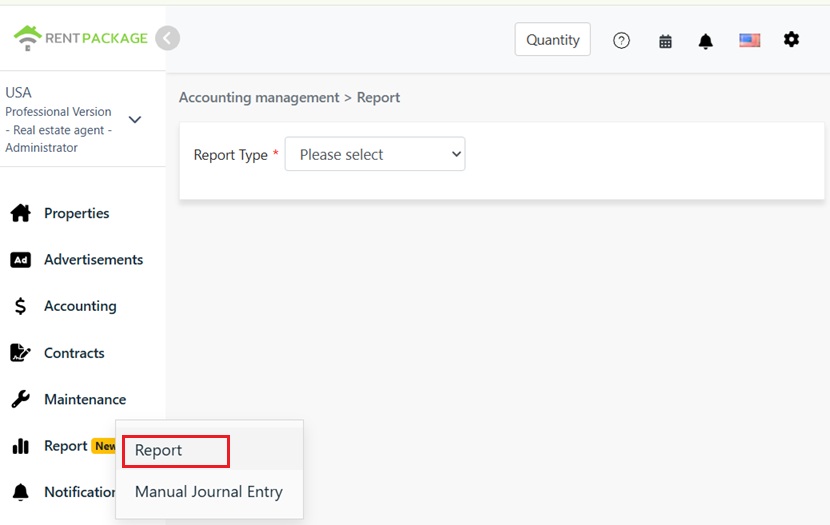
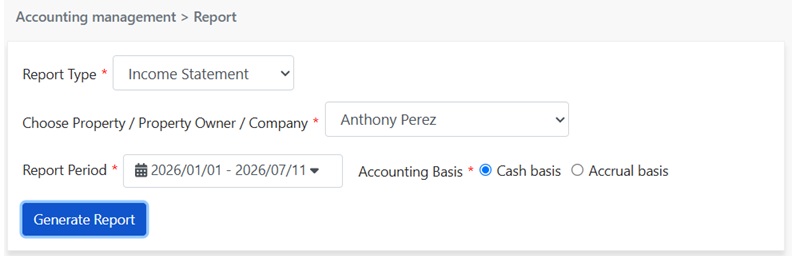
- Report Type: Select Profit and Loss Statement.
- Select Property/Owner/Company: Decide the report's scope: View a single property, all properties under an owner's name, or the entire company's income and expenses.
- 报表期间: 自由选择起止日期,不限整年或整月。想看某个租约期间、某一季度或任意区间都可以。
- 会计基础: 选择现金制或权责制,两者的差异见下一节说明。
现金制与权责制怎么选?
同一笔租金,用两种基础产生的报表,金额可能落在不同期间:
- 现金制: 以实收款日归属期间。钱实际入账或付出的那天算在哪个期间,就计入那个期间的报表。想看实际现金进出,选现金制。
- 权责制: 以应收款日归属期间。账款的应收款日落在哪个期间,就计入那个期间,与实际收付日无关。想看各期间真实的经营成果,选权责制。
步骤二:生成报告
点击生成报告,系统将根据条件生成损益表,内容分为三个部分:
- 收入: 期间内的所有收入科目及金额,如租金收入、水电费收入、手续费收入、清洁费收入,最后汇总为总收入。
- 支出: 期间内的所有费用科目及金额,汇总为总支出。期间内无任何费用记录时,将显示本期无记录。
- 本期净利: 总收入减去总支出,即为这一期间的损益结果。
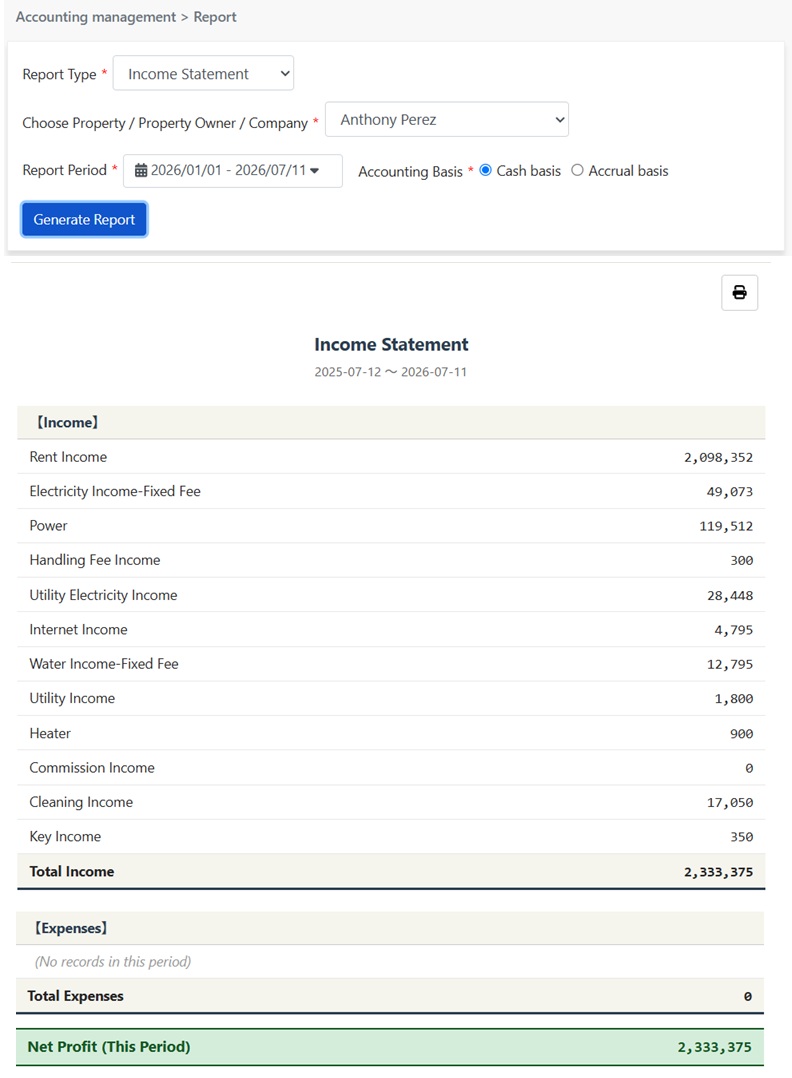
点击报告右上角的打印图标,可直接打印或另存为PDF,供会计或业主留存。
报告数字来源?
损益表无需另行输入数据,金额来自您平时在系统中的两种记录:
- Tenant Billing Period: During the lease billing period, rent, utilities, miscellaneous fees, etc., are automatically entered into the corresponding income or expense line by category.
- Manual Entry: Income and expenses outside the billing period (such as repair costs, insurance fees, depreciation) are recorded through manual entry and automatically included in reports.
In other words, if you keep your accounts well, the income statement is ready-made, without needing a separate final organization.
FAQ
Why are the amounts in cash basis and accrual basis reports different?
This is normal. The two bases attribute the same transaction to different periods: cash basis considers the actual payment date, while accrual basis considers the transaction's billing period. With cross-period payments (e.g., late rent, prepaid amounts), single period amounts will differ between reports, but the total over a longer period will match.
Can I view a specific owner or property only?
Yes. The dropdown menu allows you to select a single property, owner, or company. When reporting to an owner, the management company can directly select the owner to generate the report.
What is the difference between an income statement and a balance sheet?
The concept of time differs. An income statement shows the results over a period, like how much was earned and spent, and net income from January 1 to June 30, similar to a movie clip. A balance sheet shows the financial state at a specific point, like June 30, how much assets and liabilities exist with tenants, like a photograph. To know if you made money in the past half year, check the income statement; to know how much of tenant money is held and the asset structure, check the balance sheet.
为什么押金和预收的电费款没有出现在损益表?
因为这两笔钱的所有者是租客,不是您的收入。押金在退租时要退还给租客;预收电费款是租客先存放一笔钱,用来逐期抵扣实际产生的电费,避免每月抄表结算的麻烦,退租时剩余金额同样要结清退还。因此收到时,这两笔在账上属于负债,会出现在资产负债表的负债区,而不是损益表。之后每期实际抵扣电费时,抵扣的金额才会以电费收入认列,出现在当期的损益表。