
如何在 RentPackage 使用房源总览快速掌握整栋房屋状态
一、什么是房源总览?
房源总览就像酒店的“房态图”,将整栋房源中所有房间的出租状态、租金、押金与租约信息整理在同一页,让您不必逐间点开房间,就能一眼掌握全貌。
Property overview is ideal for:
- Routine Inspections: Quickly see which are overdue, upcoming rent collections, and vacant properties available for leasing.
- Company Meetings: In meetings with agencies or property management companies, directly use the overview to report property status, such as expiring leases, reserved units, or viewings needed.
- Print Archive: One-click to print the status of the entire building for paper meetings and archiving.
二、开启房源总览
First, [ follow ] the property (click the eye icon on the top right of the property card). Besides yourself, you can add employees to follow and co-manage the property; only followed members can view the property overview.
Then click the “⋯” menu on the property card, select “[ Property ] → “[ Property Overview ] to open.
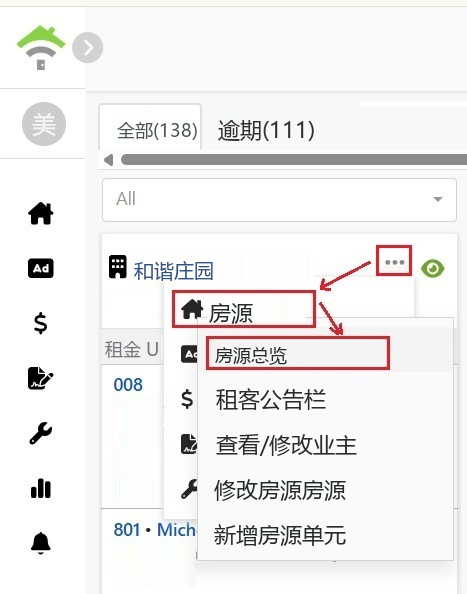
三、总览页面内容说明
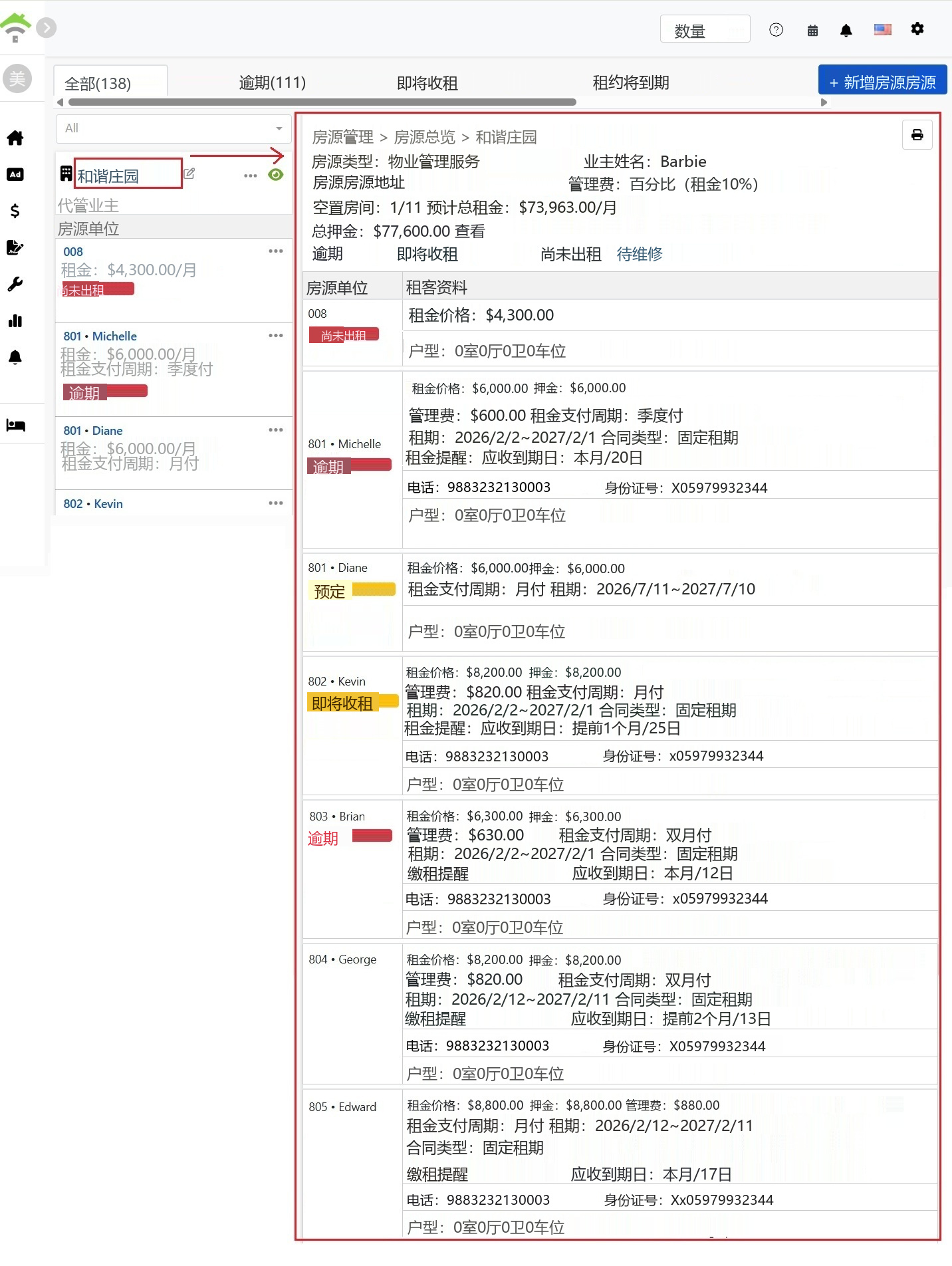
The top of the overview page displays basic property info and overall statistics:
- Basic Property Information: 刊登类型、业主姓名、房源地址、管理费计算方式。
- 空房数: 显示目前空房间数 / 总房间数,例如 1/11。
- 预估总租金: 整栋房源每月租金的预估总额。
- 总押金: 整栋房源目前收取的押金总额,点击[ 查看 ]可连到「业主结转」→「押金账户」查看每一笔押金明细。
- 状态统计: 各状态的房间数量一目了然,包含逾期、即将收租、空房、预定、维修中、未抄表。
提醒:
「自管房源」与「二房东房源」因为没有向业主收取管理费,总览页不会显示管理费栏位。
四、房间明细表
总览页下方会逐间列出每个房间的详细信息:
- Room Status: Status labels for vacancies, overdue, upcoming rent, reservations, etc., with overdue days displayed.
- Rent & Deposit: Rent, deposit, and management fee amounts per room.
- Lease Info: Rent cycle (monthly, bimonthly, quarterly, annually), lease start and end dates, contract type.
- Rent Reminder & A/R Date: Shows rent reminder settings and expected collection date for the room, e.g., "Notify both parties 3 days in advance|Expected collection date: 1st of each month."
- Tenant Contact Info: Phone, ID number, domicile.
- Layout: Room and property layout with parking.
提醒:
空房会显示该房间[ 默认的租金与押金 ],方便您招租报价时直接引用。
五、打印总览表
点击总览页右上角的[ 打印 ]按钮,即可打印整份总览表。为了方便打印与阅读,总览表的数据不会分页,整栋房源的状态会完整呈现在同一份报表中。
✅ 立即开启房源总览,一页掌握整栋房源的出租状态,让开会报告与日常管理更有效率!