📄 작업 환경 소개: 5분 안에 메인 화면을 이해하고, 각 업무를 어디에서 처리해야 하는지 알 수 있습니다. 📄 RentPackage에서 부동산 개요를 사용하여 전체 빌딩 상태를 빠르게 파악하는 방법 📄 대행 관리 부동산 추가: 물건 생성, 소유주, 계정 생성부터 온라인 계약까지 한 번에 완료 📄 세입자의 입주 및 계약: 임대 기간, 보증금, 공과금 일괄 설정, 청구 주기 자동 생성 📄 세입자 정산 관리: 수금 확인, 부분 결제, 검침 및 보증금 처리 - 일상적인 임대 수납이 모두 여기에서 이루어집니다. 📄 임대인 이월 기능 설명 📄 임대 커스텀 알림: 임대료 알림, 계약 만료, 시스템이 적시에 적절한 사람에게 전송 📄 RentPackage에서 예측 수금을 사용하여 다음 달 및 연간 예상 임대 수익을 빠르게 추정하는 방법 📄 규제 준수 지원 및 책임 설명 📄 임대차계약 템플릿 기능 설명 📄 이중 임대인 기능 설명 📄 부분 결제 기능 설명 📄 선수금 기능 설명 📄 임대료 청구 기간 기능 설명 📄 청구 기능 설명 📄 주기적 청구 기간 기능 설명 📄 예약 기능 소개 📄 전자 임대 설정 가이드 📄 위탁 관리 회사의 관리비 설정 가이드 📄 보증금과 선불금이 회계상 부채로 분류되는 이유는? 📄 RentPackage 일반 안내 📄 커미션 분할 설정 가이드 📄 모든 임대인와 중개인이 왜 임대 관리 자동화 소프트웨어가 필요한가? 📄 유로로 임대료를 설정할 때 환율을 어떻게 올바르게 처리합니까? 📄 미국 세금 신고 - Schedule E 보고서 사용 설명서 📄 영국 세금 신고 - SA105 보고서 사용 설명서 📄 RentPackage에서 Stripe 온라인 결제 활성화 방법 📄 일정으로 세입자에게 알림 보내기: 정전 알림 예시 📄 중개사 로고 설정 방법 - 이메일 알림과 계약서 PDF에 브랜드 표시하기 📄 임대료 보험이란? 임대료 미납 시 보상, 보험증서는 임대 계약과 함께 관리됩니다. 📄 RentPackage에서 독일 임대 소득세 신고서(Anlage V) 사용 방법 📄 T776 캐나다 임대소득세 보고서 사용자 가이드 📄 PIT-28 폴란드 임대 소득세 보고서 사용 안내 📄 RentPackage에서 호주 임대세금 신고표(Rental Schedule) 생성하기, 수익 및 비용이 ATO 신고 분류와 자동 매칭됩니다. 📄 RentPackage에서 루마니아 임대 소득 신고서(Declarația Unică 212) 사용 방법 📄 RentPackage에서 헝가리 SZJA 임대 소득 신고 데이터를 생성하여 eSZJA 신고 숫자를 한 번에 정리하는 방법 📄 손익계산서: 각 물건 및 소유자의 임대 수입과 지출 자동 계산 📄 대차대조표: 은행 잔액 중 얼마가 임차인의 것인지? 보증금과 선수금 명확히 보기 📄 현금흐름표: 이 기간 동안 장부상의 현금이 실제로 얼마나 증가했나요? 📄 RentPackage에서 총계정원장을 생성하여 임대료 및 자산 회계 자동 집계하는 방법 📄 분개 수동 입력: 수리비, 보험, 감가상각, 회계 기간 외 수입 및 지출도 반영 가능 📄 임대 커스텀 알림: 임대료 알림, 계약 만료, 시스템이 적시에 적절한 사람에게 전송 📄 왜 부동산 관리 소프트웨어가 시간과 비용을 절감할 수 있나요?

SA105 UK Property Income Tax Report User Guide

Quick Navigation

What is SA105?

SA105 is the UK property income supplement form required by HM Revenue and Customs (HMRC). It is filed as part of your Self Assessment Tax Return. If you own rental properties in the UK, you need to complete this form each year to report your rental income and related expenses.

📅 UK Tax Year: 6 April to 5 April of the following year. For example, the 2025/2026 tax year runs from 6 April 2025 to 5 April 2026.

RentPackage provides an SA105 report feature that automatically summarizes your rental income and expenses, making UK tax preparation simple and efficient.

How to Use

Step 1: Select Report Type and Tax Year
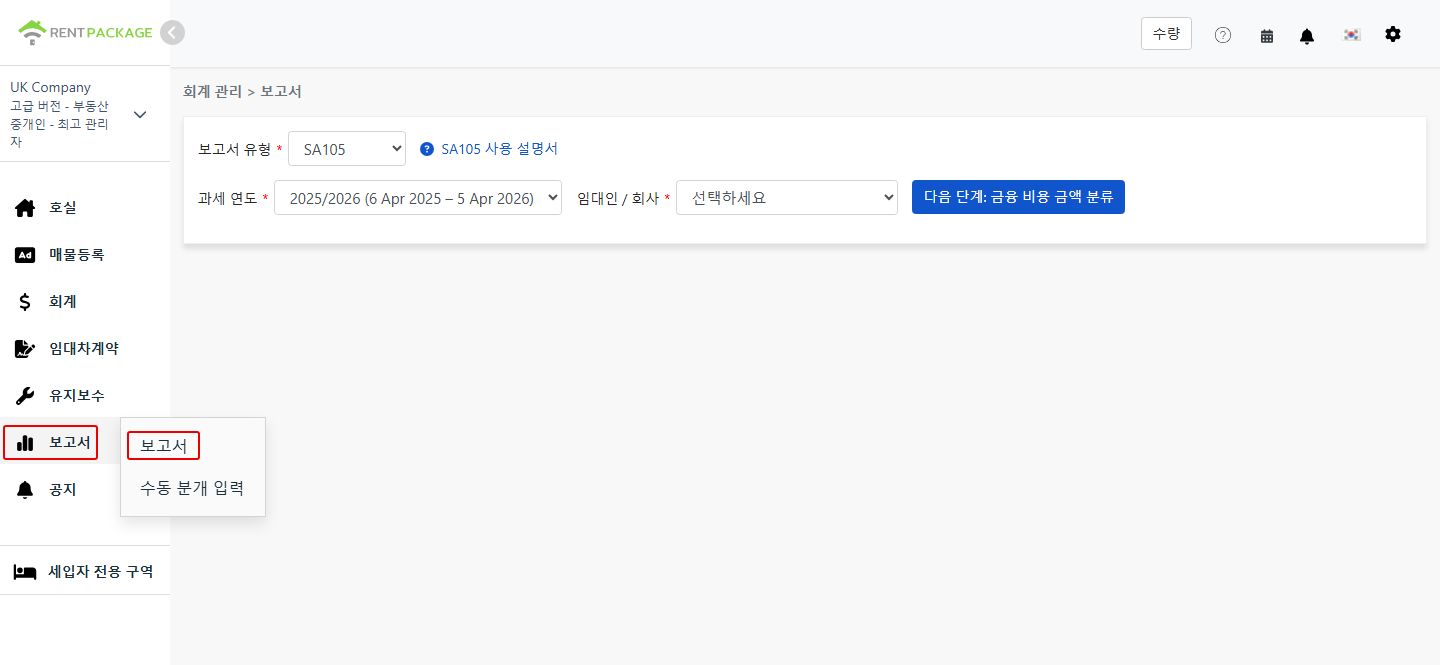
  • Access the Report: Go to function list → Reports → Select "SA105" as the report type
  • Select Tax Year: The dropdown will display complete tax year ranges, e.g., "2025/2026 (6 Apr 2025 - 5 Apr 2026)"
Select SA105 as the report type
💡 Tip: The system defaults to the most recently completed tax year. For example, if it's currently June 2026, the system will pre-select the 2025/2026 tax year.
Step 2: Select Owner or Company

In the "Owner/Company" dropdown, select the entity for which you want to generate the report:

  • Company: If you hold properties under a company name, select the corresponding company
  • Owner: If you are a self-managing landlord or sublandlord, select the corresponding owner name

After selection, click "Next: Allocate Finance Costs".

Step 3: Allocate Finance Costs (Box 26 / Box 44)
⚠️ Important: Unlike the US Schedule E, UK tax returns do not have a depreciation field. However, there is a special requirement: Loan interest and finance costs must be allocated between residential (Box 44) and non-residential (Box 26) properties.

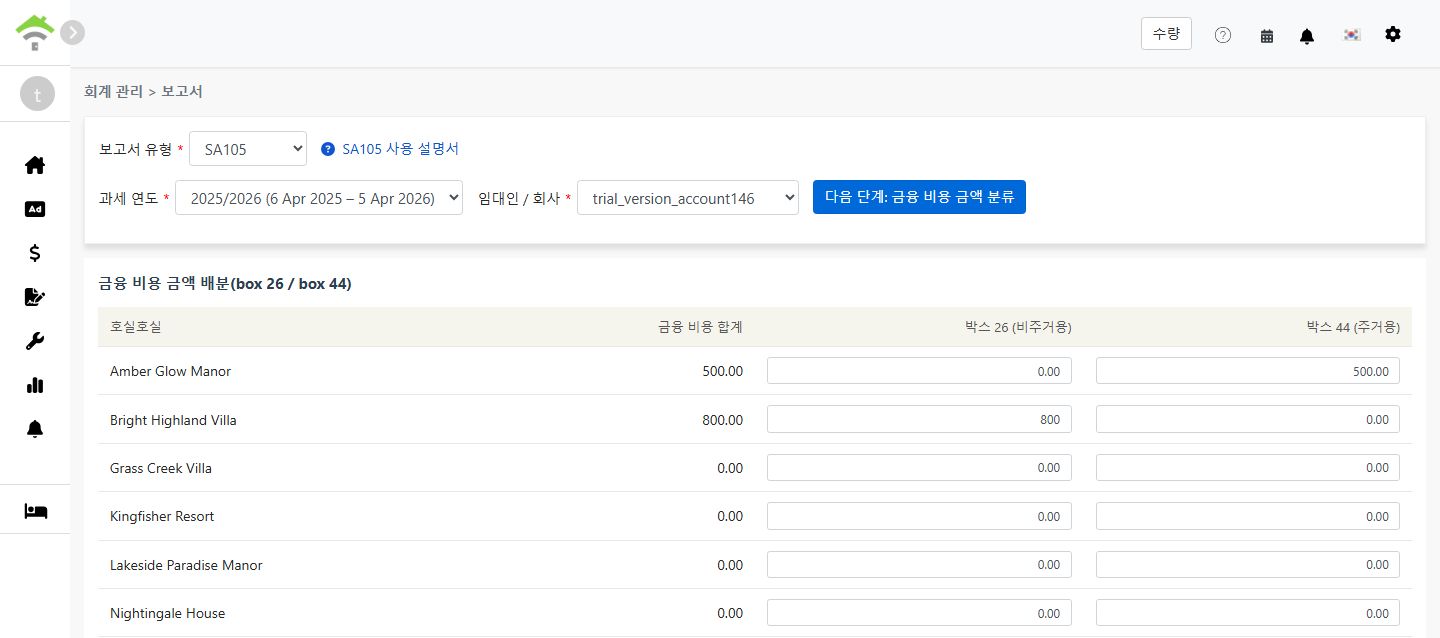
When you click "Allocate Finance Costs", the system retrieves the total amount from all accounts mapped to "Box 26/44 Finance Costs" and displays a screen for you to allocate the amount between Box 26 and Box 44:

Property Total Finance Costs Box 26 (Non-Residential) Box 44 (Residential)
123 High Street 0.00

Allocation Rules:

  • Box 26 (Non-Residential): Fully deductible as an expense against rental income
  • Box 44 (Residential): Not directly deductible; instead receives a 20% tax credit
  • The system defaults all amounts to Box 44. For each property, Box 26 + Box 44 must equal the total finance costs
  • For mixed-use properties (residential and commercial), allocate the amounts proportionally based on usage
Allocate Finance Costs (Box 26 / Box 44)
💡 Different from Schedule E: The total finance cost amount cannot be entered manually on this page. It can only come from lease periods or journal entries. This design ensures accuracy and prevents discrepancies between entered amounts and actual accounting records.
Step 4: Generate Report
  • After confirming the finance cost allocation is correct, click "Generate Report"
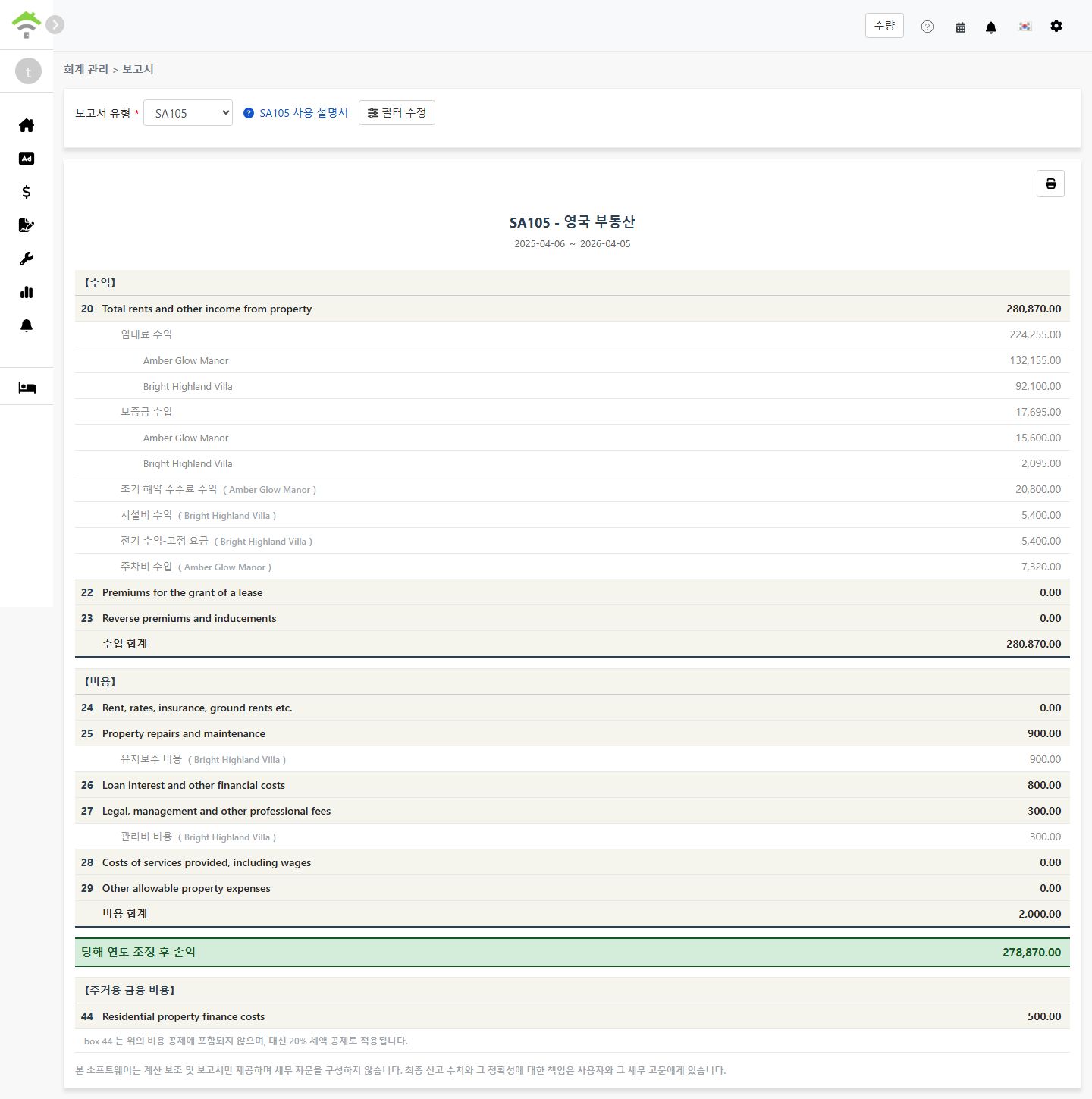
  • The system will generate an SA105 report showing:
    • Income: Lines 20-23 - Rental income, lease premiums, etc.
    • Expenses: Lines 24-29 - Allowable property expenses
    • Adjusted Profit/Loss for the Year: Total Income - Total Expenses
    • Residential Finance Costs: Line 44 - Residential mortgage interest (20% tax credit)
  • You can print the report or export it as a PDF for your tax preparation records
Generate SA105 Report

Box 26 vs Box 44 Explained

Item Box 26 (Non-Residential) Box 44 (Residential)
Property Type Commercial properties, offices, shops, etc. Residential lettings
Tax Treatment Fully deductible as an expense Not deductible; receives 20% tax credit instead
Report Location Line 26: Loan interest and other financial costs Line 44: Residential property finance costs

Example:

Suppose you have a mixed-use property with total loan interest of £10,000, where 30% is for commercial use and 70% is for residential use:

  • Box 26 (Non-Residential): £10,000 × 30% = £3,000 (fully deductible)
  • Box 44 (Residential): £10,000 × 70% = £7,000 (20% tax credit = £1,400)

How to Set Up Chart of Accounts for SA105?

To map an account to finance costs:

  1. Go to Accounting → Chart of Accounts
  2. Find the account you want to map (e.g., Loan Interest)
  3. Set the SA105 Box to "Box 26/44 Finance Costs". The system will then automatically include this account's amounts in the finance costs total

To add finance cost transactions (two methods):

  1. Add to Lease Period: Add a transaction in the property's lease period using an account mapped to "Box 26/44 Finance Costs"
  2. Add Journal Entry: Create a journal entry using an account mapped to "Box 26/44 Finance Costs"

Amounts added through either method will be automatically included in the finance costs total.

Frequently Asked Questions

Does UK tax allow depreciation deductions?

No. Unlike the US Schedule E, UK property income tax does not have a depreciation field. In the UK, property depreciation is typically only relevant when calculating Capital Gains Tax upon sale of the property.

Why is my total finance cost showing as 0?

Please ensure your chart of accounts is correctly configured with SA105 Box set to "Box 26/44 Finance Costs". If not configured, the system will not include that account's amounts in the finance costs total.

Can Box 26 + Box 44 exceed the total finance costs?

No. The system validates that for each property, Box 26 + Box 44 must equal the total finance costs for that property.

Can I manually enter the total finance cost amount on the report page?

No. Unlike Schedule E depreciation, SA105 finance cost totals can only come from lease periods or journal entries. This design ensures accuracy and prevents discrepancies with your actual accounting records.

Why does the UK tax year run from 6 April to 5 April?

This is the official UK tax year as defined by HMRC. Unlike the standard calendar year (January to December), the UK tax year begins on 6 April each year and ends on 5 April of the following year.

SA105 Field Reference

【Income】

Box Field Name Description
20 Total rents and other income from property Total rental income and other property income
22 Premiums for the grant of a lease Premiums received for granting a lease
23 Reverse premiums and inducements Reverse premiums and inducements received

【Expenses】

Box Field Name Description
24 Rent, rates, insurance, ground rents etc. Ground rent, rates, insurance premiums
25 Property repairs and maintenance Repairs and maintenance costs
26 Loan interest and other financial costs Finance costs for non-residential properties (fully deductible)
27 Legal, management and other professional fees Legal fees, property management fees, accountant fees
28 Costs of services provided, including wages Service costs including employee wages
29 Other allowable property expenses Other allowable expenses not listed above

【Residential Finance Costs】

Box Field Name Description
44 Residential property finance costs Finance costs for residential properties (20% tax credit)
✅ Start using the SA105 report feature today and make your UK rental property tax preparation easier!