
Anlage V 독일 임대소득세 보고서 사용자 가이드
빠른 링크
1. Anlage V란 무엇인가?
Anlage V(Einkünfte aus Vermietung und Verpachtung, 임대 및 대여 소득)은 독일 소득세 신고 시 소득세 신고서(Einkommensteuererklärung)와 함께 세무서(Finanzamt)에 제출해야 하는 부동산 소득 첨부 서류입니다. 독일에 임대 소득이 있는 경우, 각 부동산에 대해 매년 별도의 Anlage V를 작성해야 하며, 해당 부동산의 임대 소득 및 관련 비용을 신고합니다.
RentPackage는 Anlage V 보고서 기능을 제공하며, 독일의 유입/유출 원칙(Zufluss-/Abflussprinzip)을 따르는 현금 기준으로 임대 소득 및 비용을 자동으로 계산하여 독일 세금 신고 준비 과정을 더 쉽고 효율적으로 만듭니다.
2. 보고서 유형, 세금 연도 및 물건 선택
다음 단계에 따라 보고서를 여세요:
- 보고서 열기:왼쪽 메뉴에서 '보고서'를 클릭 → 보고서 유형 드롭다운에서 'Anlage V' 선택
- 세금 연도 선택:신고하려는 달력 연도를 선택합니다. 예: '2026'
- 객체 선택:이 보고서에 해당하는 객체를 선택하세요
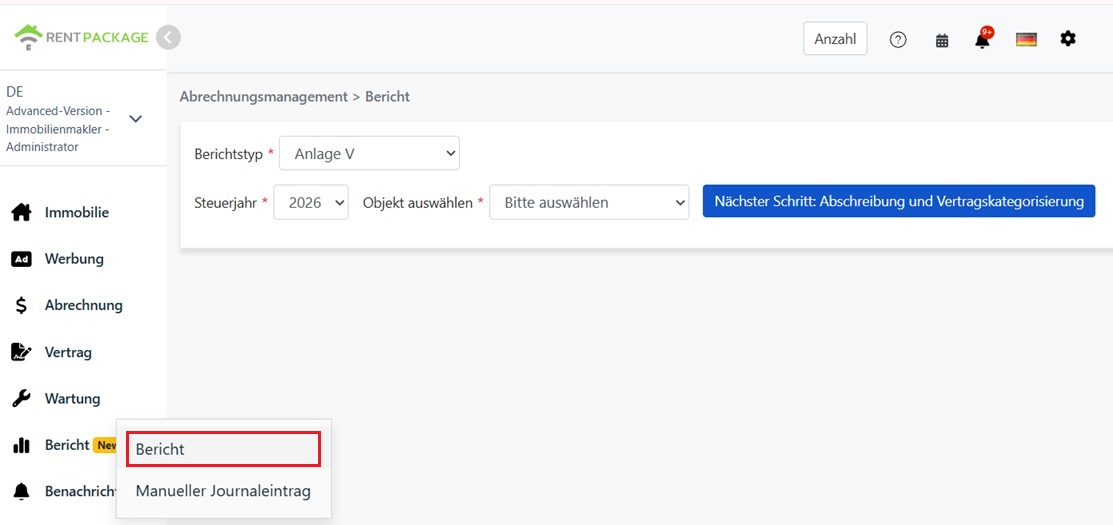
선택 완료 후, '다음 단계: 감가상각 및 계약 분류'를 클릭하세요.
3. 감가상각 금액 및 분류 계약 입력
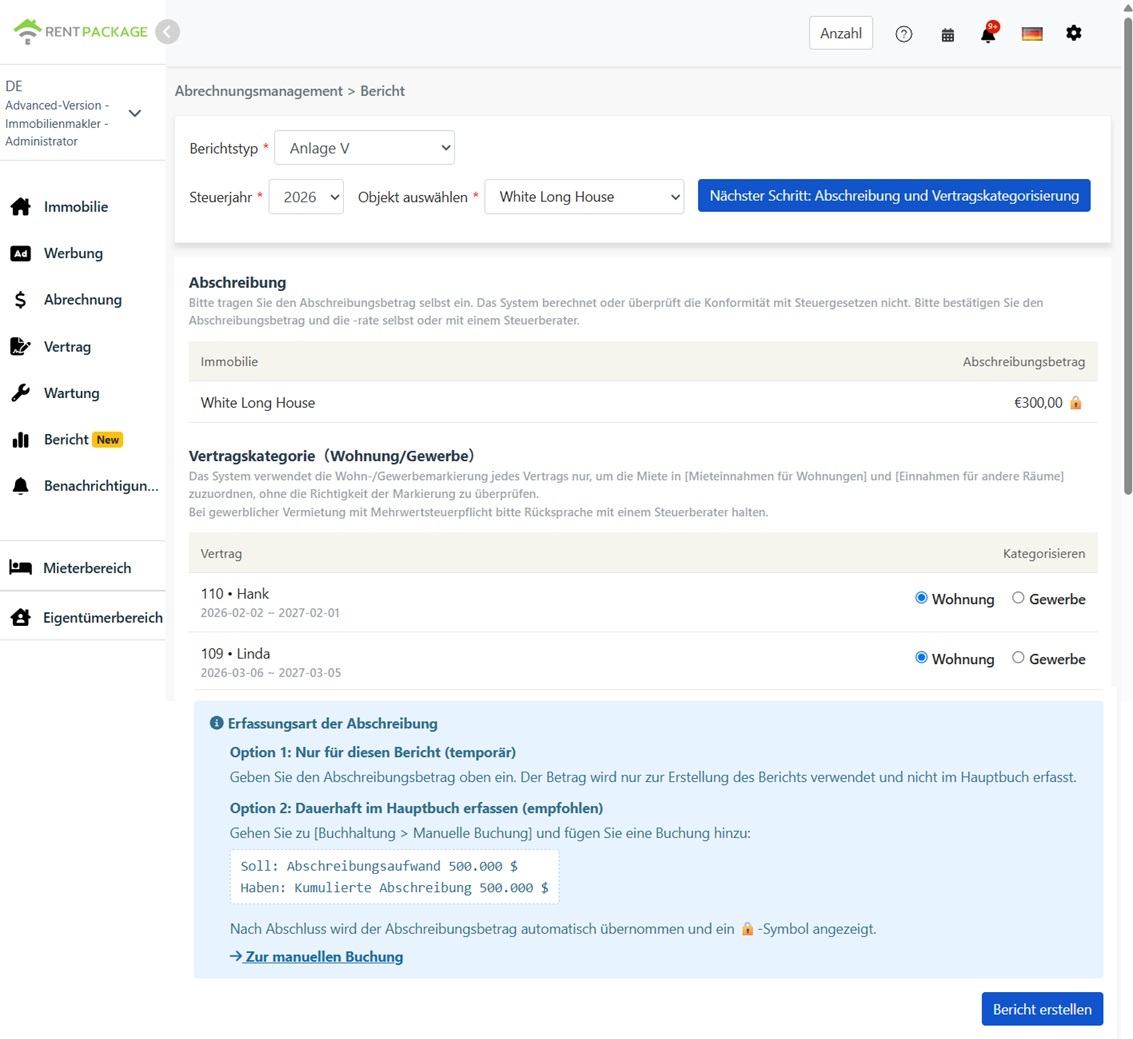
감가상각 (Absetzung für Abnutzung, AfA)
감가상각 금액은 직접 입력하세요. 시스템은 자동으로 계산하지 않으며, 감가상각률을 적용하지 않고, 금액이 독일 세법에 부합하는지 검증하지 않습니다. 독일 건물 감가상각은 여러 형태가 있습니다(예: 건축 연도에 따라 적용되는 직선 감가상각률, 특별 감가상각 방안). 정확한 금액과 감가상각률을 확인하거나 세무사(Steuerberater)와 상담하세요.
계약 분류(주거 / 상업)
보고서는 이 화면에서 각 계약의 분류에 따라 임대수입을 두 개의 항목으로 나눕니다:
- 주거:이 계약의 임대료는 'Mieteinnahmen für Wohnungen'(주거용 단위 임대수입)에 포함됩니다.
- 상업:이 계약의 임대료는 'Einnahmen für andere Räume'(기타 장소 수입, 예: 사무실, 상점)에 포함됩니다.
4. 보고서 생성
감가상각 금액과 계약 분류를 확인한 후, '보고서 생성'을 클릭하세요.
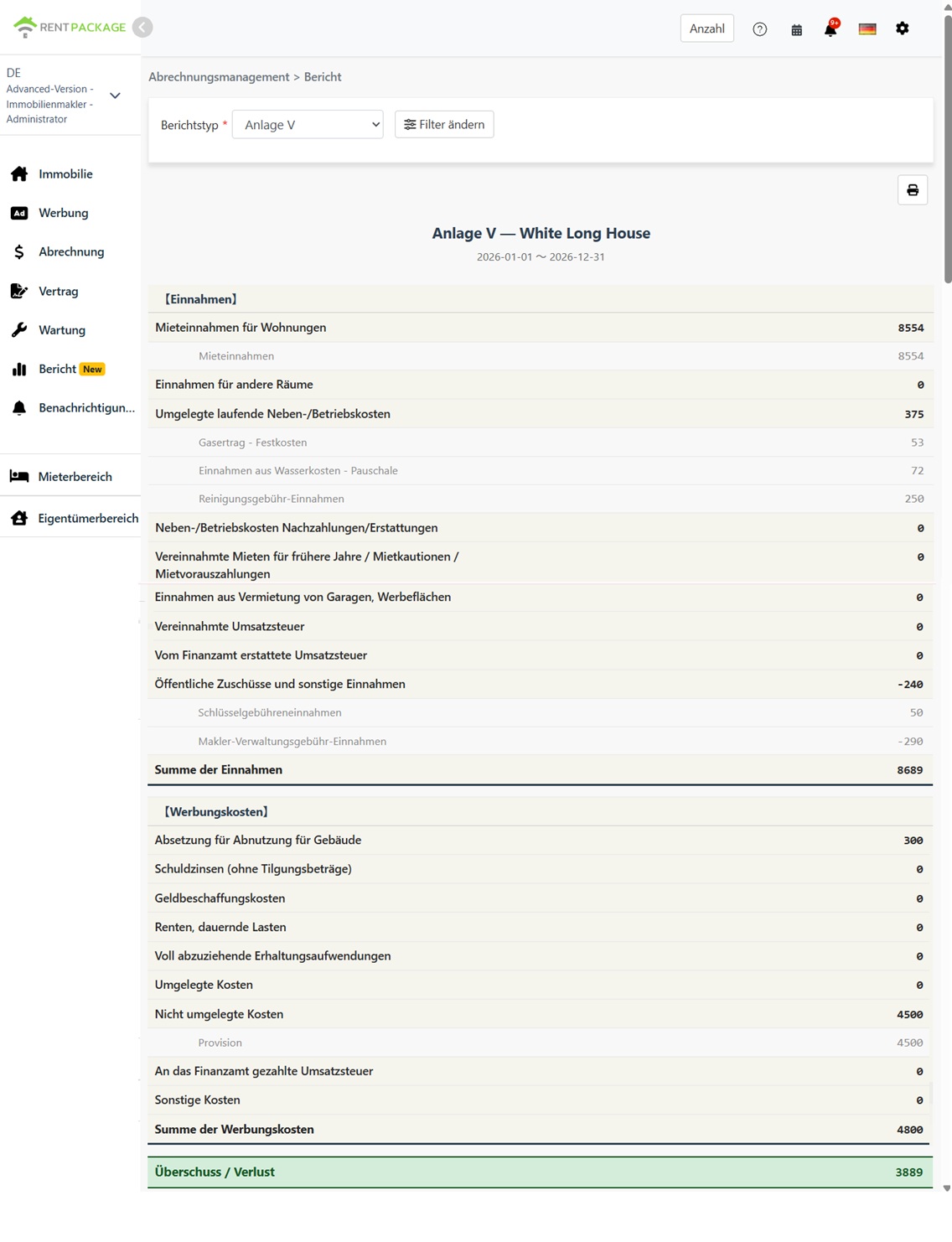
시스템은 Anlage V 보고서를 생성하여 다음 내용을 표시합니다:
- 수입(Einnahmen):주택 임대료, 상업 임대료, 세입자 전가 운영비용 및 기타 수입 항목
- 비용 (Werbungskosten):감가상각, 대출 이자, 수리비 및 기타 비용 항목
- 흑자/적자 (Überschuss / Verlust):총수입 - 총비용
각 항목에는 포함된 계정과 금액이 표시되어, 숫자의 출처를 추적할 수 있습니다.
5. 감가상각 기록 방법 두 가지
방법 1: 해당 보고서에만 사용(임시)
보고서 화면에 감가상각 금액을 입력하세요. 이 금액은 이번 보고서 생성을 위해서만 사용되며, 장부에는 기록되지 않습니다.
방법 2: 장부에 기록(추천)
"회계 관리" → "수기 입력"으로 이동하여 분개를 생성하세요:
- 차변: 감가상각비
- 대변: 감가상각누계액
분개 작성 후, 시스템은 자동으로 감가상각 금액을 보고서 화면에 입력하고 🔒 잠금 아이콘을 표시하며, 금액이 회계에서 왔음을 나타냅니다. 잠금된 금액을 수정하려면 보고서 화면이 아닌 분개를 편집하세요.
6. 주거용 및 상업용 임대 구분
| 항목 | 주거용 | 상업용 |
|---|---|---|
| 계약 유형 | 주거 임대 (아파트, 주택) | 사무실, 상점, 기타 비주거 장소 |
| 보고서 필드 | Mieteinnahmen für Wohnungen | Einnahmen für andere Räume |
| 부가가치세(VAT) | 일반적으로 부가가치세 면제 | 적용 선택 시 부가가치세가 적용될 수 있음; 세무 상담 권장 |
시스템은 임대료를 어떻게 분류합니까? 계약 기준으로 분류되며, 결제 기준이 아닙니다. 주거용으로 분류된 계약의 모든 임대료는 '주택 임대 수익(Mieteinnahmen für Wohnungen)'에 포함되며, 상업용 계약의 임대료는 '기타 공간 수익(Einnahmen für andere Räume)'에 포함됩니다.
7. 자주 묻는 질문
시스템이 감가상각을 자동으로 계산합니까?
아니요. 감가상각 금액은 직접 입력해야 하며, 시스템은 독일 세법에 부합 여부를 확인하지 않습니다. 독일 건물 감가상각(AfA)은 여러 옵션이 있으며, 감가상각율은 건설 연도와 건축 유형에 따라 다릅니다. 정확한 금액은 직접 확인하거나 세무 상담을 받으세요.
보고서 화면의 감가상각 금액이 잠금 표시(🔒)되는 이유는 무엇입니까?
잠금 아이콘은 금액이 회계의 감가상각 분개에서 온 것임을 나타냅니다. 수정하려면 '회계 관리'→'수동 분개'에서 해당 분개를 편집하시고, 보고서는 업데이트된 금액을 자동으로 가져옵니다.
전년도 임대료 수령분은 어느 항목에 기록해야 하나요?
엄밀히 말해, 임차인이 지불한 전년도 임대료는 '이전 연도의 수취 임대료 / 입주 보증금 조정 / 선납 임대료(Vereinnahmte Mieten für frühere Jahre / verrechnete Mietkautionen / Mietvorauszahlungen)'에 기록되어야 합니다. 시스템은 이 상황을 자동으로 감지하지 않으며, 모든 임대료는 주거용 또는 상업용 임대 수익 항목에 계약별로 분류됩니다. 총 수익은 정확하지만, 특정 항목에 금액 표시가 필요할 경우 공식 양식에 수기로 조정하세요.
보고서에서 10일 규칙(Zehn-Tage-Regel)을 적용합니까?
아니오. 보고서는 회계 연도의 실제 결제 날짜를 기준으로 수입 및 비용을 배정합니다. 연말과 연초에 정기 결제가 발생하고 10일 규칙이 적용되는 경우, 신고 전에 세무사와 확인하고 관련 금액을 조정하십시오.
보고서에서 여러 매물을 선택할 수 있나요?
아니요. 각 보고서는 하나의 매물만 다루며, 독일의 각 임대 부동산에 대해 별도로 Anlage V를 제출하는 관례에 부합합니다.
왜 제 임대 수입이 한 칸에만 표시되나요?
단계 3의 계약 분류를 확인하십시오. 모든 계약이 주거로 분류된 경우 모든 임대 수입은 'Mieteinnahmen für Wohnungen'에 포함되며, 상업용 칸에는 0이 표시됩니다. 그 반대의 경우도 마찬가지입니다.
8. Anlage V 필드 매핑 테이블
【수입(Einnahmen)】
| 필드 이름 | 설명 |
|---|---|
| Mieteinnahmen für Wohnungen | 주거 유닛 임대 수입 (주거로 분류된 계약) |
| Einnahmen für andere Räume | 기타 장소 수입 (상업용으로 분류된 계약) |
| Umgelegte laufende Neben-/Betriebskosten | 임차인에게 전가되는 운영 비용 (예: 유틸리티, 관리비) |
| Neben-/Betriebskosten Nachzahlungen/Erstattungen | 운영 비용의 추가 납부 또는 환불 |
| Vereinnahmte Mieten für frühere Jahre / Mietkautionen / Mietvorauszahlungen | 지난해 임대료 수금, 보증금 공제, 선불 임대료 |
| Einnahmen aus Vermietung von Garagen, Werbeflächen | 주차장, 광고 공간 등의 임대 수익 |
| Vereinnahmte Umsatzsteuer | 수취한 부가가치세 |
| Vom Finanzamt erstattete Umsatzsteuer | 세무 당국으로부터 환급된 부가가치세 |
| Öffentliche Zuschüsse und sonstige Einnahmen | 공공 보조금 및 기타 수입 |
【비용(Werbungskosten)】
| 필드 이름 | 설명 |
|---|---|
| Absetzung für Abnutzung für Gebäude | 건물 감가상각 (AfA) — 입력하거나 전표로부터 가져온 금액 |
| Schuldzinsen (ohne Tilgungsbeträge) | 대출 이자 (원금 상환 제외) |
| Geldbeschaffungskosten | 금융 비용 (예: 대출 수수료) |
| Renten, dauernde Lasten | 연금 및 정기적 부담금 |
| Voll abzuziehende Erhaltungsaufwendungen | 전액 공제 가능한 수리 및 유지보수 비용 |
| Umgelegte Kosten | 임차인에게 전가된 비용 |
| Nicht umgelegte Kosten | 세입자에게 전가되지 않은 비용 |
| An das Finanzamt gezahlte Umsatzsteuer | 세무서에 납부하는 부가가치세 |
| Sonstige Kosten | 기타 비용 |