📄 작업 환경 소개: 5분 안에 메인 화면을 이해하고, 각 업무를 어디에서 처리해야 하는지 알 수 있습니다. 📄 RentPackage에서 부동산 개요를 사용하여 전체 건물 상태를 빠르게 파악하는 방법 📄 대행 관리 부동산 추가: 물건 생성, 소유주, 계정 생성부터 온라인 계약까지 한 번에 완료 📄 세입자의 입주 및 계약: 임대 기간, 보증금, 공과금 일괄 설정, 청구 주기 자동 생성 📄 세입자 정산 관리: 수금 확인, 부분 결제, 검침 및 보증금 처리 - 일상적인 임대 수납이 모두 여기에서 이루어집니다. 📄 임대인 이월 기능 설명 📄 임대 커스텀 알림: 임대료 알림, 계약 만료, 시스템이 적시에 적절한 사람에게 전송 📄 RentPackage에서 예측 수금을 사용하여 다음 달 및 연간 예상 임대 수익을 빠르게 추정하는 방법 📄 규제 준수 지원 및 책임 설명 📄 임대차계약 템플릿 기능 설명 📄 이중 임대인 기능 설명 📄 부분 결제 기능 설명 📄 선수금 기능 설명 📄 임대료 청구 기간 기능 설명 📄 청구 기능 설명 📄 주기적 청구 기간 기능 설명 📄 예약 기능 소개 📄 전자 임대 설정 가이드 📄 위탁 관리 회사의 관리비 설정 가이드 📄 보증금과 선불금이 회계상 부채로 분류되는 이유는? 📄 RentPackage 일반 안내 📄 커미션 분할 설정 가이드 📄 모든 임대인와 중개인이 왜 임대 관리 자동화 소프트웨어가 필요한가? 📄 유로로 임대료를 설정할 때 환율을 어떻게 올바르게 처리합니까? 📄 미국 세금 신고 - Schedule E 보고서 사용 설명서 📄 영국 세금 신고 - SA105 보고서 사용 설명서 📄 RentPackage에서 Stripe 온라인 납부 개설 방법 📄 일정으로 세입자에게 알림 보내기: 정전 알림 예시 📄 중개사 로고 설정 방법 - 이메일 알림과 계약서 PDF에 브랜드 표시하기 📄 임대료 보험이란? 임대료 미납 시 보상, 보험증서는 임대 계약과 함께 관리됩니다. 📄 Anlage V 독일 임대소득세 보고서 사용자 가이드 📄 T776 캐나다 임대소득세 보고서 사용자 가이드 📄 PIT-28 폴란드 임대 소득세 보고서 사용 안내 📄 RentPackage에서 호주 임대세금 신고표(Rental Schedule) 생성하기, 수익 및 비용이 ATO 신고 분류와 자동 매칭됩니다. 📄 RentPackage에서 루마니아 임대 소득 신고서(Declarația Unică 212) 사용 방법 📄 RentPackage에서 헝가리 SZJA 임대 소득 신고 데이터를 생성하여 eSZJA 신고 숫자를 한 번에 정리하는 방법 📄 손익계산서: 각 물건 및 소유자의 임대 수입과 지출 자동 계산 📄 대차대조표: 은행 잔액 중 얼마가 임차인의 것인지? 보증금과 선수금 명확히 보기 📄 현금흐름표: 이 기간 동안 장부상의 현금이 실제로 얼마나 증가했나요? 📄 RentPackage에서 총계정원장을 생성하여 임대료 및 자산 회계 자동 집계하는 방법 📄 분개 수동 입력: 수리비, 보험, 감가상각, 회계 기간 외 수입 및 지출도 반영 가능 📄 임대 커스텀 알림: 임대료 알림, 계약 만료, 시스템이 적시에 적절한 사람에게 전송 📄 왜 부동산 관리 소프트웨어가 시간과 비용을 절감할 수 있나요?

T776 캐나다 임대소득세 보고서 사용자 가이드

Quick Navigation

What is T776?

T776 (Statement of Real Estate Rentals) is the Canadian rental income form required by the Canada Revenue Agency (CRA). It is filed as part of your T1 personal income tax return. If you earn rental income in Canada, you need to complete this form each year to report your rental income and related expenses.

📅 Canadian Tax Year: The calendar year, 1 January to 31 December.

RentPackage provides a T776 report feature that automatically summarizes your rental income and expenses by line number, making Canadian tax preparation simple and efficient.

How to Use

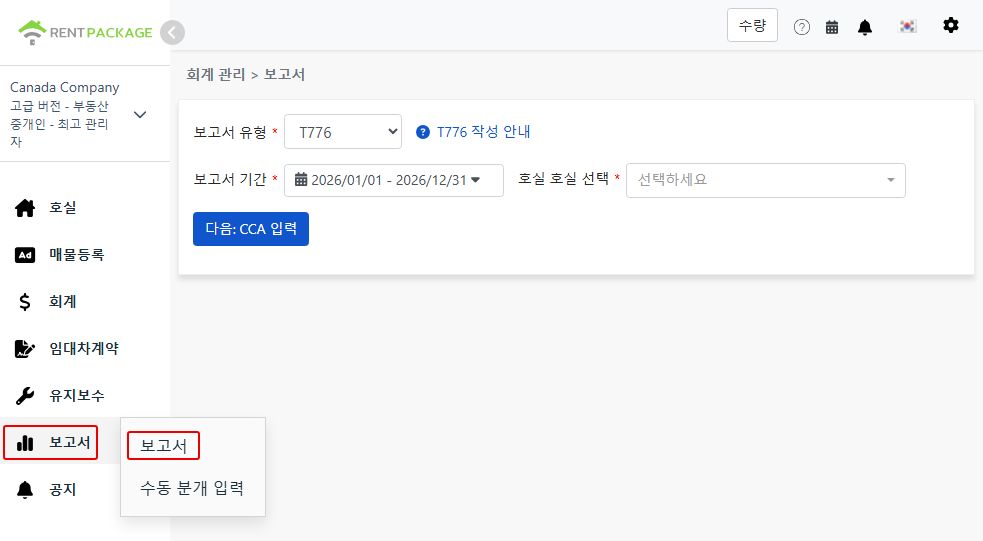
Step 1: Select Report Type, Period and Property
  • Access the Report: Go to function list → Reports → Select "T776" as the report type
  • Select Report Period: Select the calendar year you are filing for, e.g., "2026/01/01 - 2026/12/31"
  • Choose Property: Select the property for this report
Select T776 as the report type

After selection, click "Next: enter CCA".

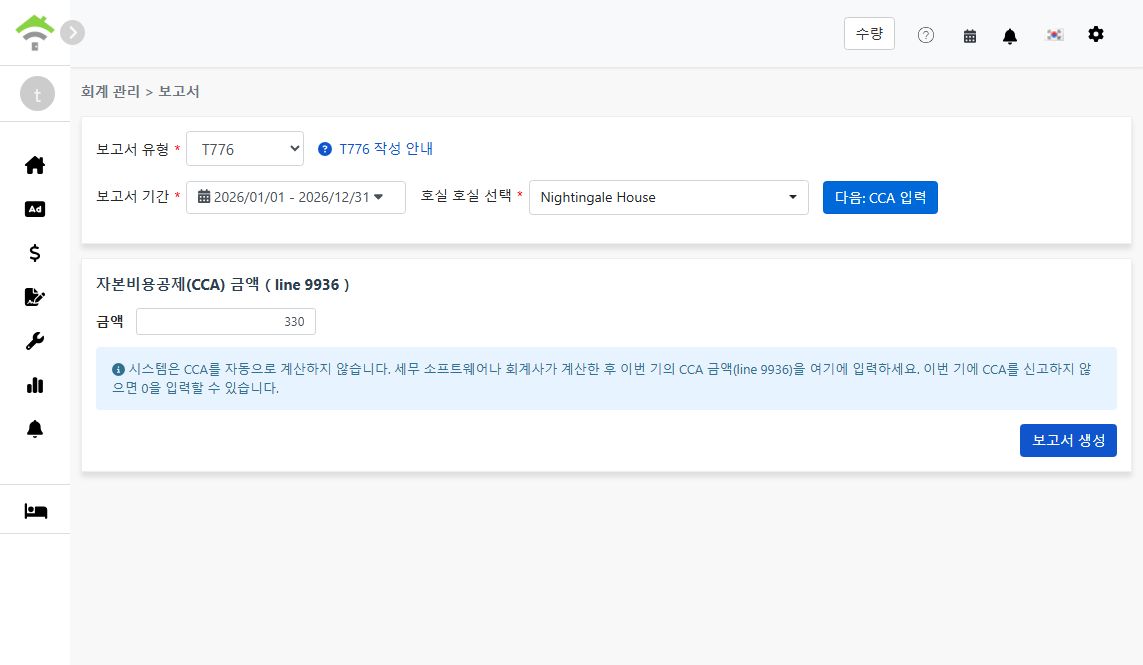
Step 2: Enter Capital Cost Allowance (CCA, Line 9936)
⚠️ Important: The system does not calculate CCA automatically. After calculating it with tax software or an accountant, enter this period's CCA amount here (line 9936). If you are not claiming CCA this period, enter 0.
Enter the CCA amount for line 9936
Step 3: Generate Report
  • After confirming the CCA amount, click "Generate Report"
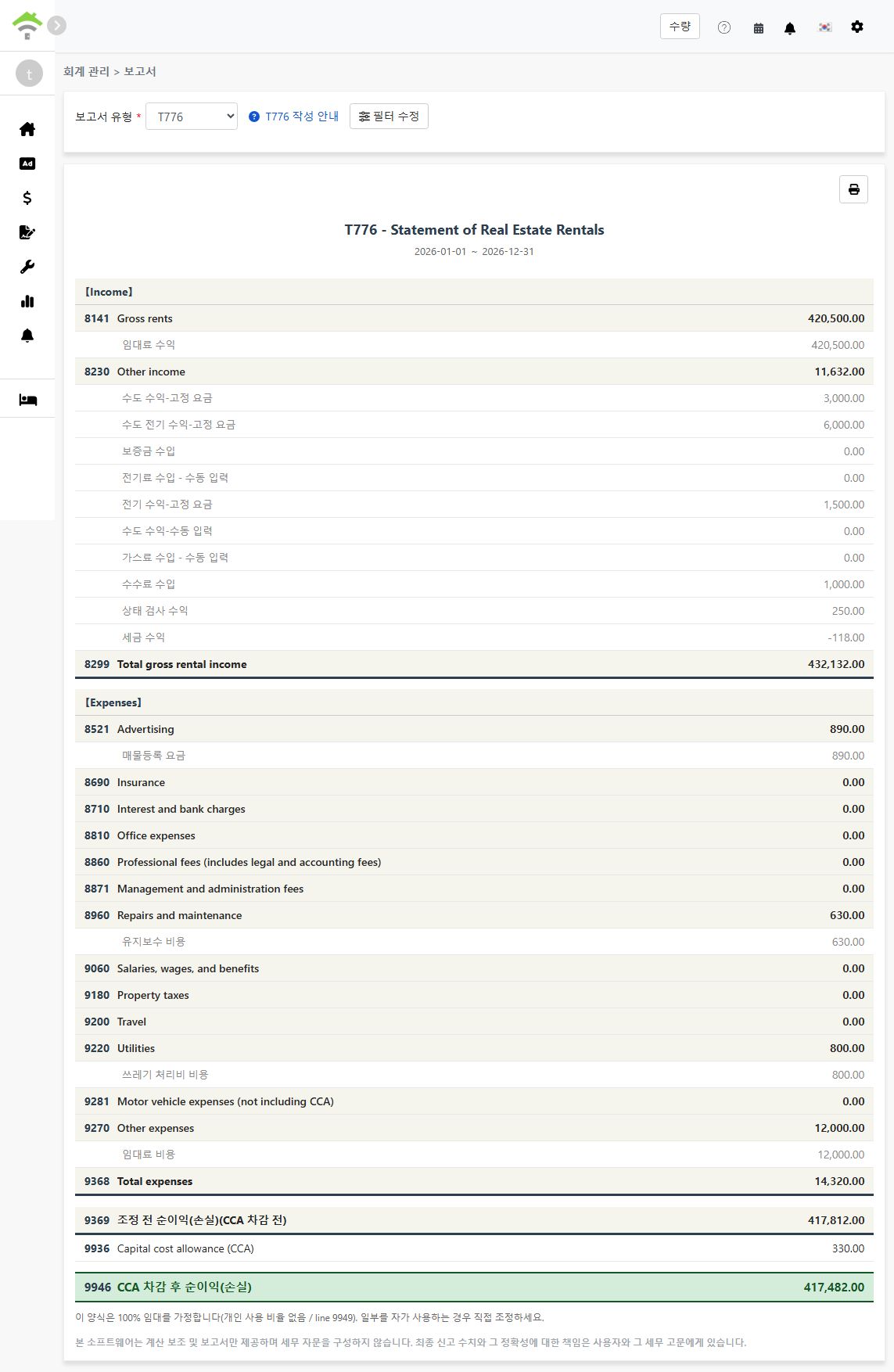
  • The system will generate a T776 report showing:
    • Income: Lines 8141-8299 - Gross rents, other income, and total gross rental income
    • Expenses: Lines 8521-9368 - Advertising, repairs, utilities, and other deductible expenses
    • Line 9369: Net income (loss) before adjustments (before CCA)
    • Line 9936: Capital cost allowance (CCA) - the amount you entered
    • Line 9946: Net income (loss) after CCA
  • Each line shows the accounts and amounts included, so you can trace every figure back to your records
  • You can print the report for your tax preparation records
Generated T776 report
💡 100% rental use assumed: This report assumes the property is fully rented out, with no personal-use portion (line 9949). If you use part of the property personally, adjust the figures manually when transferring them to the official form.

About CCA

Capital cost allowance (CCA) is the Canadian equivalent of depreciation: it lets you deduct the cost of the building and other capital property over multiple years. A few key points:

  • CCA is optional: You decide each year whether to claim it and how much (up to the maximum for the asset's class). Entering 0 simply means you are not claiming CCA this year
  • CCA cannot create or increase a rental loss: CRA rules limit the CCA claim so it cannot turn a rental profit into a loss or make an existing loss larger
  • Recapture on sale: If you sell the property for more than its depreciated value, previously claimed CCA may be added back to your income (recapture)

Because of these trade-offs, calculate your CCA amount with tax software or an accountant, then enter the result in step 2.

Frequently Asked Questions

Does the system calculate CCA for me?

No. CCA depends on the asset class, the undepreciated capital cost carried forward from prior years, and your choice of how much to claim. Calculate it with tax software or an accountant, then enter the amount on the report screen. If you are not claiming CCA this period, enter 0.

Do I have to claim CCA every year?

No. CCA is optional in Canada. Some landlords choose not to claim it to avoid recapture when selling the property. Decide with your accountant based on your situation.

I use part of the property personally. Can I use this report as-is?

Not directly. The report assumes 100% rental use and does not fill in a personal-use portion (line 9949). Adjust the expense figures for the personal-use share manually when transferring them to the official form.

Why is one of my expense lines showing 0?

Please ensure the relevant accounts in your chart of accounts are mapped to the corresponding T776 line, and that the transactions were recorded within the selected report period. Only mapped accounts are included in each line's total.

Can I select multiple properties in one report?

No. Each report covers one property. If you own several rental properties, generate one report per property and combine the figures when completing your return.

T776 Field Reference

【Income】

Line Field Name Description
8141 Gross rents Total rental income received
8230 Other income Other rental-related income (e.g., utility income charged to tenants)
8299 Total gross rental income Sum of gross rents and other income

【Expenses】

Line Field Name Description
8521 Advertising Advertising costs to find tenants
8960 Repairs and maintenance Repairs and maintenance costs
9060 Salaries, wages, and benefits Wages and benefits paid to employees
9180 Property taxes Property taxes paid for the rental property
9200 Travel Travel costs related to managing the rental
9220 Utilities Utility costs paid by the landlord (e.g., fuel, electricity, water)
9281 Motor vehicle expenses (not including CCA) Vehicle costs related to the rental, excluding CCA
9270 Other expenses Other deductible expenses not listed above
9368 Total expenses Sum of all expense lines

【Net Income】

Line Field Name Description
9369 Net income (loss) before adjustments Total income - total expenses (before CCA)
9936 Capital cost allowance (CCA) The CCA amount you entered in step 2
9946 Net income (loss) after CCA Line 9369 - line 9936
✅ Start using the T776 report feature today and make your Canadian rental property tax preparation easier!