📄 操作介面概覽:五分鐘了解主介面,掌握各項操作位置 📄 如何在 RentPackage 使用房源總覽快速掌握整棟房屋狀態 📄 新增代管物業:從建立物件、業主、開帳到線上簽約,一次完成 📄 房客搬入與簽約:租期、押金、水電雜費一次設定,帳期自動產生 📄 房客帳期操作:收款核銷、部分付款、抄表及押金,日常收租都在這一頁 📄 業主結轉功能說明 📄 出租自訂通知:繳租提醒、租約到期,系統在適當時間發送給正確的人 📄 如何在 RentPackage 用預估收款快速預估下個月與全年的租金收入 📄 合規協助與責任說明 📄 合約範本功能說明 📄 二房東功能說明 📄 部份付款功能說明 📄 預收帳款功能說明 📄 租金帳期功能說明 📄 開帳功能說明 📄 週期性帳期功能說明 📄 預定功能介紹 📄 電子合約設定教學 📄 代管公司的管理費設定教學 📄 為什麼押金和預收帳款在會計上屬於負債科目? 📄 RentPackage 通用版介紹 📄 佣金拆分設定教學 📄 為什麼每個房東與房仲都需要一套租戶管理自動化軟體? 📄 租金以歐元定價時,如何正確處理匯率? 📄 美國報稅申報 - Schedule E 報表說明 📄 英國報稅申報 - SA105 報表說明 📄 如何在 RentPackage 開啟 Stripe 線上收租 📄 如何使用行事曆排程通知房客:以停電通知為例 📄 如何設定仲介公司LOGO,使Email通知與合約PDF展現您的品牌 📄 什麼是租金保險?補償租金損失,保單隨租約管理 📄 Anlage V 德國出租所得稅報告使用者指南 📄 T776 加拿大出租所得稅報告使用者指南 📄 PIT-28 波蘭出租所得稅報告使用指南 📄 如何在 RentPackage 生成澳洲租賃報稅表(Rental Schedule),收支自動對應 ATO 申報分類 📄 如何在 RentPackage 使用羅馬尼亞租金所得稅報表(Declarația Unică 212) 📄 如何在 RentPackage 產生匈牙利 SZJA 出租所得申報數據,一鍵整理 eSZJA 填報數字 📄 損益表:每間物件、每位業主的租金收支,自動算出賺多少 📄 資產負債表:看出多少銀行餘額實為房客的?押金與預收款一目了然 📄 現金流量表:收租這段期間,帳上的現金實際多了多少? 📄 如何在 RentPackage 產生總分類帳,自動彙總租金與物業帳務 📄 手動輸入分錄:修繕、保險、折舊,非帳期內的收支也可入帳 📄 出租自訂通知:繳租提醒、租約到期,系統在適當時間發送給正確的人 📄 為什麼物業管理軟體可以大幅節省時間與成本?

T776 加拿大出租所得稅報告使用者指南

Quick Navigation

What is T776?

T776 (Statement of Real Estate Rentals) is the Canadian rental income form required by the Canada Revenue Agency (CRA). It is filed as part of your T1 personal income tax return. If you earn rental income in Canada, you need to complete this form each year to report your rental income and related expenses.

📅 Canadian Tax Year: The calendar year, 1 January to 31 December.

RentPackage provides a T776 report feature that automatically summarizes your rental income and expenses by line number, making Canadian tax preparation simple and efficient.

How to Use

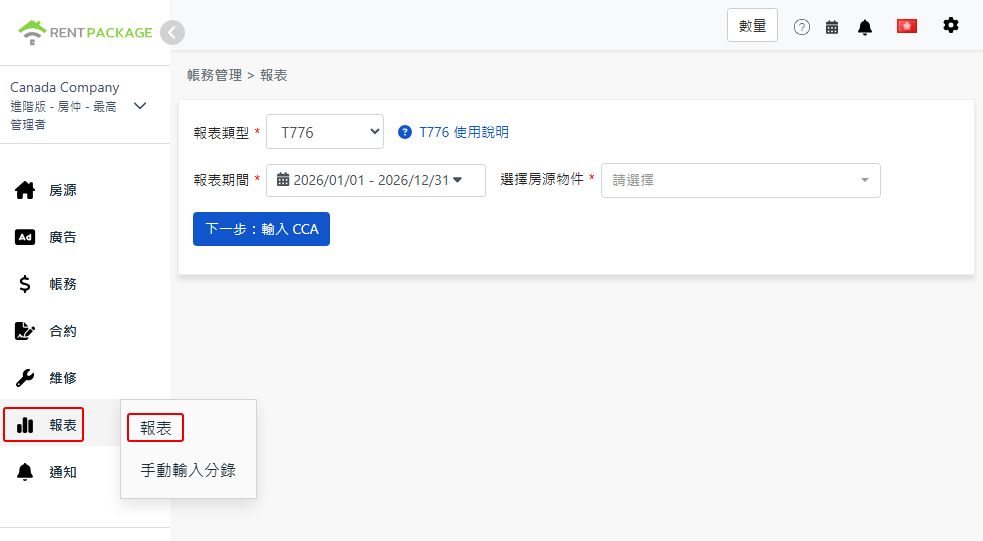
Step 1: Select Report Type, Period and Property
  • Access the Report: Go to function list → Reports → Select "T776" as the report type
  • Select Report Period: Select the calendar year you are filing for, e.g., "2026/01/01 - 2026/12/31"
  • Choose Property: Select the property for this report
Select T776 as the report type

After selection, click "Next: enter CCA".

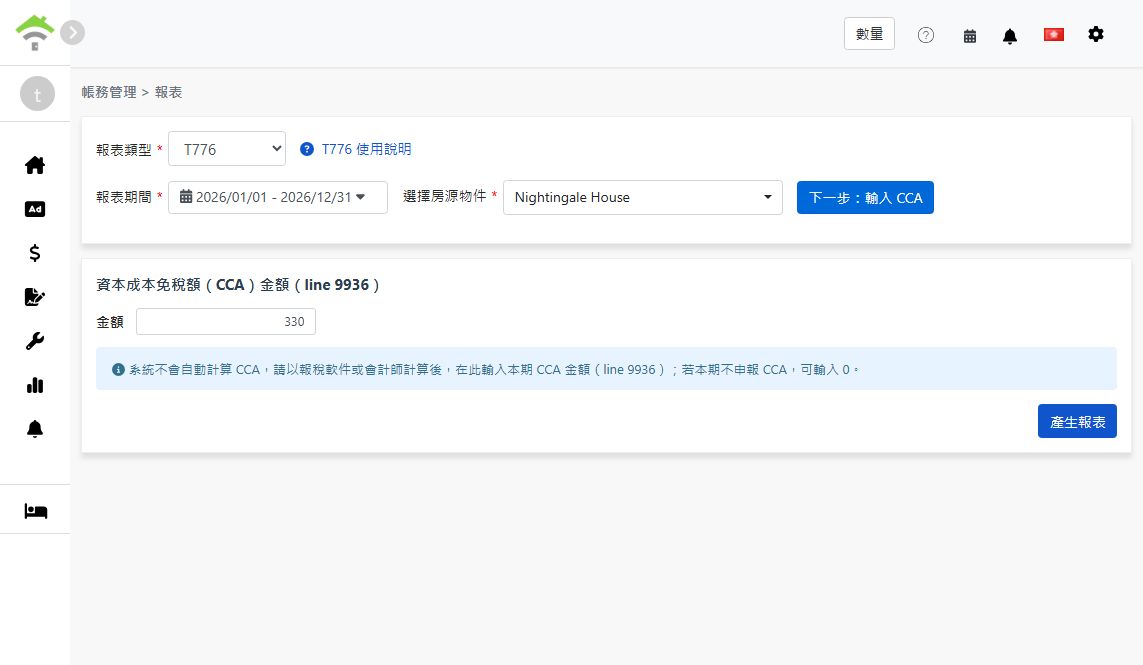
Step 2: Enter Capital Cost Allowance (CCA, Line 9936)
⚠️ Important: The system does not calculate CCA automatically. After calculating it with tax software or an accountant, enter this period's CCA amount here (line 9936). If you are not claiming CCA this period, enter 0.
Enter the CCA amount for line 9936
Step 3: Generate Report
  • After confirming the CCA amount, click "Generate Report"
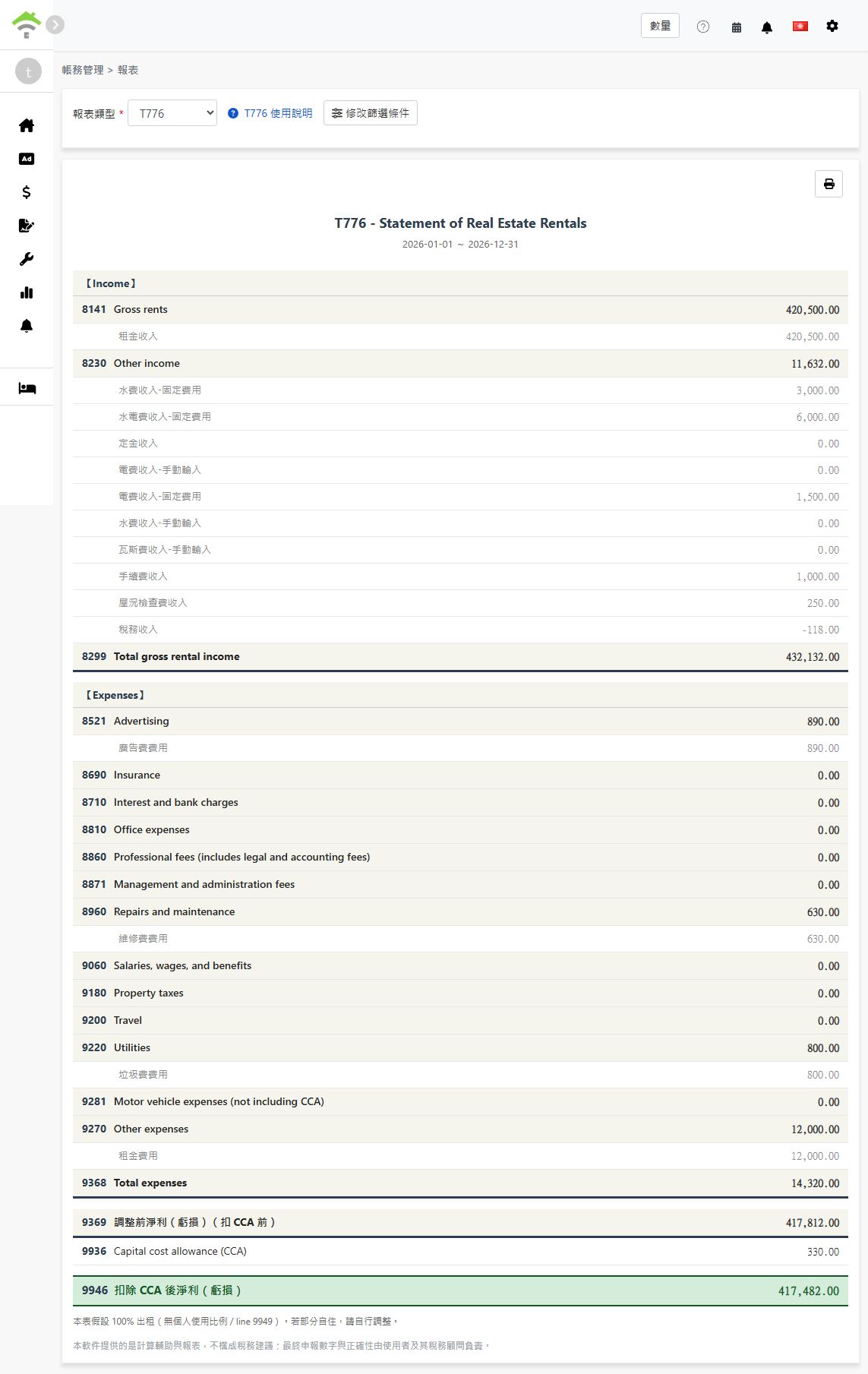
  • The system will generate a T776 report showing:
    • Income: Lines 8141-8299 - Gross rents, other income, and total gross rental income
    • Expenses: Lines 8521-9368 - Advertising, repairs, utilities, and other deductible expenses
    • Line 9369: Net income (loss) before adjustments (before CCA)
    • Line 9936: Capital cost allowance (CCA) - the amount you entered
    • Line 9946: Net income (loss) after CCA
  • Each line shows the accounts and amounts included, so you can trace every figure back to your records
  • You can print the report for your tax preparation records
Generated T776 report
💡 100% rental use assumed: This report assumes the property is fully rented out, with no personal-use portion (line 9949). If you use part of the property personally, adjust the figures manually when transferring them to the official form.

About CCA

Capital cost allowance (CCA) is the Canadian equivalent of depreciation: it lets you deduct the cost of the building and other capital property over multiple years. A few key points:

  • CCA is optional: You decide each year whether to claim it and how much (up to the maximum for the asset's class). Entering 0 simply means you are not claiming CCA this year
  • CCA cannot create or increase a rental loss: CRA rules limit the CCA claim so it cannot turn a rental profit into a loss or make an existing loss larger
  • Recapture on sale: If you sell the property for more than its depreciated value, previously claimed CCA may be added back to your income (recapture)

Because of these trade-offs, calculate your CCA amount with tax software or an accountant, then enter the result in step 2.

Frequently Asked Questions

Does the system calculate CCA for me?

No. CCA depends on the asset class, the undepreciated capital cost carried forward from prior years, and your choice of how much to claim. Calculate it with tax software or an accountant, then enter the amount on the report screen. If you are not claiming CCA this period, enter 0.

Do I have to claim CCA every year?

No. CCA is optional in Canada. Some landlords choose not to claim it to avoid recapture when selling the property. Decide with your accountant based on your situation.

I use part of the property personally. Can I use this report as-is?

Not directly. The report assumes 100% rental use and does not fill in a personal-use portion (line 9949). Adjust the expense figures for the personal-use share manually when transferring them to the official form.

Why is one of my expense lines showing 0?

Please ensure the relevant accounts in your chart of accounts are mapped to the corresponding T776 line, and that the transactions were recorded within the selected report period. Only mapped accounts are included in each line's total.

Can I select multiple properties in one report?

No. Each report covers one property. If you own several rental properties, generate one report per property and combine the figures when completing your return.

T776 Field Reference

【Income】

Line Field Name Description
8141 Gross rents Total rental income received
8230 Other income Other rental-related income (e.g., utility income charged to tenants)
8299 Total gross rental income Sum of gross rents and other income

【Expenses】

Line Field Name Description
8521 Advertising Advertising costs to find tenants
8960 Repairs and maintenance Repairs and maintenance costs
9060 Salaries, wages, and benefits Wages and benefits paid to employees
9180 Property taxes Property taxes paid for the rental property
9200 Travel Travel costs related to managing the rental
9220 Utilities Utility costs paid by the landlord (e.g., fuel, electricity, water)
9281 Motor vehicle expenses (not including CCA) Vehicle costs related to the rental, excluding CCA
9270 Other expenses Other deductible expenses not listed above
9368 Total expenses Sum of all expense lines

【Net Income】

Line Field Name Description
9369 Net income (loss) before adjustments Total income - total expenses (before CCA)
9936 Capital cost allowance (CCA) The CCA amount you entered in step 2
9946 Net income (loss) after CCA Line 9369 - line 9936
✅ Start using the T776 report feature today and make your Canadian rental property tax preparation easier!