
Mwongozo wa matumizi ya fomu ya SA105 kwa mapato ya kukodisha nchini Uingereza
Viungo vya haraka
- SA105 ni nini?
- Hatua ya 1: chagua aina ya ripoti na mwaka wa kodi
- Hatua ya 2: chagua mmiliki au kampuni
- Hatua ya 3: gawanya gharama za kifedha
- Hatua ya 4: tengeneza ripoti
- Tofauti kati ya Kisanduku 26 na Kisanduku 44
- Jinsi ya kuweka chati ya akaunti kwa SA105?
- Maswali yanayoulizwa mara kwa mara
- Jedwali la visanduku vya SA105
SA105 ni nini?
SA105 ni kiambatisho cha mapato ya mali kisichoweza kukosekana kinachotakiwa na Mamlaka ya Mapato na Forodha ya Uingereza (HMRC), na huwasilishwa pamoja na tamko la kujitathmini (Self Assessment Tax Return). Ikiwa unamiliki mali za kukodisha nchini Uingereza, unapaswa kujaza fomu hii kila mwaka ili kuripoti mapato ya kukodisha na gharama zinazohusiana.
RentPackage inatoa kipengele cha ripoti ya SA105 kinachojumlisha kiotomatiki mapato na gharama zako za kukodisha, hivyo kurahisisha maandalizi ya kodi nchini Uingereza.
Jinsi ya kutumia
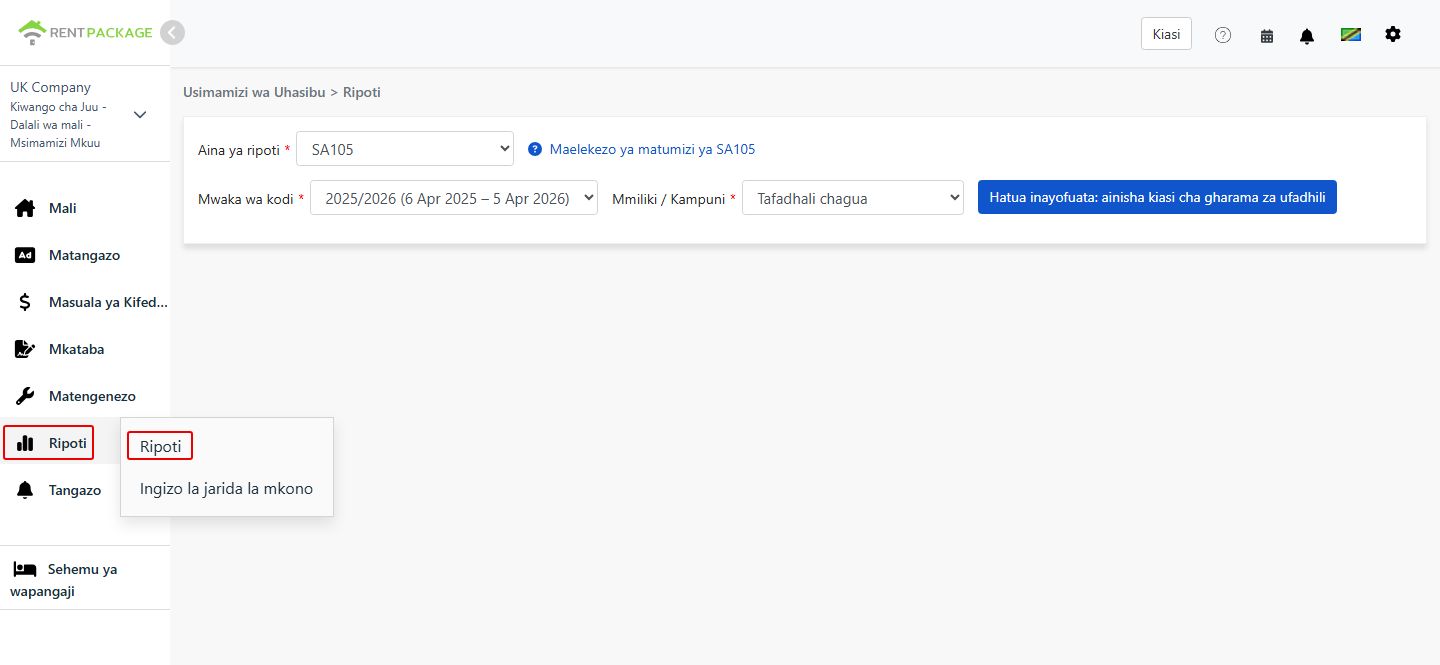
Hatua ya 1: chagua aina ya ripoti na mwaka wa kodi
- Fungua ripoti:Nenda kwenye orodha ya vipengele → Ripoti → Chagua 'SA105' kama aina ya ripoti
- Chagua mwaka wa kodi:Orodha kunjuzi huonyesha vipindi kamili vya miaka ya kodi, kwa mfano '2025/2026 (6 Apr 2025 - 5 Apr 2026)'
Hatua ya 2: chagua mmiliki au kampuni
Katika orodha kunjuzi ya 'Mmiliki/Kampuni', chagua upande unaotaka kutengenezea ripoti:
- Kampuni:Ikiwa mali zimesajiliwa kwa jina la kampuni, chagua kampuni husika
- Mmiliki:Ikiwa wewe ni mwenye nyumba unayejisimamia mwenyewe au mkodishaji wa pili, chagua jina la mmiliki husika
Baada ya kuchagua, bofya 'Ifuatayo: gawanya gharama za kifedha'.
Hatua ya 3: gawanya gharama za kifedha (Kisanduku 26 / Kisanduku 44)
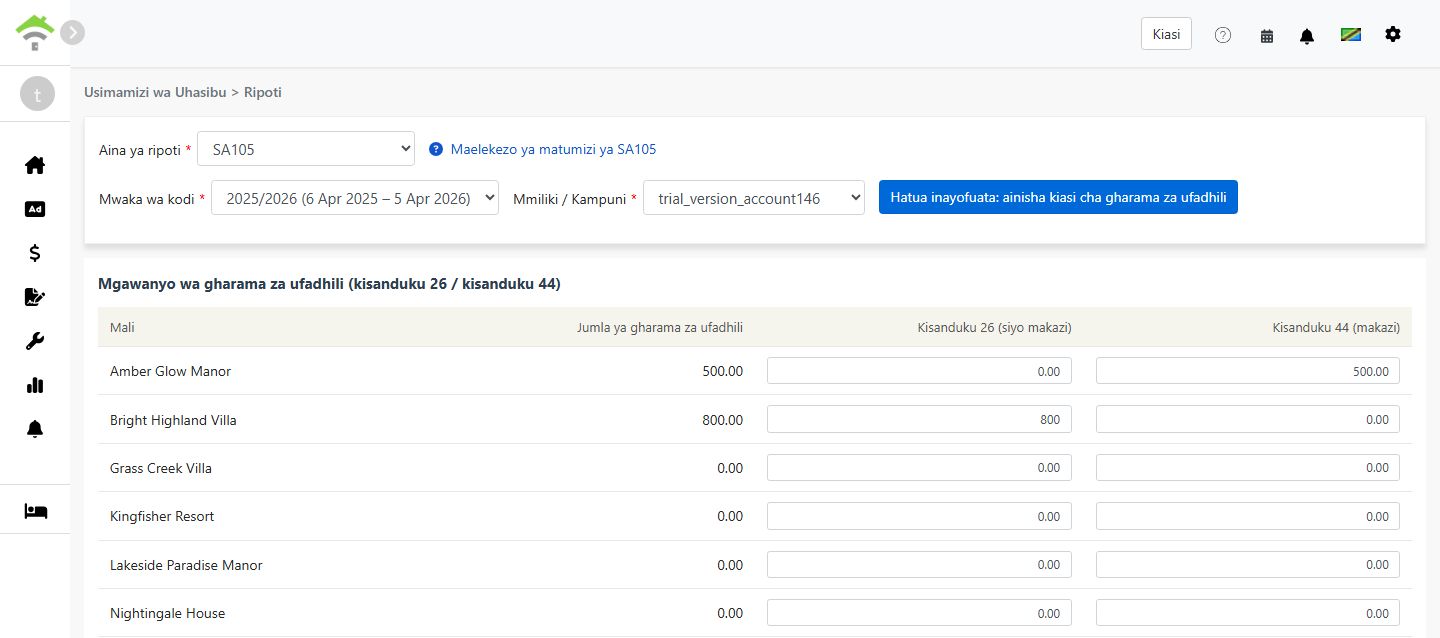
Unapobofya 'Gawanya gharama za kifedha', mfumo huchukua jumla ya kiasi kutoka akaunti zote zilizounganishwa na 'Gharama za kifedha Visanduku 26/44' na kuonyesha skrini ya kugawanya kiasi kati ya Kisanduku 26 na Kisanduku 44:
| Mali | Jumla ya gharama za kifedha | Kisanduku 26 (siyo makazi) | Kisanduku 44 (makazi) |
|---|---|---|---|
| 123 High Street | 0.00 |
Kanuni za mgawanyo:
- Kisanduku 26 (siyo makazi):Hukatwa kikamilifu kama gharama kutoka mapato ya kukodisha
- Kisanduku 44 (makazi):Haikatwi moja kwa moja; badala yake hupata punguzo la kodi la asilimia 20
- Mfumo huweka kiasi chote kwenye Kisanduku 44 kwa chaguomsingi. Kwa kila mali, Kisanduku 26 + Kisanduku 44 lazima iwe sawa na jumla ya gharama za kifedha
- Kwa mali zenye matumizi mchanganyiko, yaani makazi na biashara, gawanya kiasi kulingana na uwiano halisi wa matumizi
Hatua ya 4: tengeneza ripoti
- Baada ya kuthibitisha mgawanyo wa gharama za kifedha ni sahihi, bofya 'Tengeneza ripoti'
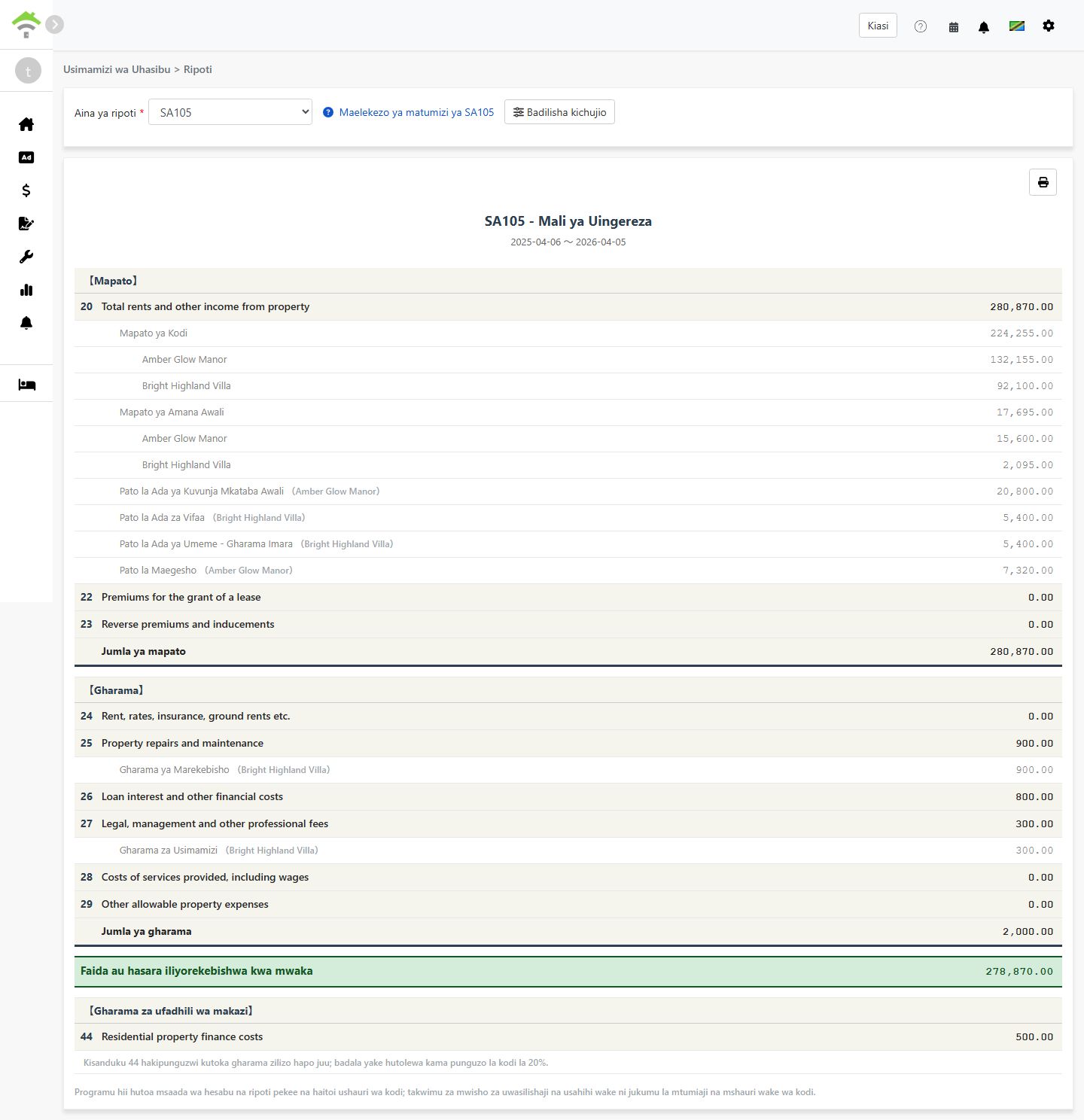
- Mfumo utatengeneza ripoti ya SA105 inayoonyesha:
- Mapato:Visanduku 20-23 - Mapato ya kukodisha, malipo ya kutoa upangaji na vipengele vinavyofanana
- Gharama:Visanduku 24-29 - Gharama za mali zinazoruhusiwa kukatwa
- Faida au hasara iliyorekebishwa ya mwaka:Jumla ya mapato - jumla ya gharama
- Gharama za kifedha za makazi:Kisanduku 44 - Riba ya mkopo wa nyumba ya makazi, inayopata punguzo la kodi la asilimia 20
- Unaweza kuchapisha ripoti au kuihamisha kama PDF kwa ajili ya kumbukumbu zako za maandalizi ya kodi
Tofauti kati ya Kisanduku 26 na Kisanduku 44
| Kipengele | Kisanduku 26 (siyo makazi) | Kisanduku 44 (makazi) |
|---|---|---|
| Aina ya mali | Mali za biashara, ofisi, maduka na maeneo yanayofanana | Kukodisha kwa makazi |
| Utaratibu wa kodi | Hukatwa kikamilifu kama gharama | Haikatwi; hupata punguzo la kodi la asilimia 20 |
| Nafasi katika ripoti | Kisanduku 26 - Loan interest and other financial costs | Kisanduku 44 - Residential property finance costs |
Mfano:
Tuseme una mali yenye matumizi mchanganyiko ambapo riba ya mkopo ni jumla ya £10,000, kati ya hiyo asilimia 30 ni ya biashara na asilimia 70 ni ya makazi:
- Kisanduku 26 (siyo makazi):£10,000 × 30% = £3,000(hukatwa kikamilifu)
- Kisanduku 44 (makazi):£10,000 × 70% = £7,000(punguzo la kodi la asilimia 20 = £1,400)
Jinsi ya kuweka chati ya akaunti kwa SA105?
Ili kuunganisha akaunti na gharama za kifedha:
- Nenda kwenye Uhasibu → Chati ya akaunti
- Tafuta akaunti unayotaka kuunganisha, kwa mfano Riba ya mkopo
- Weka Kisanduku cha SA105 kuwa 'Gharama za kifedha Visanduku 26/44'. Kisha mfumo utajumuisha kiasi cha akaunti hiyo katika jumla ya gharama za kifedha kiotomatiki
Kuna njia mbili za kurekodi gharama za kifedha:
- Ongeza katika kipindi cha kukodisha:Ongeza muamala katika kipindi cha kukodisha cha mali ukitumia akaunti iliyounganishwa na 'Gharama za kifedha Visanduku 26/44'
- Ongeza kumbukumbu ya uhasibu:Tengeneza kumbukumbu ya uhasibu ukitumia akaunti iliyounganishwa na 'Gharama za kifedha Visanduku 26/44'
Kiasi kilichoongezwa kwa njia yoyote kati ya hizi hujumuishwa kiotomatiki katika jumla ya gharama za kifedha.
Maswali yanayoulizwa mara kwa mara
Je, kodi ya Uingereza inaruhusu kukata uchakavu?
Hapana. Tofauti na Schedule E ya Marekani, kodi ya mapato ya mali nchini Uingereza haina sehemu ya uchakavu. Nchini Uingereza, uchakavu wa mali kwa kawaida huhusika tu wakati wa kukokotoa kodi ya faida ya mtaji mali inapouzwa.
Kwa nini jumla ya gharama zangu za kifedha inaonyesha 0?
Tafadhali hakikisha chati yako ya akaunti imewekwa sawasawa, na Kisanduku cha SA105 kimewekwa kuwa 'Gharama za kifedha Visanduku 26/44'. Kama hakijawekwa, mfumo hautajumuisha kiasi cha akaunti hiyo katika jumla ya gharama za kifedha.
Je, Kisanduku 26 + Kisanduku 44 vinaweza kuzidi jumla ya gharama za kifedha?
Hapana. Mfumo huhakiki kwamba kwa kila mali, Kisanduku 26 + Kisanduku 44 ni sawa na jumla ya gharama za kifedha za mali hiyo.
Je, naweza kuingiza jumla ya gharama za kifedha kwa mkono kwenye skrini ya ripoti?
Hapana. Tofauti na uchakavu katika Schedule E, jumla ya gharama za kifedha za SA105 inaweza kutoka tu katika vipindi vya kukodisha au kumbukumbu za uhasibu. Muundo huu unahakikisha usahihi wa viasi na kuzuia tofauti na kumbukumbu zako halisi za uhasibu.
Kwa nini mwaka wa kodi wa Uingereza huanza 6 Aprili hadi 5 Aprili?
Huu ndio mwaka rasmi wa kodi wa Uingereza kama ulivyowekwa na HMRC. Tofauti na mwaka wa kalenda wa kawaida kuanzia Januari hadi Desemba, mwaka wa kodi wa Uingereza huanza tarehe 6 Aprili kila mwaka na kuisha tarehe 5 Aprili mwaka unaofuata.
Jedwali la visanduku vya SA105
【Mapato】
| Kisanduku | Jina la kisanduku | Maelezo |
|---|---|---|
| 20 | Total rents and other income from property | Jumla ya mapato ya kukodisha na mapato mengine ya mali |
| 22 | Premiums for the grant of a lease | Malipo yaliyopokelewa kwa kutoa upangaji |
| 23 | Reverse premiums and inducements | Malipo ya kinyume na motisha kwa mpangaji zilizopokelewa |
【Gharama】
| Kisanduku | Jina la kisanduku | Maelezo |
|---|---|---|
| 24 | Rent, rates, insurance, ground rents etc. | Kodi ya ardhi, kodi za mitaa na ada za bima |
| 25 | Property repairs and maintenance | Gharama za ukarabati na matengenezo |
| 26 | Loan interest and other financial costs | Gharama za kifedha za mali zisizo za makazi, hukatwa kikamilifu |
| 27 | Legal, management and other professional fees | Ada za kisheria, ada za usimamizi wa mali na ada za mhasibu |
| 28 | Costs of services provided, including wages | Gharama za huduma zilizotolewa, ikiwa ni pamoja na mishahara ya wafanyakazi |
| 29 | Other allowable property expenses | Gharama nyingine zinazoruhusiwa kukatwa ambazo hazikutajwa hapo juu |
【Gharama za kifedha za makazi】
| Kisanduku | Jina la kisanduku | Maelezo |
|---|---|---|
| 44 | Residential property finance costs | Gharama za kifedha za mali za makazi, zinazopata punguzo la kodi la asilimia 20 |