
SA105 यूके किराया आय कर रिपोर्ट उपयोगकर्ता मार्गदर्शिका
त्वरित लिंक
SA105 क्या है?
SA105 यूके राजस्व एवं सीमा शुल्क विभाग (HMRC) द्वारा अनिवार्य संपत्ति आय अनुपूरक फ़ॉर्म है, जिसे स्व-निर्धारण कर विवरणी (Self Assessment Tax Return) के साथ दाखिल किया जाता है। यदि आपके पास यूके में किराए पर दी गई संपत्तियाँ हैं, तो आपको हर वर्ष यह फ़ॉर्म भरकर किराया आय और संबंधित व्यय घोषित करने होते हैं।
RentPackage की SA105 रिपोर्ट सुविधा आपकी किराया आय और व्यय को स्वतः संकलित करती है, जिससे यूके में कर तैयारी सरल और कुशल हो जाती है।
उपयोग कैसे करें
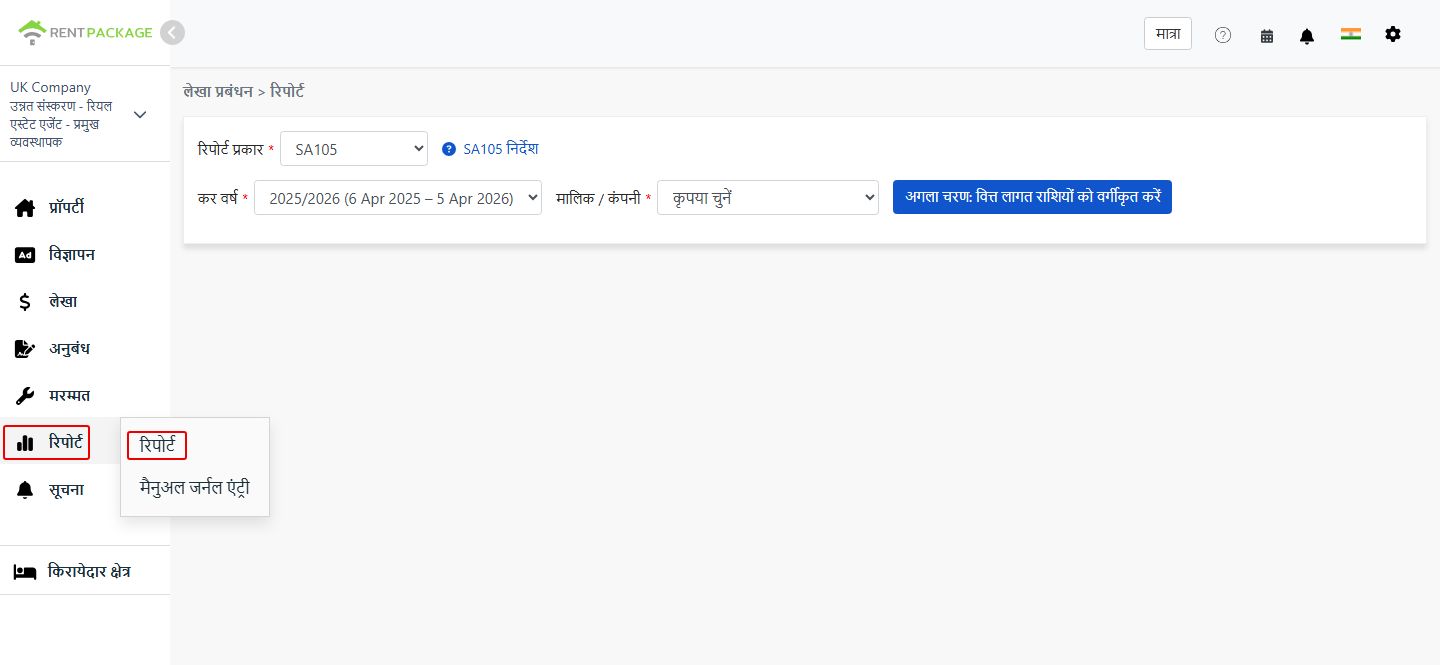
चरण 1: रिपोर्ट प्रकार और कर वर्ष चुनें
- रिपोर्ट खोलें:फ़ंक्शन सूची → रिपोर्ट पर जाएं → रिपोर्ट प्रकार में 'SA105' चुनें
- कर वर्ष चुनें:ड्रॉपडाउन में कर वर्ष की पूरी अवधि दिखाई देती है, उदाहरण के लिए '2025/2026 (6 अप्रैल 2025 - 5 अप्रैल 2026)'
चरण 2: स्वामी या कंपनी चुनें
'स्वामी/कंपनी' ड्रॉपडाउन में वह इकाई चुनें जिसके लिए रिपोर्ट बनानी है:
- कंपनी:यदि संपत्तियाँ कंपनी के नाम पर हैं, तो संबंधित कंपनी चुनें
- स्वामी:यदि आप स्वयं प्रबंधन करने वाले मकान मालिक या उप-मकान मालिक हैं, तो संबंधित स्वामी का नाम चुनें
चयन के बाद 'अगला: वित्तीय लागत का बँटवारा' पर क्लिक करें।
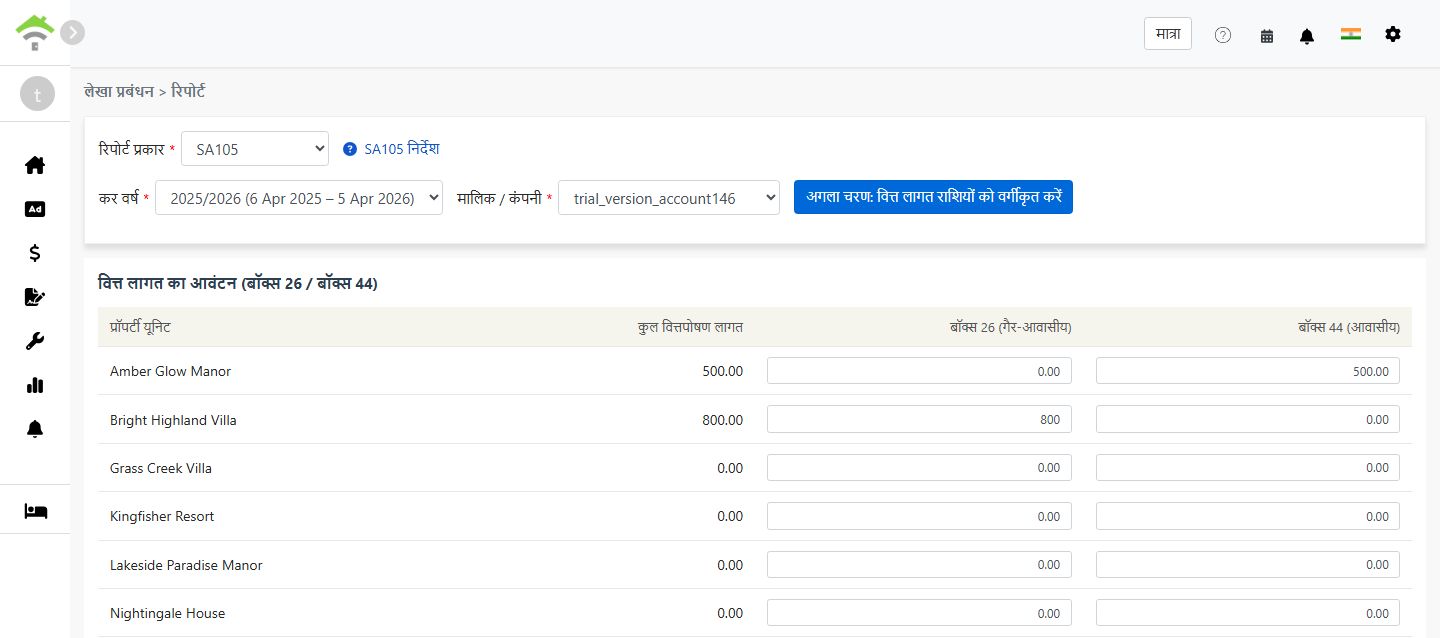
चरण 3: वित्तीय लागत का बँटवारा करें (बॉक्स 26 / बॉक्स 44)
'वित्तीय लागत का बँटवारा' पर क्लिक करने पर सिस्टम 'बॉक्स 26/44 वित्तीय लागत' से मैप किए गए सभी खातों से कुल राशि लेता है और बॉक्स 26 तथा बॉक्स 44 के बीच राशि बाँटने के लिए एक स्क्रीन दिखाता है:
| संपत्ति | कुल वित्तीय लागत | बॉक्स 26 (गैर-आवासीय) | बॉक्स 44 (आवासीय) |
|---|---|---|---|
| 123 High Street | 0.00 |
बँटवारे के नियम:
- बॉक्स 26 (गैर-आवासीय):किराया आय से व्यय के रूप में पूर्णतः कटौती योग्य
- बॉक्स 44 (आवासीय):सीधे कटौती योग्य नहीं; इसके बदले 20% कर क्रेडिट मिलता है
- सिस्टम डिफ़ॉल्ट रूप से पूरी राशि बॉक्स 44 में रखता है। प्रत्येक संपत्ति के लिए बॉक्स 26 + बॉक्स 44 कुल वित्तीय लागत के बराबर होना चाहिए
- मिश्रित उपयोग वाली संपत्तियों में, यानी आवासीय और वाणिज्यिक, राशि को वास्तविक उपयोग के अनुपात में बाँटें
चरण 4: रिपोर्ट बनाएं
- वित्तीय लागत का बँटवारा सही होने की पुष्टि के बाद 'रिपोर्ट बनाएं' पर क्लिक करें
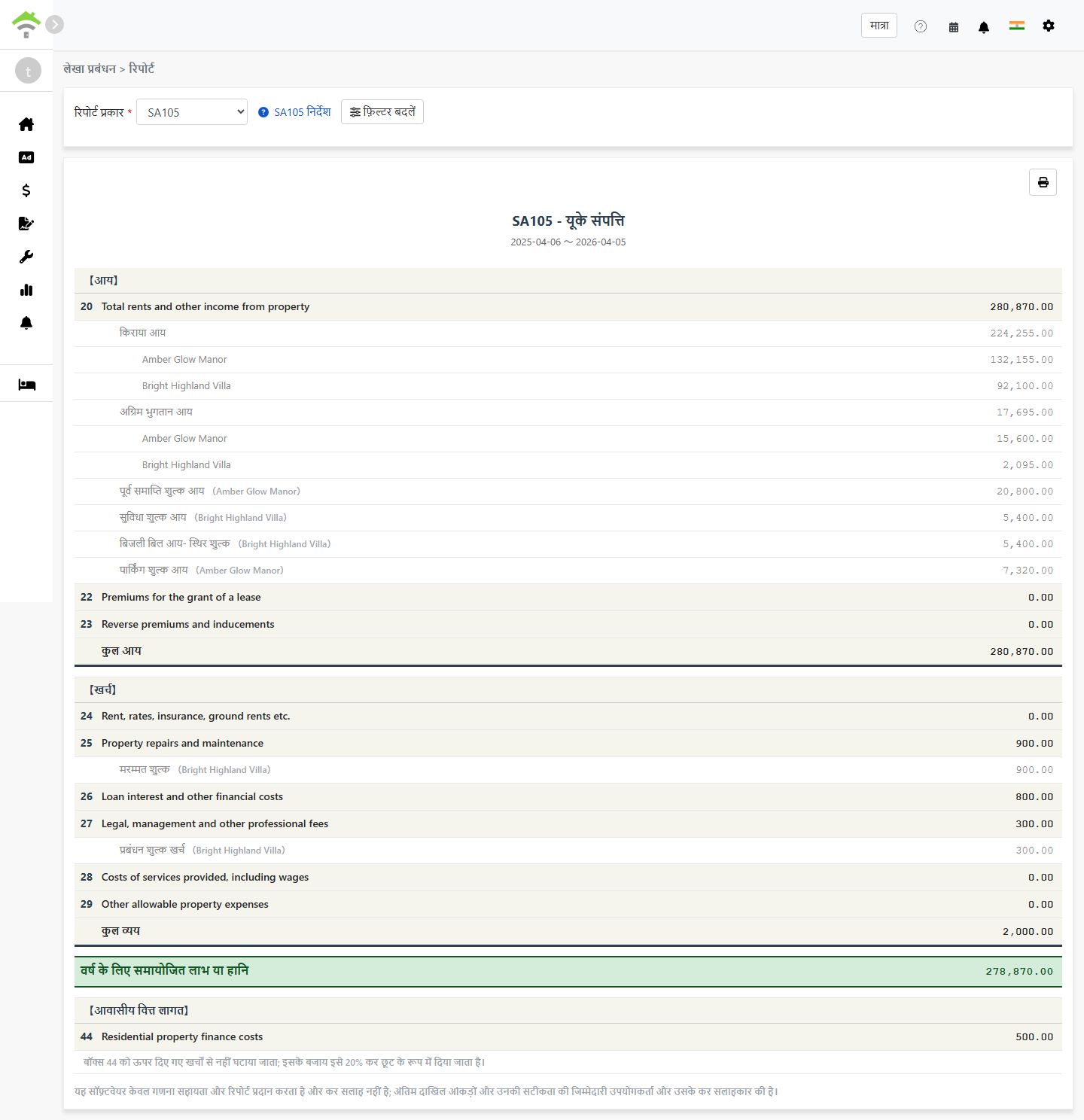
- सिस्टम एक SA105 रिपोर्ट बनाएगा जिसमें यह दिखेगा:
- आय:बॉक्स 20-23 - किराया आय, पट्टा प्रीमियम और समान मदें
- व्यय:बॉक्स 24-29 - संपत्ति के कटौती योग्य व्यय
- वर्ष का समायोजित लाभ या हानि:कुल आय - कुल व्यय
- आवासीय वित्तीय लागत:बॉक्स 44 - आवासीय बंधक ब्याज, जिस पर 20% कर क्रेडिट मिलता है
- आप रिपोर्ट प्रिंट कर सकते हैं या PDF के रूप में निर्यात करके अपनी कर तैयारी के अभिलेखों में रख सकते हैं
बॉक्स 26 और बॉक्स 44 का अंतर
| मद | बॉक्स 26 (गैर-आवासीय) | बॉक्स 44 (आवासीय) |
|---|---|---|
| संपत्ति का प्रकार | वाणिज्यिक संपत्तियाँ, कार्यालय, दुकानें और समान परिसर | आवासीय किराया |
| कर व्यवहार | व्यय के रूप में पूर्णतः कटौती योग्य | कटौती योग्य नहीं; 20% कर क्रेडिट मिलता है |
| रिपोर्ट में स्थान | बॉक्स 26 - Loan interest and other financial costs | बॉक्स 44 - Residential property finance costs |
उदाहरण:
मान लीजिए आपके पास मिश्रित उपयोग वाली एक संपत्ति है जिस पर ऋण ब्याज कुल £10,000 है, जिसमें 30% वाणिज्यिक और 70% आवासीय उपयोग के लिए है:
- बॉक्स 26 (गैर-आवासीय):£10,000 × 30% = £3,000(पूर्णतः कटौती योग्य)
- बॉक्स 44 (आवासीय):£10,000 × 70% = £7,000(20% कर क्रेडिट = £1,400)
SA105 के लिए खाता चार्ट कैसे सेट करें?
किसी खाते को वित्तीय लागत से मैप करने के लिए:
- लेखांकन → खाता चार्ट पर जाएं
- जिस खाते को मैप करना है उसे खोजें, उदाहरण के लिए ऋण ब्याज
- SA105 बॉक्स को 'बॉक्स 26/44 वित्तीय लागत' पर सेट करें, फिर सिस्टम उस खाते की राशियाँ स्वतः कुल वित्तीय लागत में शामिल कर लेगा
वित्तीय लागत दर्ज करने के दो तरीके हैं:
- किराया अवधि में जोड़ें:संपत्ति की किराया अवधि में 'बॉक्स 26/44 वित्तीय लागत' से मैप किए गए खाते का उपयोग करके एक लेनदेन जोड़ें
- लेखा प्रविष्टि जोड़ें:'बॉक्स 26/44 वित्तीय लागत' से मैप किए गए खाते का उपयोग करके एक लेखा प्रविष्टि बनाएं
इनमें से किसी भी तरीके से जोड़ी गई राशियाँ स्वतः कुल वित्तीय लागत में शामिल हो जाती हैं।
अक्सर पूछे जाने वाले प्रश्न
क्या यूके कर में मूल्यह्रास की कटौती मिलती है?
नहीं। अमेरिकी Schedule E के विपरीत यूके के संपत्ति आय कर में मूल्यह्रास का फ़ील्ड नहीं होता। यूके में संपत्ति का मूल्यह्रास सामान्यतः केवल तब प्रासंगिक होता है जब संपत्ति बेचते समय पूँजीगत लाभ कर की गणना की जाती है।
मेरी कुल वित्तीय लागत 0 क्यों दिख रही है?
कृपया सुनिश्चित करें कि आपके खाता चार्ट में SA105 बॉक्स सही ढंग से 'बॉक्स 26/44 वित्तीय लागत' पर सेट है। यदि सेट नहीं है, तो सिस्टम उस खाते की राशियाँ कुल वित्तीय लागत में शामिल नहीं करेगा।
क्या बॉक्स 26 + बॉक्स 44 कुल वित्तीय लागत से अधिक हो सकता है?
नहीं। सिस्टम जाँचता है कि प्रत्येक संपत्ति के लिए बॉक्स 26 + बॉक्स 44 उस संपत्ति की कुल वित्तीय लागत के बराबर हो।
क्या मैं रिपोर्ट स्क्रीन पर कुल वित्तीय लागत मैन्युअल रूप से दर्ज कर सकता हूँ?
नहीं। Schedule E के मूल्यह्रास के विपरीत SA105 की कुल वित्तीय लागत केवल किराया अवधि या लेखा प्रविष्टियों से आती है। यह व्यवस्था राशियों की सटीकता सुनिश्चित करती है और आपके वास्तविक लेखा अभिलेखों से अंतर को रोकती है।
यूके का कर वर्ष 6 अप्रैल से 5 अप्रैल तक क्यों होता है?
यह HMRC द्वारा निर्धारित यूके का आधिकारिक कर वर्ष है। सामान्य कैलेंडर वर्ष यानी जनवरी से दिसंबर के विपरीत यूके का कर वर्ष हर वर्ष 6 अप्रैल को शुरू होता है और अगले वर्ष 5 अप्रैल को समाप्त होता है।
SA105 फ़ील्ड तालिका
【आय】
| बॉक्स | फ़ील्ड नाम | विवरण |
|---|---|---|
| 20 | Total rents and other income from property | किराया आय और संपत्ति से अन्य आय का कुल योग |
| 22 | Premiums for the grant of a lease | पट्टा प्रदान करने के बदले प्राप्त प्रीमियम |
| 23 | Reverse premiums and inducements | प्राप्त प्रतिलोम प्रीमियम और किरायेदार प्रोत्साहन |
【व्यय】
| बॉक्स | फ़ील्ड नाम | विवरण |
|---|---|---|
| 24 | Rent, rates, insurance, ground rents etc. | भू-भाटक, स्थानीय कर और बीमा प्रीमियम |
| 25 | Property repairs and maintenance | मरम्मत और रखरखाव व्यय |
| 26 | Loan interest and other financial costs | गैर-आवासीय संपत्तियों की वित्तीय लागत, पूर्णतः कटौती योग्य |
| 27 | Legal, management and other professional fees | विधिक शुल्क, संपत्ति प्रबंधन शुल्क और लेखाकार शुल्क |
| 28 | Costs of services provided, including wages | प्रदान की गई सेवाओं की लागत, जिसमें कर्मचारियों का वेतन शामिल है |
| 29 | Other allowable property expenses | ऊपर सूचीबद्ध न किए गए अन्य कटौती योग्य व्यय |
【आवासीय वित्तीय लागत】
| बॉक्स | फ़ील्ड नाम | विवरण |
|---|---|---|
| 44 | Residential property finance costs | आवासीय संपत्तियों की वित्तीय लागत, जिन पर 20% कर क्रेडिट मिलता है |