
Panduan pengguna laporan cukai sewa Anlage V Jerman
Pautan Pantas Artikel Ini
1. Apakah itu Anlage V?
Anlage V (Einkünfte aus Vermietung und Verpachtung, pendapatan daripada sewaan dan pajakan) ialah lampiran pendapatan harta tanah yang mesti diserahkan bersama dengan pengisytiharan cukai pendapatan (Einkommensteuererklärung) kepada pejabat cukai (Finanzamt) semasa memfailkan cukai di Jerman. Jika anda mempunyai pendapatan sewa di Jerman, setiap tahun anda mesti mengisi satu Anlage V bagi setiap hartanah untuk melaporkan pendapatan sewaan dan perbelanjaan berkaitan.
RentPackage menawarkan fungsi laporan Anlage V yang secara automatik menyusun pendapatan sewa dan perbelanjaan berdasarkan tarikh penerimaan wang tunai sebenar (prinsip asas tunai Zufluss-/Abflussprinzip Jerman), memudahkan dan meningkatkan kecekapan persiapan cukai di Jerman.
2. Pilih jenis laporan, tahun cukai dan hartanah
Ikuti langkah berikut untuk membuka laporan:
- Buka Laporan:Klik "Laporan" di menu sebelah kiri → Pilih "Anlage V" dari senarai jenis laporan
- Pilih Tahun Cukai:Pilih tahun kalendar yang ingin anda laporkan, contohnya "2026"
- Pilih Harta:Pilih harta yang berkaitan dengan laporan ini
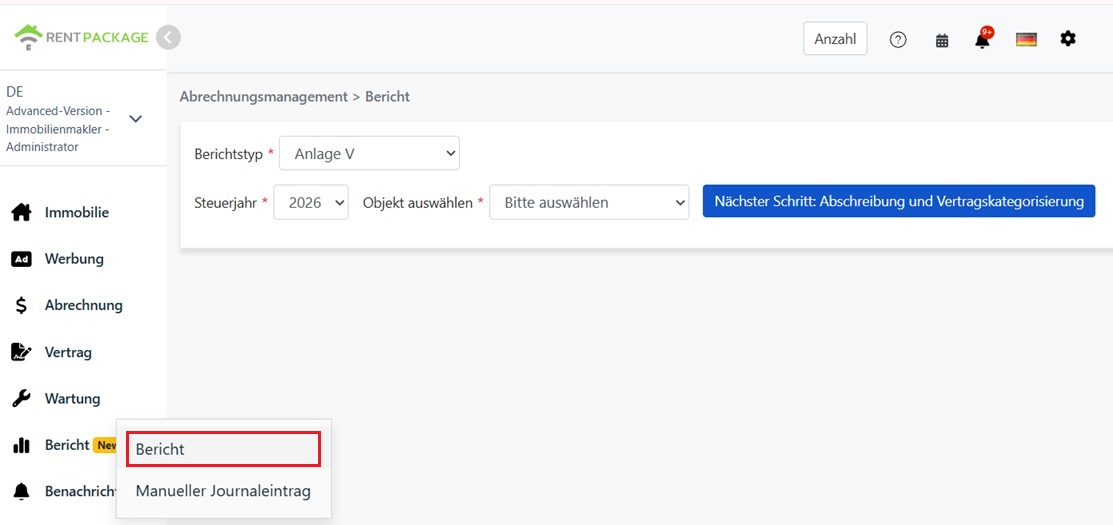
Setelah memilih, klik "Seterusnya: Pengurangan & Klasifikasi Kontrak".
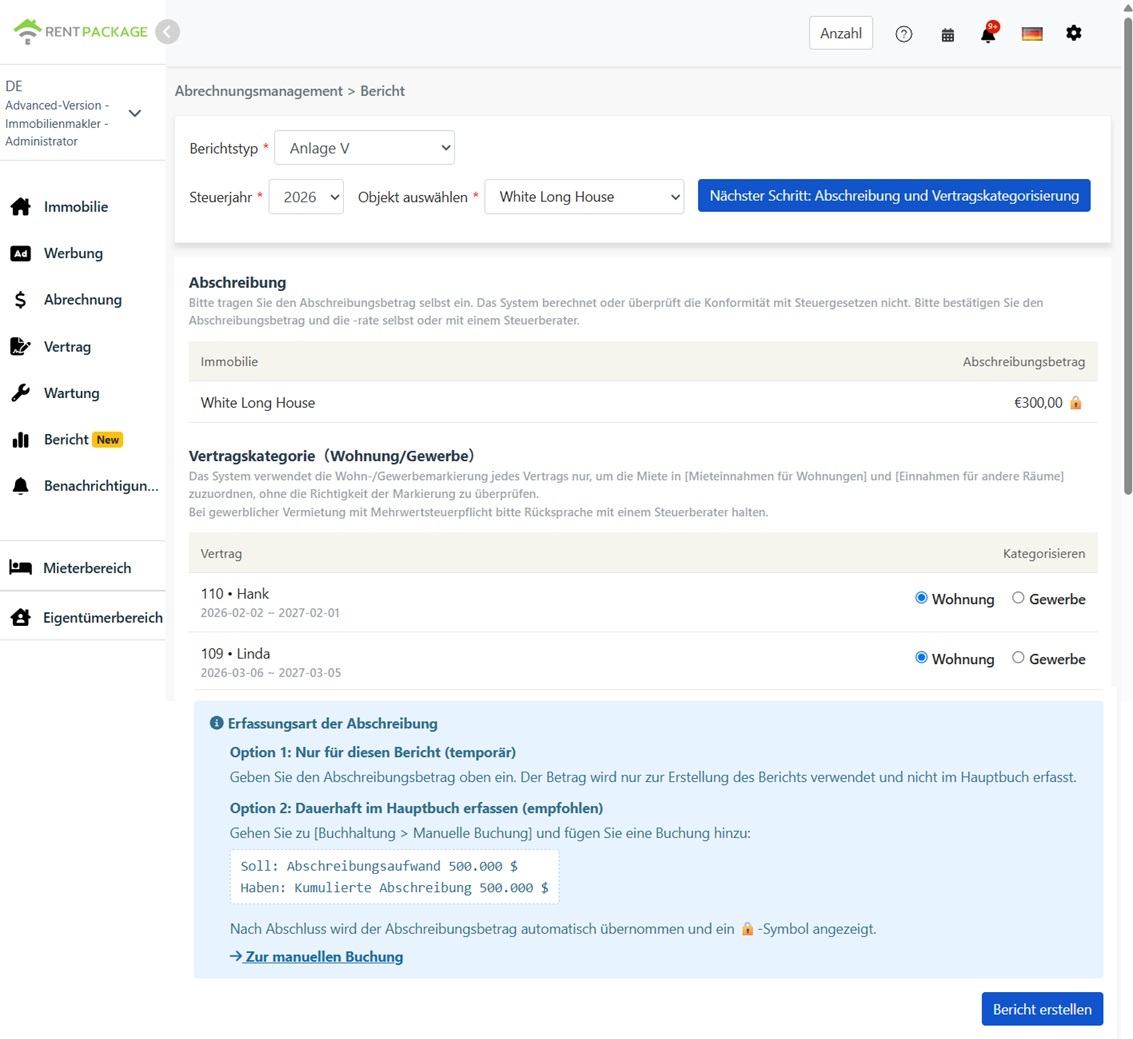
3. Masukkan jumlah susut nilai dan klasifikasi kontrak
Susut Nilai (Absetzung für Abnutzung, AfA)
Sila masukkan jumlah susut nilai secara manual. Sistem tidak akan mengira secara automatik, tidak akan menggunakan kadar susut nilai, dan tidak akan mengesahkan sama ada jumlah tersebut mematuhi undang-undang cukai Jerman. Terdapat pelbagai bentuk susut nilai untuk bangunan di Jerman (contohnya, kadar susut nilai linear berbeza bergantung kepada tahun pembinaan, serta terdapat skim susut nilai khas). Sila sahkan jumlah dan kadar susut nilai yang betul, atau berunding dengan penasihat cukai anda (Steuerberater).
Kategori kontrak (Kediaman/Komersial)
Laporan akan memisahkan pendapatan sewa kepada dua lajur berdasarkan kategori kontrak yang anda tetapkan di sini:
- Kediaman:Sewa kontrak ini dimasukkan dalam "Mieteinnahmen für Wohnungen" (Pendapatan Sewa Unit Kediaman)
- Komersial:Sewa kontrak ini dimasukkan dalam "Einnahmen für andere Räume" (Pendapatan Ruang Lain, seperti pejabat, kedai)
4. Jana laporan
Setelah mengesahkan jumlah susut nilai dan kategori kontrak, klik "Jana Laporan".
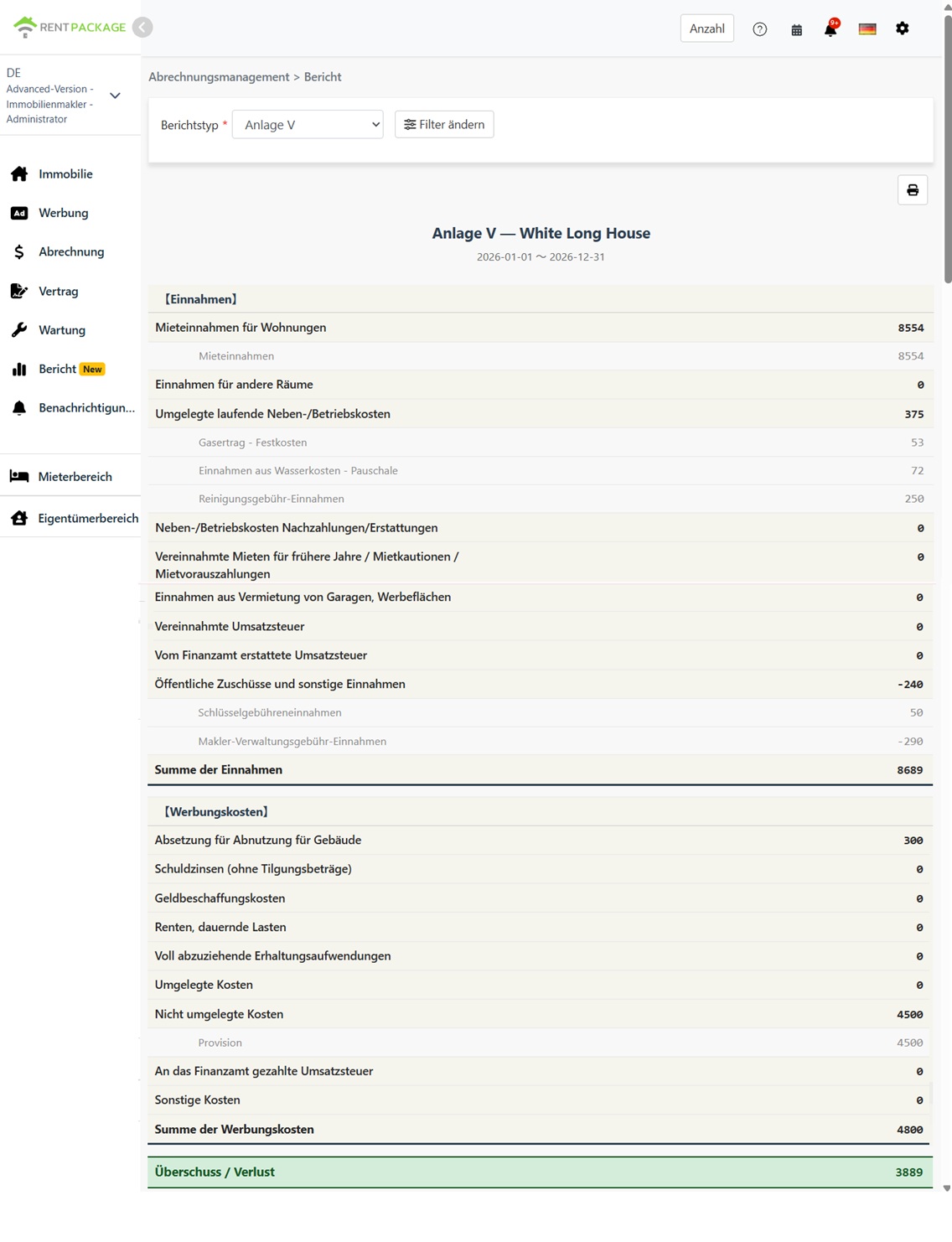
Sistem akan menjana laporan Anlage V yang menunjukkan kandungan berikut:
- Pendapatan (Einnahmen):Sewa kediaman, sewa komersial, kos operasi yang dialihkan kepada penyewa, dan ruangan pendapatan lain
- Perbelanjaan (Werbungskosten):Susut nilai, faedah pinjaman, kos penyelenggaraan, dan ruangan perbelanjaan lain
- Lebihan/Defisit (Überschuss / Verlust):Jumlah pendapatan - Jumlah perbelanjaan
Setiap ruangan akan memaparkan akaun dan jumlah yang disertakan, memudahkan anda menjejak punca setiap angka.
5. Dua kaedah rekod susut nilai
Cara 1: Untuk kegunaan laporan ini sahaja (sementara)
Masukkan amaun susut nilai terus dalam paparan laporan. Amaun ini hanya akan digunakan untuk menjana laporan ini dan tidak akan direkodkan dalam akaun.
Cara 2: Rekod dalam akaun (disyorkan)
Pergi ke 'Pengurusan Akaun' → 'Entri Manual' untuk cipta satu entri:
- Debit: Kos Susut Nilai
- Kredit: Susut Nilai Terkumpul
Setelah jurnal dibuat, sistem akan mengisi jumlah susut nilai ke dalam paparan laporan dan menunjukkan ikon 🔒 yang bermakna jumlah adalah dari akaun. Untuk mengubah jumlah yang dikunci, sila edit jurnal dan bukan pada paparan laporan.
6. Pengelasan sewa kediaman dan komersial
| Item | Kediaman | Komersial |
|---|---|---|
| Jenis Kontrak | Pajakan Kediaman (Apartmen, Rumah) | Pejabat, Kedai, Lain-lain Ruang Bukan Kediaman |
| Ruang Laporan | Mieteinnahmen für Wohnungen | Einnahmen für andere Räume |
| Cukai nilai tambah (Umsatzsteuer) | Biasanya dikecualikan daripada cukai nilai tambah | Jika memilih untuk mengenakan, mungkin melibatkan cukai nilai tambah; sila rujuk penasihat cukai |
Bagaimana sistem mengklasifikasikan sewa: Klasifikasi adalah mengikut kontrak, bukan pembayaran. Semua sewa di bawah kontrak kediaman dikategorikan di bawah 'Mieteinnahmen für Wohnungen'; sewa di bawah kontrak komersial dikategorikan di bawah 'Einnahmen für andere Räume'.
7. Soalan Lazim
Adakah sistem secara automatik mengira susut nilai?
Tidak. Amaun susut nilai perlu dimasukkan secara manual, dan sistem tidak akan mengesahkan pematuhannya kepada undang-undang cukai Jerman. Terdapat pelbagai pilihan susut nilai bangunan di Jerman (AfA), dengan kadar susut nilai bergantung kepada tahun pembinaan dan jenis bangunan. Sila sahkan amaun yang betul atau rujuk penasihat cukai.
Kenapa amaun susut nilai dalam skrin laporan dipaparkan sebagai terkunci (🔒)?
Ikon terkunci menunjukkan amaun berasal dari entri susut nilai dalam perakaunan. Untuk mengubahnya, sila ke 'Pengurusan Perakaunan' → 'Entri Manual' untuk mengedit entri tersebut, dan laporan akan secara automatik mendapatkan amaun terkini.
Di manakah keuntungan sewa tahun lalu perlu ditempatkan?
Secara tegas, sewa yang dibayar oleh penyewa untuk tahun sebelumnya harus ditempatkan di lajur 'Vereinnahmte Mieten für frühere Jahre / verrechnete Mietkautionen / Mietvorauszahlungen'. Sistem tidak mengesan keadaan ini secara automatik — semua sewa dikategorikan mengikut kontrak dalam lajur sewa kediaman atau komersial. Jumlah pendapatan masih betul; jika anda memerlukan amaun dipaparkan dalam lajur tertentu, sila buat penyesuaian manual apabila memindahkan kepada borang rasmi.
Adakah laporan akan menggunakan peraturan 10 hari (Zehn-Tage-Regel)?
Tidak. Laporan disusun berdasarkan tarikh pembayaran sebenar dalam tahun kalendar. Jika anda mempunyai pembayaran berkala sekitar akhir tahun yang tertakluk kepada peraturan 10 hari, sila semak dan laraskan amaun berkenaan dengan penasihat cukai sebelum mengemukakan.
Bolehkah saya memilih pelbagai hartanah dalam satu laporan?
Tidak. Setiap laporan hanya meliputi satu hartanah, selaras dengan amalan Jerman di mana setiap harta sewa perlu mengemukakan Anlage V secara individu.
Mengapa pendapatan sewa saya hanya muncul dalam satu medan?
Sila periksa pengelasan kontrak di langkah ketiga. Jika semua kontrak dikelaskan sebagai kediaman, maka semua sewa akan disenaraikan dalam "Mieteinnahmen für Wohnungen", dan medan komersil menunjukkan 0, dan sebaliknya.
8. Jadual perbandingan lapangan Anlage V
【Pendapatan (Einnahmen)】
| Nama Medan | Penerangan |
|---|---|
| Mieteinnahmen für Wohnungen | Pendapatan sewa unit kediaman (kontrak yang dikelaskan sebagai kediaman) |
| Einnahmen für andere Räume | Pendapatan daripada premis lain (kontrak yang dikelaskan sebagai komersil) |
| Umgelegte laufende Neben-/Betriebskosten | Perbelanjaan operasi yang dipulangkan kepada penyewa (contoh: utiliti, yuran pengurusan) |
| Neben-/Betriebskosten Nachzahlungen/Erstattungen | Bayaran balik atau pemulangan bayaran kos operasi |
| Vereinnahmte Mieten für frühere Jahre / Mietkautionen / Mietvorauszahlungen | Sewaan tahun terdahulu yang diterima, deposit dikreditkan, sewaan prabayar |
| Einnahmen aus Vermietung von Garagen, Werbeflächen | Pendapatan daripada sewaan tempat letak kereta, ruang iklan, dll. |
| Vereinnahmte Umsatzsteuer | Cukai Jualan Tambahan diterima |
| Vom Finanzamt erstattete Umsatzsteuer | Pemulangan Cukai Jualan Tambahan daripada jabatan cukai |
| Öffentliche Zuschüsse und sonstige Einnahmen | Subsidi awam dan pendapatan lain |
【Kos Pengiklanan (Werbungskosten)】
| Nama Medan | Penerangan |
|---|---|
| Absetzung für Abnutzung für Gebäude | Susut nilai bangunan (AfA) — amaun yang dimasukkan atau dipindahkan daripada penyertaan |
| Schuldzinsen (ohne Tilgungsbeträge) | Faedah pinjaman (tidak termasuk pelunasan pokok) |
| Geldbeschaffungskosten | Kos pembiayaan (seperti yuran pemprosesan pinjaman) |
| Renten, dauernde Lasten | Anuiti dan beban berulang |
| Voll abzuziehende Erhaltungsaufwendungen | Kos penyelenggaraan boleh ditolak sepenuhnya |
| Umgelegte Kosten | Kos dipindahkan kepada penyewa |
| Nicht umgelegte Kosten | Kos yang tidak dipindahkan kepada penyewa |
| An das Finanzamt gezahlte Umsatzsteuer | Cukai nilai tambah dibayar kepada jabatan cukai |
| Sonstige Kosten | Kos lain-lain |